Most "best SEO automation software" lists rank tools by feature count and call it a day. That is the wrong lens. The question that actually matters when you are paying for one of these is: what does this tool do when it finds a problem? Some just tell you. Some draft a fix and stop. A small third group publishes the fix and checks whether it worked.
This list sorts every tool by that distinction, because it is the single biggest predictor of whether the software saves you real hours or just adds another dashboard to your Monday morning routine.
What "SEO Automation Software" Actually Means in 2026
An SEO automation tool uses rules, crawlers, or AI to handle SEO work that used to require a person: crawling a site for technical issues, tracking rankings, drafting content, or generating reports. The category spans a huge range, from a $0 rank-tracking script to a $900/month agency platform, and the tools genuinely do different jobs.
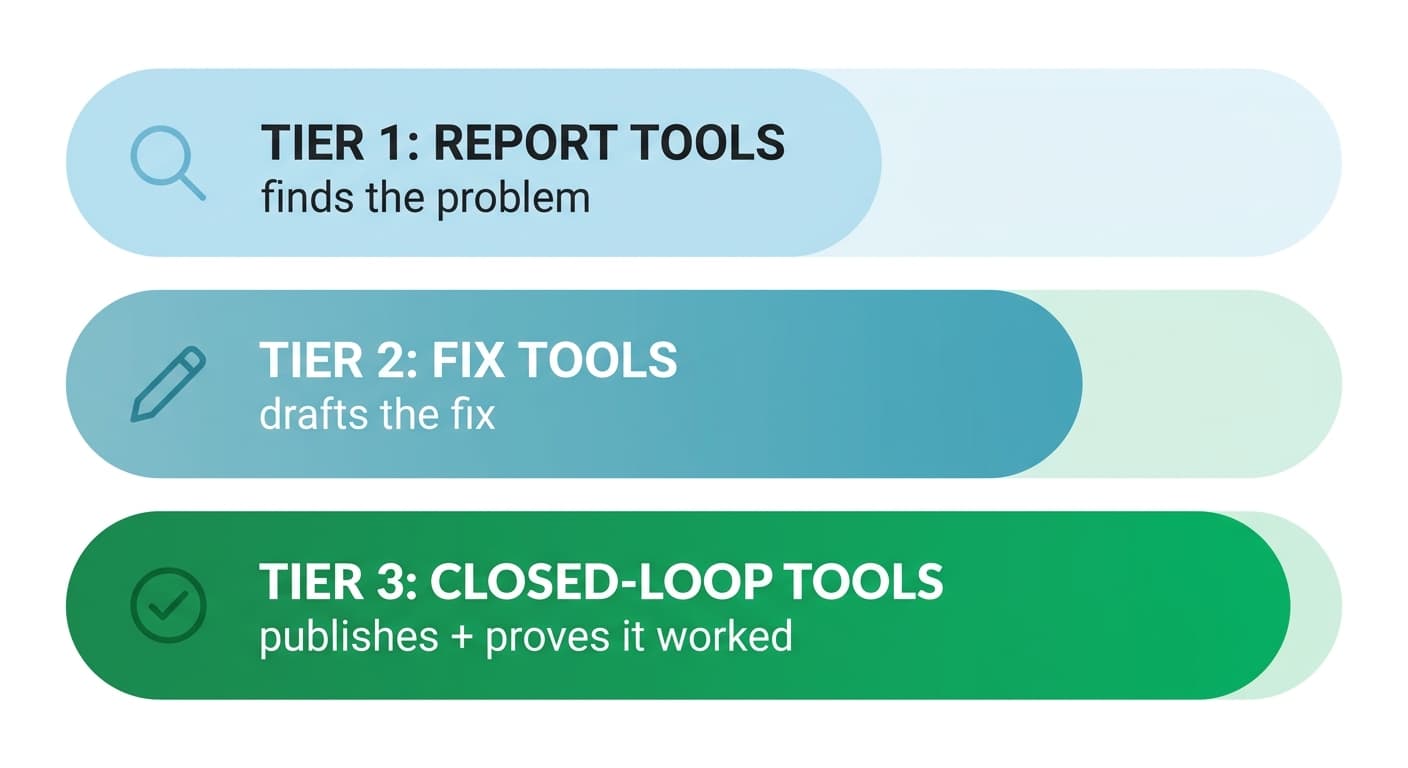
Before comparing names, it helps to sort any tool into one of three tiers:
- Report tools surface data (rankings dropped, a backlink was lost, a page has a broken title tag) and leave you to act on it.
- Fix tools generate an asset, usually a content draft, an outline, or an on-page recommendation, but the drafting is where the automation stops. You still copy it into your CMS.
- Closed-loop tools detect the issue, draft the fix, publish it after your approval, and then track whether the ranking actually recovered.
Most of the market sits in the first two tiers. That is not a criticism. Rank tracking and content drafting are genuinely useful on their own. But if your real bottleneck is the gap between "we found a problem" and "we know the fix worked," a report tool or a fix tool will not close it for you. Keep that distinction in mind as you read the list below. It is more useful than any star rating.
The Best SEO Automation Software, Compared by What It Fixes
| Tool | Best for | What it actually fixes | What it still leaves to you | Starting price |
|---|---|---|---|---|
| Ahrefs | Backlink and keyword research automation | Nothing directly; it detects and reports | Drafting, publishing, and re-checking the fix | $29/mo (Starter), $129/mo for full Keywords Explorer access |
| Semrush | All-in-one enterprise reporting | Nothing directly; strong alerting and audits | Same gap as Ahrefs, at a broader scope | $139.95/mo |
| Screaming Frog | Technical crawl automation | Nothing; flags broken links, redirects, duplicate tags | Every fix has to be applied manually in your CMS | Free (500 URLs), $279/yr unlimited |
| Surfer SEO | AI-assisted on-page drafting | Drafts a page or section against a target keyword | Publishing and rank verification | $99/mo |
| Gumloop | Custom no-code SEO workflows | Whatever workflow you build (scraping, briefs, alerts) | Requires you to design and maintain the automation yourself | Free tier, $37/mo |
| Alli AI | On-page changes pushed live via a site snippet | Applies approved on-page edits directly to your site | Content drafting quality and rank-impact proof | $169/mo |
| Murkuz | Closed-loop detect, fix, publish, prove | Detects declining pages, drafts the fix in your brand voice, publishes to WordPress/Webflow/Framer, and proves which fix caused which ranking change | The final approval decision, by design | See pricing |
Pricing changes; verify current tiers directly with each vendor before you buy. The table above reflects what each platform's own site states as of this writing.
Report Tools: Good at Finding Problems, Not Fixing Them
Ahrefs and Semrush anchor this tier. Both are excellent at what they were built for: backlink analysis, keyword research, rank tracking, and site audits. If your bottleneck is genuinely "I do not know what is wrong with my site," either one will tell you fast and accurately.
Neither one drafts a fix or publishes anything. When Ahrefs flags that a page dropped from position 6 to 15, you still have to open the page, figure out why, write or commission new content, get it into your CMS, and come back in three weeks to see if it worked. That workflow, not the detection, is where most SEO hours actually disappear.
Screaming Frog sits in the same tier for technical SEO specifically. It is still the fastest way to crawl a site and catch broken links, redirect chains, missing alt text, and duplicate title tags at scale. It has no concept of publishing a fix; it hands you a spreadsheet.
If your main pain point is audit speed and you already have a person or process to act on findings, a report tool is often the right and cheapest choice. The mistake is expecting one to close the loop it was never built to close.
Fix Tools: Draft an Asset, Then Stop
Surfer SEO is the clearest example. Give it a keyword and it generates a content outline or draft scored against what is currently ranking. That is genuinely useful for speeding up the writing stage. But Surfer does not know your site's CMS, does not publish anything, and has no mechanism to check whether the resulting page actually moved up in rankings after you publish it. You are still the one pasting it into WordPress and watching Search Console for the next month.
Alli AI is a partial exception worth calling out separately: after you install its site snippet, it can push approved on-page changes (title tags, meta descriptions, internal links) live without a manual CMS edit. That is real automation of the publish step for on-page tweaks specifically. It does not draft full content or prove ranking impact, so it is best thought of as a fix tool for a narrow slice of on-page work, not a full loop.
Gumloop is the flexible option in this tier: a no-code workflow builder where you wire together scraping, an LLM step, and an output. It can do almost anything you configure it to do, including parts of detection, drafting, or reporting. The tradeoff is that "automation" here means "automation you build," which takes setup time and ongoing maintenance whenever a site you scrape changes its layout.
Closed-Loop Tools: Detect, Fix, Publish, and Prove It Worked
This is the smallest and newest tier, and the gap it closes is specific: none of the tools above tell you, with actual before-and-after ranking data, that a fix they helped you make is the reason a page recovered.
Murkuz is built around exactly that gap, so we will describe what it does plainly rather than pretend to be a neutral reviewer. It runs five steps end to end: it detects declining pages, positions-11-to-20 opportunities, and content cannibalization directly from your Google Search Console data every day; it turns each finding into a task with the problem, the affected keywords, and a recommended fix attached; it drafts the fix using a brand-voice knowledge base (HyBrain) so the copy sounds like your team wrote it, not a generic model; after you approve it, one click pushes the update to WordPress, Webflow, or Framer; and it then tracks the ranking daily and shows an Impact Scorecard that links the specific fix to the specific ranking change, not just a traffic graph trending upward.
<mark class="km-highlight" style="--hl:#FEF08A;background:#FEF08A">The tools worth paying for are the ones that shorten the distance between "we found a problem" and "we can prove it is fixed," not the ones that add one more dashboard to check.</mark>
The tradeoff of a closed-loop tool is trust: you are connecting your CMS and letting the platform draft and, on approval, publish content on your behalf. That is why the approval step matters. A closed-loop tool should surface the fix and wait for a human to review it, never auto-publish blind. If you are evaluating one, check exactly where that review step sits before you connect a live site. For a line-by-line look at how this differs from a pure reporting tool, see Murkuz vs Ahrefs.
How to Evaluate Any SEO Automation Software Before You Buy
Run every tool on your shortlist through these five questions before you commit to a contract:
- What specific job does it automate, end to end? Not "SEO," a specific job: crawling, drafting, publishing, or measuring. Vague answers are a warning sign.
- Does it touch your CMS, or stop at a dashboard? Ask the vendor to show you the actual publish step, not just the report screen.
- Can it match your brand voice, or does everything sound generic? If the tool drafts content, ask what it uses as source material for tone and facts. A tool with no brand-voice input will produce copy that reads like every other AI-written page on the internet.
- Does a human review sit between draft and live? Full auto-publish with no review step is a liability, not a feature, especially for anything factual or client-facing.
Murkuz's workflow requires approval before anything goes live, and that pattern is worth insisting on regardless of which tool you pick. - Can it show causal proof, or just a correlation chart? Ask specifically: "if I make this fix, how will I know it worked?" A vague answer ("check your rankings dashboard") means you are back to manual reporting. A tool with real proof will show you a specific fix tied to a specific ranking change, not a general upward trend line.
Most tools will fail at least one of these. That is fine. Use the answers to match the tool to the actual bottleneck in your workflow, not the other way around.
Free and Low-Cost Options Worth Knowing
Not every team needs an enterprise contract on day one. Screaming Frog is free up to 500 URLs, which covers most small sites for technical audits. Gumloop has a free tier (2,000 credits) if you are comfortable building your own workflow. Google Search Console itself, while not a dedicated "automation" tool, already surfaces the declining-page data that most paid platforms are reading from anyway, and it costs nothing. If your budget is genuinely $0, start there before paying for a layer on top of it. For a deeper walkthrough of which parts of the workflow are worth automating first regardless of budget, see our guide on SEO automation tools.
FAQ
What is the best SEO automation software for a small business?
It depends on your bottleneck. If you need audits, Screaming Frog or a free GSC-based check is enough. If your bottleneck is turning a declining page into a published fix without hiring extra hands, look at a closed-loop tool that covers detection through publishing in one workflow.
Is SEO automation software worth it for a solo founder or freelancer?
Usually yes for the mechanical parts (crawling, tracking, alerting) and no for the parts that need judgment (strategy, final copy approval, brand voice). The time savings show up fastest on repetitive tasks you already do every week.
Can SEO automation software replace an SEO specialist?
No. It replaces the repetitive parts of the job: manual audits, spreadsheet exports, copy-pasting into a CMS, and building reports by hand. Strategy, prioritization, and final review still need a person, and tools that skip the review step tend to produce thin, generic pages that hurt more than they help.
How much does SEO automation software typically cost?
Report tools like Ahrefs and Semrush start around $99 to $140 per month. Fix tools like Surfer start near $99 per month. Closed-loop platforms vary; Murkuz's entry plan covers a single site on up to 200 pages, and the current price is on the pricing page.
What is the difference between SEO automation software and an SEO agency?
An agency provides people and strategy; software provides speed and consistency on defined tasks. Many teams use both: software to handle detection, drafting, and publishing at scale, and a person (in-house or agency) to set strategy and review what goes live.
Junaid Khalid is the founder of Ertiqah and the builder of Murkuz. He has run SEO as the first growth channel across his own SaaS products, and built Murkuz around the idea that the tools worth paying for are the ones that finish the job: not just detect a problem, but fix it, publish it, and prove it worked.