Most "best SEO automation tools" lists are really just SEO tool lists with the word "automation" bolted on. They name ten platforms, describe what each one does in a sentence, and leave you to figure out the actual question: which parts of your SEO work can you genuinely hand off to software, and which parts will quietly break if you do?
That is the wrong list to start from. The right question is not "which tool" but "which job." Some SEO work is mechanical and repetitive enough that automation makes it faster with no real loss in quality. Other work depends on judgment, brand context, and taste that no model reliably gets right yet. Picking tools before you have drawn that line is how teams end up with a dashboard full of alerts nobody reads, or worse, a site full of AI-generated pages that all sound the same.
This guide sorts SEO automation by job, not by brand name: what to automate first, what to automate carefully, what to never fully automate, and how to evaluate any tool (including ours) against that framework.
The Real Question: What Can You Safely Automate?
Every SEO task sits somewhere on a spectrum from purely mechanical to purely judgment-based.
Mechanical work is repetitive, rule-based, and has a clearly correct answer. Checking whether a page returns a 200 status code, pulling this week's Search Console positions, or flagging a missing meta description are mechanical. A script does this exactly as well as a human, forever, for free.
Judgment work requires understanding your brand, your customer, and the specific competitive context of a page. Deciding why a page is losing rankings, choosing the right angle for a new article, or deciding whether two pages should be merged or kept separate are judgment calls. Get these wrong and automation does not save you time, it just produces confident-sounding mistakes at scale.
Most real SEO tasks are a blend. The useful skill is not "should I automate this," it is "which part of this task is mechanical enough to hand off, and which part still needs my eyes on it before it goes live."
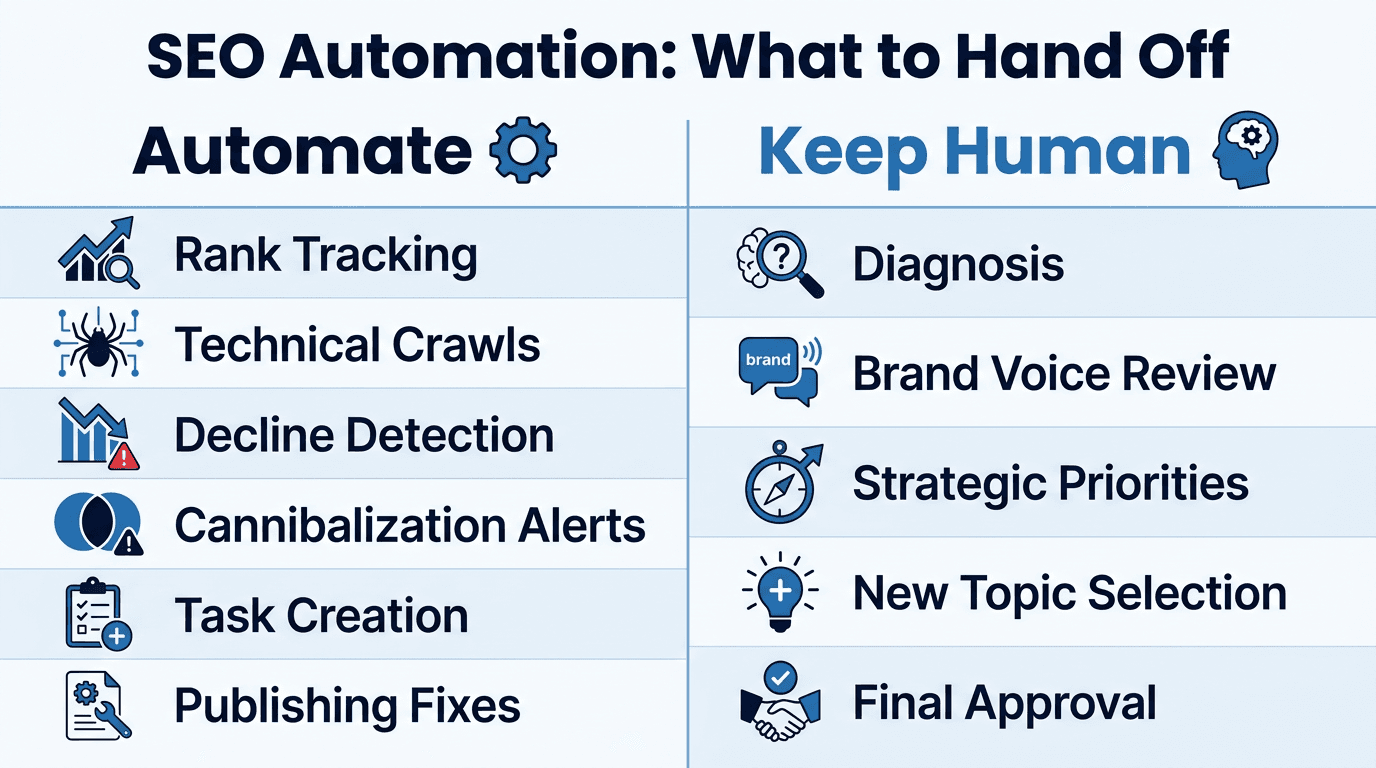
What You Can Automate Safely (Almost Always)
These are the jobs where automation is a clear win with very little downside, because the work is closer to data processing than to writing or strategy.
- Rank and position tracking. Pulling daily or weekly position data from Google Search Console or a rank tracker is pure data retrieval. There is no judgment call in recording that a page moved from position 5 to position 14.
- Technical crawls and broken link detection. Tools like Screaming Frog have automated this for years: crawling a site, flagging 404s, redirect chains, and missing tags. This is checklist work, and a checklist is exactly what software is good at.
- Decline and opportunity detection. Scanning Search Console data every day to surface which pages are losing positions, and which pages sitting at positions 11 to 20 are one push away from page one, is pattern-matching over numbers. A human reviewing a spreadsheet for this is slower and more error-prone than software doing it continuously.
- Content cannibalization detection. Finding that three of your pages are competing for the same keyword is a matching problem across your own site's data. Automation catches this faster and more consistently than a manual quarterly audit.
- Alerting and task creation. Turning a detected problem into a prioritized task, with the underlying data attached, removes the manual step of someone noticing a problem, screenshotting it, and writing a ticket.
- Publishing the approved fix. Once a human has reviewed and approved a content change, pushing that update live to WordPress, Webflow, or another CMS is a mechanical hand-off. There is no reason a person should be copy-pasting HTML into a CMS editor in 2026.
The common thread: none of this requires understanding your customer or your voice. It requires consistency, and consistency is what software does better than people.
What Needs a Human in the Loop
This is the part most "automate everything" pitches skip, and it is the part that actually protects your site.
- Deciding what to say, not just that something changed. A tool can tell you a page's rankings dropped. It cannot reliably tell you whether that is because a competitor published something genuinely better, because your content went stale, or because Google reclassified the query's intent. That diagnosis takes a person who understands the topic and can read the SERP.
- Brand voice and factual accuracy in generated content. Generic AI content drafting tends to drift toward the same bland, hedge-everything tone regardless of who asked for it, and it can state things confidently that are simply wrong. Any AI-drafted content refresh needs a human review pass before it goes live, every time, no exceptions.
- Strategic prioritization across a roadmap. Software can rank tasks by estimated traffic impact. It cannot know that you are about to launch a new product line next quarter and should be building topical authority for it now. That context lives with your team, not in a dashboard.
- New topic and angle selection. Deciding to write about a topic at all, and choosing the angle that will differentiate the page from what already ranks, is closer to editorial judgment than data processing. Automation can surface a content gap. A person should still decide if, and how, to fill it.
- Anything customer-facing that could embarrass the brand. Auto-publishing unreviewed AI content directly to a live site is the single most common way "SEO automation" goes wrong. It produces pages that are technically optimized and substantively empty, and readers notice.
A useful rule of thumb: automate the parts of the workflow that happen before a decision (detecting, gathering, drafting) and after a decision (publishing, monitoring). Keep a human at the decision point itself.
How the Category Splits: Report Tools vs Fix Tools vs Closed-Loop Tools
Once you separate mechanical work from judgment work, the tools on the market split into three functional tiers, and this is the distinction most buying guides miss entirely. The same report-versus-fix split shows up in the newer LLM SEO trackers that measure AI citations instead of rankings.
| Tier | What it does | What it does not do | Example jobs |
|---|---|---|---|
| Report | Surfaces data: rankings, backlinks, technical issues, keyword gaps | Does not fix anything. You still export, brief, and publish manually | Rank tracking, backlink audits, keyword research |
| Fix (single-step) | Generates a specific asset: an article draft, an optimized meta tag, an outline | Stops at the draft. Publishing, monitoring, and proving impact are still manual | AI content drafting, on-page optimization suggestions |
| Closed-loop | Detects the problem, drafts the fix, publishes it after approval, tracks whether the ranking actually recovered | Requires you to trust the pipeline enough to connect your CMS | Full detect-to-proof workflows |
Most of the market sits in the first two tiers. A tool like Screaming Frog is a report tool: excellent at finding technical problems, but it hands you a spreadsheet and walks away. Content-drafting tools are fix tools: they generate a draft, but you are still the one who copies it into your CMS, publishes it, and checks back in three weeks to see if anything changed.
The gap between "I have a report" and "I know the fix worked" is where most SEO time actually disappears. It is also the part of the workflow that is hardest to automate well, because it means chaining detection, drafting, publishing, and measurement into one system without losing the human review step in the middle.
If the report tier is the one you have not settled yet, the three big report platforms compared works through Ahrefs, Moz and Semrush on exactly these terms: what each detects well, and where each one hands the job back to you.
A Practical Framework for Choosing a Tool
Before comparing feature lists, answer four questions about your own situation:
- What is actually costing you time right now? If it is finding problems, a report tool might be enough. If it is the gap between finding a problem and shipping a fix, you need something further along the pipeline.
- Does it touch your CMS, or stop at a dashboard? A tool that ends at "here is a list of issues" still leaves you to do the manual work of briefing a writer and publishing. Check whether the tool actually pushes to WordPress, Webflow, or wherever your site lives, or whether "automation" just means the report refreshes on a schedule.
- Can it sound like you? Any tool that drafts content should let you feed it your actual brand voice, house style, and factual guardrails, not just a generic prompt. Otherwise every automated page reads like it came from the same nameless AI as every competitor's.
- Can it prove the fix worked? A tool that flags a decline and drafts a fix is only half the job. The other half is coming back three weeks later and showing, with actual before-and-after ranking data, that the specific change caused the recovery. Without that step you are guessing whether any of this is working.
<mark class="km-highlight" style="--hl:#FEF08A;background:#FEF08A">The tools worth paying for are the ones that shorten the distance between "we found a problem" and "we proved it is fixed," not the ones that just add one more dashboard to check.</mark>
Where Murkuz Fits: Automating the Loop, Not Just the Report
We built Murkuz around exactly this gap. Most SEO platforms stop at detection: they tell you a page is declining and leave the rest to you. Murkuz runs the closed loop end to end, in five steps: it detects declining pages and content opportunities directly from your Search Console data every day, turns each one into a prioritized task with the context attached, drafts a fix using your own brand voice and facts (stored in what we call HyBrain, so the output does not read like generic AI copy), pushes the approved fix live to WordPress, Webflow, or Framer with one click, and then tracks the ranking daily afterward so you can see, in an Impact Scorecard, whether that specific fix actually caused the recovery.
The judgment call, deciding whether a suggested fix is right for your page, still belongs to you. Murkuz surfaces the problem and drafts the option; you review and approve before anything publishes. That is deliberate. The mechanical parts of the workflow, mostly the detecting, drafting, publishing, and measuring, are where automation earns its keep. The decision in the middle stays yours.
If you are running dozens or hundreds of similar pages, such as location pages, comparison pages, or product-category pages, the same closed loop applies to programmatic SEO: one template and a data source generate the pages, and each one is still monitored individually and flagged for a refresh if it starts to decay, instead of being published once and forgotten.
You can see the full breakdown of what each step automates, and where a human review sits, on the Murkuz features page.
FAQ
Can SEO be fully automated?
No, and treating it as fully automatable is how sites end up with thin, interchangeable pages that Google's helpful content systems are specifically built to catch. The mechanical parts (tracking, crawling, alerting, publishing) automate well. The judgment parts (diagnosis, strategy, brand voice, final review) still need a person.
What is the best SEO automation tool for a small team?
It depends on where your time is actually going. If you are drowning in manual audits, a technical crawler on a schedule solves that narrow problem. If your bottleneck is the gap between finding a declining page and getting a fix published, you need a tool that covers detection, drafting, and publishing together, not just one piece of it.
Is AI-generated SEO content safe to publish automatically?
Not without a human review step. AI drafts can be factually wrong or off-brand in ways that are easy to miss if nobody reads them before they go live. The safest pattern is AI drafts the content, a person approves it, then publishing is automated.
What is the difference between an SEO automation tool and a rank tracker?
A rank tracker is a narrow reporting tool: it tells you where you rank. An SEO automation platform typically covers more of the workflow, potentially including detection, task creation, content drafting, CMS publishing, and results tracking, though most tools on the market still only cover part of that chain.
How do I know if an SEO automation tool is actually working?
Look for before-and-after proof tied to a specific change, not a general traffic chart. If a tool cannot show you "we made this fix on this date, and the ranking moved from this position to that position afterward," you are trusting a black box instead of seeing evidence.
Junaid Khalid is the founder of Ertiqah and the builder of Murkuz. He has run SEO as the first growth channel across his own SaaS products, and built Murkuz around the belief that SEO should be run as an engineering problem: automate the repetitive 80%, and keep a human on the 20% that actually requires judgment.