If you learned SEO reporting on Universal Analytics, GA4 did not just move your menus around. It changed what the numbers mean. Sessions became "engaged sessions." Bounce rate flipped its own definition. Goals became "key events." And the report you used to build in ten minutes, organic traffic by landing page, now takes a custom exploration because the old canned view does not exist anymore.
This is not a "here is what GA4 is" explainer. It is what actually changed for the specific job of measuring SEO, which reports you need to rebuild, and where GA4 still gets SEO wrong even when you set it up correctly.
The Short Version, If You Only Read One Section
GA4 is event-based, not session-based. Universal Analytics counted a "session" as its core unit and calculated bounce rate as the percentage of single-page sessions. GA4 counts events, and its headline engagement metric, engagement rate, only counts a visit as "engaged" if it lasted 10+ seconds, had a conversion event, or included 2+ pageviews. That single change is why your GA4 bounce rate and engagement rate will not match your old UA numbers, and why almost every "why did my traffic drop" panic since 2023 has actually been a metric-definition change, not a real drop.
Three practical consequences follow from that:
- Organic traffic reports need rebuilding, not just relocating. The old Acquisition > All Traffic > Channels report with a clean "Organic Search" row exists in a different shape now, under Reports > Acquisition > Traffic Acquisition, and the default view groups differently than you remember.
- You cannot see keywords in GA4 at all. That data never lived in Analytics; it lived in Search Console. GA4 can only show you keyword data if you link a Search Console property to it first, which most teams still have not done.
- GA4 underreports, more than UA did. Consent mode, ad blockers, and GA4's own sampling and thresholding on smaller properties mean the absolute numbers are directionally right and not exact. Treat GA4 as a trend tool, not an audit trail.
What Changed, Metric by Metric
<table> <tr><th>Universal Analytics</th><th>GA4 Equivalent</th><th>What Actually Changed</th></tr> <tr><td>Sessions</td><td>Sessions (still exists) + Engaged Sessions</td><td>Engaged sessions is the new default lens. A session with no engagement barely counts toward anything GA4 highlights by default.</td></tr> <tr><td>Bounce Rate</td><td>Bounce Rate (inverted) + Engagement Rate</td><td>UA bounce rate = % of single-page sessions. GA4 bounce rate = % of sessions that were NOT engaged. A "good" GA4 bounce rate is low, same direction as before, but the underlying math is different enough that year-over-year comparisons across the UA-to-GA4 boundary are not valid.</td></tr> <tr><td>Goals</td><td>Key Events (conversions)</td><td>Any event can become a conversion with one toggle. More flexible, but nothing migrates automatically. Old UA goals do not exist in GA4; you rebuild them as events.</td></tr> <tr><td>Channel: Organic Search</td><td>Session default channel group: Organic Search</td><td>Still there, but the classification rules changed slightly, and GA4 leans harder on UTM parameters and referrer data than UA did.</td></tr> <tr><td>Landing Page Report</td><td>Engagement > Landing Page</td><td>Exists, but you must add a filter for Session medium = organic to isolate SEO traffic; the default view mixes every channel together.</td></tr> <tr><td>Keyword data</td><td>Search Console integration (Library)</td><td>Never native to Analytics. GA4 makes the GSC link more visible, but you still have to set it up; nothing appears until you do.</td></tr> </table>Rebuilding the Reports You Actually Use for SEO
Skip the tour of every GA4 screen. These are the five reports an SEO or content team checks on repeat, and exactly how to get each one working.
1. Link Search Console First, Before Anything Else
This is the step almost every "GA4 for SEO" guide buries halfway down, and it should be step one. Without it, GA4 can tell you traffic moved. It cannot tell you which query, because query-level data has never lived in Analytics. Go to Admin > Product Links > Search Console Links, connect the property, and wait up to 48 hours for data to start populating the Search Console card under Reports > Library.
Once linked, you get two report types neither tool gives you alone:
- Queries driving traffic, from GSC, joined against what those visitors did after landing, from GA4: engagement, conversions, revenue.
- A genuinely complete organic funnel: impression, click, landing, engage, convert, in one place instead of stitched together manually from two exports.
2. Organic Traffic Trend: Reports > Acquisition > Traffic Acquisition
Set the date range, turn on Compare, and filter the table to the Organic Search row. This is your fastest health check: is total organic traffic to the site up or down against the prior period. It is also the report that gives the least useful answer, because it lumps every page together. A site with 200 pages can have organic traffic flat overall while ten pages are collapsing and ten others are picking up the slack. Use this report to notice something is worth investigating, never to diagnose it.
3. Page-Level Organic Traffic: Engagement > Landing Page + Session Medium Filter
This is the report that actually tells you something actionable. Go to Reports > Engagement > Landing Page, then add a filter: Session medium exactly matches organic. Now you are looking at Sessions, Engagement Rate, and Key Events per URL, organic only.
Sort by session change over your comparison window. The pages moving the most, in either direction, are where you look next. This is the GA4 equivalent of the page-level view every SEO used to build manually in UA's Landing Pages report, and it is the single highest-value report on this list for a decay or opportunity hunt.
4. Engagement Rate on Your Weakest Rankers
Positions 11 to 20 are the cheapest ranking gains most teams ignore, because they already half-work; they just need a push. Cross-reference that list (from Search Console, position 11 to 20, sorted by impressions) against this same Landing Page report. A page with decent impressions but a low engagement rate and short average engagement time is telling you something Search Console cannot: people are clicking through and immediately deciding the page is not what they wanted. That is a content-match problem, not a rankings problem, and no amount of technical SEO fixes it. Rewrite the top of the page to actually answer the query the impressions suggest people are searching.
5. Conversions From Organic, Excluding Blog Noise
If organic-driven signups or leads matter to the business, build a conversion view filtered to Session medium = organic, then segment further by landing page path (exclude /blog/ if your blog exists purely for top-of-funnel traffic and would otherwise dilute a genuine buyer-intent conversion rate). Comparing a bottom-funnel page's organic conversion rate against a blog post's is comparing two different jobs; keep them in separate views.
<mark class="km-highlight" style="--hl:#FEF08A;background:#FEF08A">The single biggest GA4-for-SEO mistake is treating engagement rate as a ranking factor.</mark> It is not confirmed as one. It is a proxy for whether the page you already rank is actually satisfying the query, which is a real and useful signal, just not the same claim.
Where GA4 Still Gets SEO Wrong (Even Set Up Correctly)
Every guide to GA4 for SEO reads like the tool is a straightforward upgrade. It mostly is, but three limitations do not go away no matter how carefully you configure it:
- It underreports, consistently. Consent-mode gaps, ad blockers, and GA4's own data thresholds on lower-traffic properties mean the number in the UI is a reasonable trend line, not an audit-grade count. Do not reconcile GA4 totals against server logs and expect them to match; they will not.
- Search Console only keeps 16 months of history, and its data has a roughly 2 to 3 day lag. GA4 inherits both limits the moment you link the two, so year-over-year query-level comparisons past 16 months are not possible through this integration at all.
- GSC dimensions inside GA4 are limited. Once you are in the Search Console reports section of GA4, you can only cross a query or landing page against a small handful of GA4 dimensions (device, country, landing page). You cannot freely mix GSC data with arbitrary custom GA4 dimensions the way you can with two native GA4 event parameters.
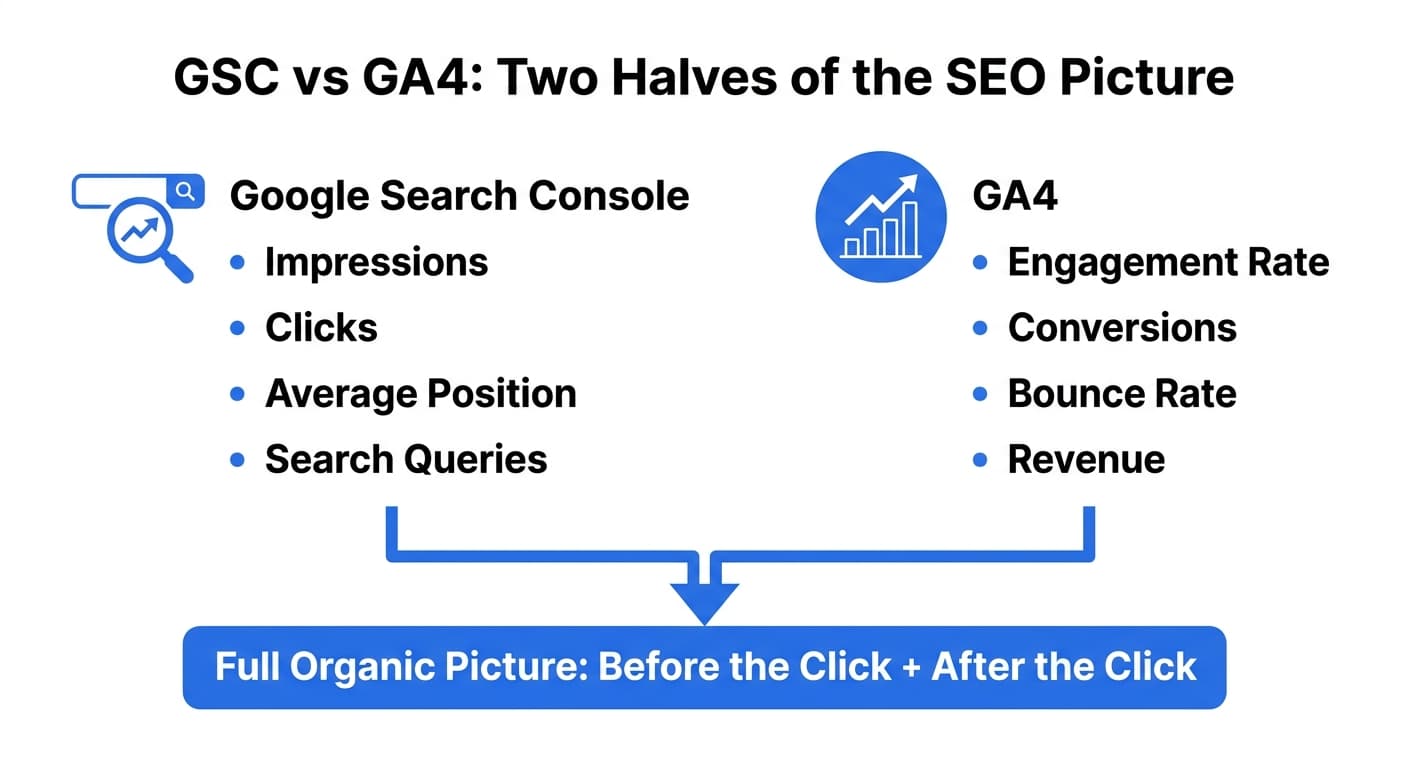
None of these make GA4 the wrong tool. They make it the wrong tool to trust blindly. Treat GSC as the source of truth for what Google saw (impressions, position, clicks) and GA4 as the source of truth for what happened after the click (engagement, conversions, revenue). Neither one alone answers "is SEO working." Together, they do.
A Practical GA4 SEO Setup Checklist
- Link the correct Search Console property under Admin > Product Links (verify you are linking the right property if you manage
wwwand non-www, or multiple subdomains). - Confirm at least one Key Event is marked as a conversion that reflects real business value, not just a pageview.
- Build one saved Exploration: Landing Page x Session Medium x Engagement Rate x Key Events, filtered to organic. This single view replaces most of the ad-hoc reports above.
- Exclude internal traffic and known bot/staging domains under Admin > Data Filters, or every report above is quietly polluted.
- Re-check the Search Console link every few months. Property changes (domain migrations, protocol changes) silently break it more often than people expect.
Getting this right manually is the whole reason seo reporting dashboards exist in the first place: once GSC and GA4 are both correctly wired, the actual work shifts from "can I get the data" to "what does the data tell me to fix." That is the harder, more valuable half of the job, and it is where most GA4 setups stop paying off, because nobody closes the loop back to actually changing the page. Murkuz's GA4 integration connects a read-only GA4 property directly to the ranking data it already pulls from Search Console, so a declining page shows its real traffic and engagement impact next to the ranking drop, not in a separate report you have to build and cross-reference by hand. When a page's fix ships, the Impact Scorecard shows the ranking recovery and the traffic recovery on the same card, which is the actual proof a client or a boss wants to see, not a screenshot of a line going up.
FAQ
Is GA4 replacing Universal Analytics for good?
Yes. Universal Analytics stopped processing new data in mid-2023, and Google has not offered a rollback path. GA4 is not a temporary or optional upgrade; for any site running Analytics today, it is the only option.
What is GA4 mainly used for in SEO?
Mainly for the half of the picture Search Console cannot show: what happened after someone clicked into your site from Google. Search Console tells you impressions, clicks, and position. GA4 tells you engagement, conversions, and revenue tied to that same organic traffic, once the two are linked.
Why does my GA4 organic traffic not match Search Console clicks?
They measure different things and rarely match exactly. Search Console counts clicks logged at Google's end, including some bot and automated traffic filtered differently than GA4's session counting, and GA4 loses additional visits to consent-mode gaps, ad blockers, and its own sampling on lower-traffic sites. Expect the two numbers to trend together, not to reconcile to the decimal.
Why is GA4 so much more complicated than Universal Analytics?
Because it moved from counting sessions to counting individual events, which is more flexible but front-loads configuration work UA used to do for you automatically (like defining what counts as a meaningful visit). The complexity is mostly setup cost: once Key Events, data filters, and the Search Console link are configured once, the ongoing reporting is not harder than UA was, just different.
Do I still need Google Search Console if I have GA4?
Yes, and neither tool substitutes for the other. GA4 has never had keyword-level query data; that has always lived exclusively in Search Console. GA4 shows what happened on your site after the click. GSC shows what happened in the search results before it. An SEO report built on only one of them is missing half the story.
Junaid Khalid is the founder of Ertiqah and has run SEO as the first growth channel across several of his own SaaS products, wiring GSC and GA4 into the same view long before it was a checkbox on a marketing dashboard. He built Murkuz to close that loop automatically: connect the ranking data and the traffic data once, and let the platform show which fixes actually moved both.