A content audit for SEO is the process of inventorying every page on your site, pulling its performance data, and deciding what to keep, update, consolidate, or remove. Done properly it takes a few hours for a small site or a couple of days for a large one, and ends with a prioritized action list, not a spreadsheet nobody opens again.
That last part is where most audits actually fail. Plenty of guides walk you through building the inventory and pulling the metrics. Almost none address what happens after the spreadsheet is full: who executes the 40 "update" rows, in what order, and how you know six weeks later whether any of it worked. This guide covers both halves: the audit itself, step by step, and the part that decides whether it was worth doing at all.
What a Content Audit for SEO Actually Is
A content audit is a structured review of your existing content against real performance data, so you can decide, page by page, whether it is earning its place on your site. The "for SEO" part narrows the lens to organic visibility: whether each page is ranking, whether it still matches how people search, and whether it is pulling its weight relative to the effort it took to produce. It differs from a technical SEO audit, which checks site-wide plumbing like crawlability and indexation rather than the pages themselves.
Three situations make a content audit worth running right now rather than "eventually": organic traffic has plateaued or is slipping with no obvious cause, you are about to redesign the site or migrate CMS and need to decide what survives, or you have been publishing for a year-plus and never once looked back.
Before You Start: Set a Scope and a Goal
Skipping this step is the single most common reason audits stall halfway through. "Audit the whole site" is not a scope; it is a way to burn a week and quit. Pick one: a full site (fine under 300 pages), a single content type (just the blog, just product pages), or one cluster or URL path, which is usually the right call the first time you do this.
Then write down the one decision the audit needs to produce. An audit aimed at migration cares about traffic and backlinks per URL; an audit aimed at decay cares about the trend line, not the snapshot. That goal determines which metrics matter in the next step.
Step 1: Build the Content Inventory
The inventory is a single spreadsheet (or a proper tool if you have one) listing every URL you are auditing, one row per page. At minimum capture: URL and page title, publish date and last-updated date, word count, content type or category, and the primary target keyword if one exists.
Two ways to build it. If you have a crawler tool (Screaming Frog's free tier handles up to 500 URLs), crawl the site and export. If not, pull the URL list from your CMS or XML sitemap into a spreadsheet; slower, but free and workable for a few hundred pages.
Resist adding every metric you can think of at this stage. An inventory with 40 columns nobody fills in is worse than one with 6 columns that are actually complete. Add performance data next, once the row list is settled.
Step 2: Pull Performance Data Per Page
This is where a content audit becomes an SEO content audit rather than a content marketing tidy-up. For every row, pull:
- Organic traffic, trailing 12 months, so seasonal pages do not look artificially dead.
- Average position and impressions from Search Console. Compare the trailing 90 days against the prior 90 days using its built-in comparison; a page sliding from position 6 to 11 is a decay candidate even if this month's traffic still looks fine.
- Ranking keywords, beyond just the one you originally targeted. Pages often rank for terms you never intended, which changes what "update" should mean for that page.
- Backlinks, at least a referring-domain count. A page with real link equity is usually worth fixing rather than deleting, even if current traffic looks weak.
- Conversions, if attributable. Traffic without a business outcome is a weaker case for "keep as-is."
You do not need five tools open for this. Search Console and Analytics alone cover traffic, impressions, position, and CTR, enough to make every decision in Step 4. Backlink data is a nice-to-have, not a blocker.
Step 3: Audit the On-Page SEO Factors
With performance data in hand, read every page flagged as declining or underperforming and check the on-page basics: does the title tag and meta description still accurately describe the page with the target keyword present but not stuffed; is the heading structure a logical H1-to-H3 hierarchy rather than bolded paragraphs pretending to be headings; does it have internal links pointing in and out (an orphaned page with zero internal links is a common, easy-to-fix cause of underperformance); is the content actually current, with no stale statistics or outdated product screenshots; and does the page still match the search intent it targets, since intent shifts over time and an old informational page may now be competing against comparison or product pages.
This step is where you separate two categories that get lumped together: a page that is thin (never had enough substance) versus one that has decayed (was good, and the world moved past it while it stood still). A thin page needs to be built out or merged into something bigger. A decayed page usually just needs its facts, examples, and structure brought current.
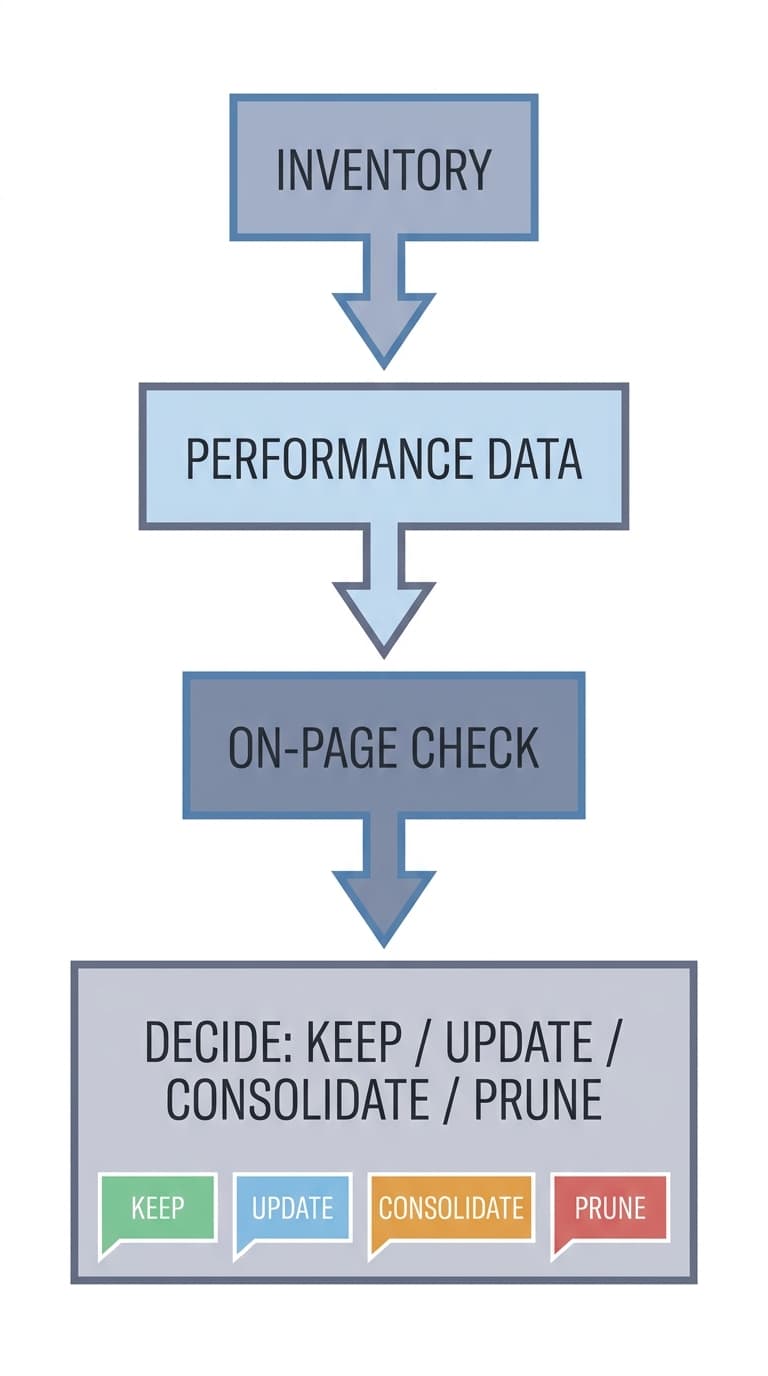
Step 4: Decide Keep, Update, Consolidate, or Prune
Every page in your inventory ends this audit in exactly one of four buckets. Use the table below as the actual decision rule, not a rough guideline; consistency here is what makes the audit's output usable by whoever executes it.
| Signal | Decision | What happens next |
|---|---|---|
| Ranks well, traffic stable or growing, content still accurate | Keep as-is | Leave it. Recheck at the next quarterly audit. |
| Ranking or impressions declining over 90+ days, or content is factually stale, but the topic still matters | Update | Refresh stats, expand thin sections, realign with current intent, then republish. |
| Two or more pages targeting the same keyword or overlapping heavily in topic | Consolidate | Merge into the stronger URL, redirect the weaker one, keep the better backlinks. |
| No search demand left, no traffic, no reasonable page to fold it into | Prune | Remove it, with a 301 redirect to the closest relevant page to preserve any residual link equity. |
A few judgment calls worth stating explicitly:
- When two pages could both be called "the stronger one," consolidate onto whichever has more backlinks or a longer track record, not whichever is newer.
- Never delete a page with meaningful referring domains without redirecting it. That is link equity you paid for once, in time or outreach, and it is expensive to rebuild.
- "Update" is usually the right first call when you are unsure. A page that once ranked has already earned some trust with search engines; starting over on a fresh URL throws that away for no reason.
Step 5: Prioritize the Action List
A finished inventory with 150 rows tagged "update" is not a plan, it is a wish. Rank the update and consolidate rows by two factors: traffic or ranking potential at stake, and effort the fix takes. A declining page that used to bring 4,000 monthly clicks and needs a light refresh is a very different priority than a page bringing 40 clicks that needs a full rewrite. A simple two-column sort works: highest historical traffic first, then lowest effort first within each tier. That clears the cheapest, highest-value wins before anyone spends a week on a page that was never going to move the needle.
Where Content Audits Actually Break Down
The audit itself is not the hard part. Every guide above walks through inventory, data, and a decision framework, and they are all correct to do so. The part almost nobody addresses is what happens between "row 47 says update" and "the update is live and the ranking actually recovered."
In practice, that gap is where most of the value of an audit quietly disappears. The spreadsheet gets built, the decisions get made, and then the 40 "update" rows sit in a backlog behind whatever ships this quarter. Someone eventually refreshes a handful of them without the original performance data in front of them, publishes by hand into the CMS, and nobody checks back in 60 days to confirm the specific fix moved the specific ranking. The audit was real work, and most of it evaporates between the decision and the redeploy.
This is the actual argument for treating a content audit as the start of a workflow, not a one-time report: the inventory and the decision framework are table stakes. What determines whether the audit was worth running is whether every "update" row turns into a published fix, and whether you can later prove which fixes actually recovered a ranking.
Murkuz runs a version of this loop automatically rather than as a one-off spreadsheet exercise: it scans your connected Google Search Console data daily, flags declining pages and cannibalization on its own (much of what Step 2 and Step 3 above do manually), turns each one into a task with the actual performance history attached, drafts a brand-matched refresh through its HyBrain knowledge base, and pushes the approved fix straight to WordPress, Webflow, or Framer. The Agentic Impact Scorecard then tracks whether the ranking actually recovered after that specific fix, which is the step a manual audit almost never gets around to.
You do not need a tool to run a good content audit. A spreadsheet, Search Console, and the decision table above will get you a real, usable inventory. What determines whether that inventory changes anything is whether the "update" rows get executed and checked, not whether the spreadsheet itself was thorough.
How Often to Repeat It
A quarterly cadence for your top-performing pages, plus a full-site pass once or twice a year, covers most sites without becoming a part-time job. Sites publishing daily or several times a week benefit from a lighter monthly check on the newest cohort, since decay can show up in Search Console within a few months on competitive topics. Each repeat gets faster, since you are refreshing an existing inventory, not starting from a blank spreadsheet.
FAQ
How long should an SEO content audit take?
For a site under 100 pages, a focused audit (inventory, performance pull, on-page check, and decisions) typically takes a few hours to a day. Larger sites, or a first-ever full-site audit, can run several days once you include prioritizing and briefing the fixes. The audit itself scales roughly with page count; the follow-through work of actually executing the fixes usually takes longer than the audit did.
What tools do I need for a content audit?
Google Search Console and Google Analytics cover traffic, impressions, position, and CTR, which is enough to make every decision in this guide. A crawler like Screaming Frog (free up to 500 URLs) speeds up building the inventory but is not required; you can pull URLs from your sitemap or CMS instead. A backlink tool is helpful but optional.
What is the difference between a content audit and a content inventory?
A content inventory is just the list: every URL, with basic metadata like title, word count, and publish date. A content audit uses that inventory as its starting point, then layers in performance data and a decision (keep, update, consolidate, or prune) for every row. The inventory is a input; the audit is the analysis and the action plan built on top of it.
How do I decide whether to update or delete a page?
Update if the page still ranks reasonably, the topic still has search demand, and it has some existing traffic or backlinks. Delete (with a redirect) only when there is no remaining search demand for the topic and no reasonable page to consolidate it into. When genuinely unsure, default to update; a page that has already earned some ranking history is usually cheaper to refresh than to replace.
Should I audit content that is not ranking at all?
Yes, but treat it as a separate pass from your decay-focused audit. Never-ranked pages usually mean either the content never matched real search intent or it is competing in a spot with no realistic path to page one; both are consolidate-or-prune candidates rather than update candidates, since there is no existing ranking or traffic history to protect.
Junaid Khalid is the founder of Ertiqah and the builder of Murkuz. Running SEO as the first growth channel across his own SaaS products meant running this exact audit process by hand, spreadsheet and all, long before he built a tool to close the gap between the decision and the published fix.