Your best article ranked #3 eight months ago. Today it sits at #9, the traffic graph in Google Search Console looks like a ski slope, and nothing about the page has changed. You didn't do anything wrong. This is content decay, and it is happening to pages on your site right now, whether or not you have noticed yet.
Content decay is the gradual loss of search rankings and organic traffic on a page that used to perform well, caused not by a penalty or a mistake but by the page simply standing still while everything around it keeps moving: competitors publish fresher takes, your statistics age out, search intent shifts, and Google's understanding of what counts as a good answer keeps getting sharper. Nobody breaks the page. Time does.
This guide covers what actually causes decay, how to catch it while it is still cheap to fix, exactly what to do once you find it, and why most teams who "know" all of this still watch it happen anyway. That last part is the piece almost nobody else writes about, and it is the actual point of this article.
What Content Decay Actually Is
Content decay is a page's organic performance eroding over time despite no direct change to the page itself. It shows up as a slow slide, not a cliff: a page drifting from position 3 to 5 to 8 to 14 over several months, each step small enough to miss, the sum large enough to matter.
It is worth separating decay from three things people often confuse it with:
- Seasonal drops. A page about holiday shipping deadlines loses traffic every January. That is a calendar effect, not decay, and it recovers on its own next season.
- Technical issues. A broken canonical tag, an accidental noindex, or a botched migration can tank a page overnight. That is a technical bug with a technical fix, not decay, which unfolds gradually.
- Tracking errors. Sometimes the page is fine and the analytics setup is not. Before you diagnose decay, rule out a broken GA4 tag or a GSC property mismatch.
True content decay is specifically the slow kind: rankings and impressions sliding over a period of months while the page itself sits untouched. That distinction matters because the fix is different for each. You do not refresh content to solve a canonical tag bug, and you do not touch robots.txt to fix decay.
What Causes Content Decay
Every page starts aging the moment it publishes. The page does not change. Everything around it does.
Competitors publish better content. Someone writes a newer article on your exact topic with fresher data, a cleaner structure, or a subtopic you never covered. Google's bar for "the best answer to this query" rises continuously, and a page that does not rise with it falls relative to the pages that do, even while staying exactly as good as the day it was published.
Statistics and examples go stale. A stat from 2023 reads as stale in 2026. Both search engines and readers prefer current information, and a page anchored to old numbers signals to anyone reading it, human or algorithm, that nobody has looked at this in a while.
Search intent evolves. The meaning behind a query shifts. A keyword that used to trigger how-to guides might now trigger product comparisons, or a term that used to be purely informational might now carry commercial intent as the market matures. A page built for yesterday's intent stops satisfying today's searcher even if nothing on the page is factually wrong.
Google's algorithm gets smarter. Core updates continuously refine how Google evaluates freshness, depth, and quality. A page that cleared the bar under an older evaluation standard is not guaranteed to clear a newer one.
Link equity erodes. Backlinks decay too. Linking pages get deleted, sites get redesigned, old links get pruned during someone else's cleanup. The authority your page borrowed from those links quietly leaks away, and rankings that depended partly on that authority follow it down.
None of these five causes require you to have made a mistake. That is the uncomfortable part of content decay: it is not a bug you introduced, it is entropy, and entropy does not ask permission.
Warning Signs of Content Decay (Before It Shows Up in Traffic)
Content decay rarely announces itself. By the time a drop is obvious in your traffic dashboard, you are usually looking at the tail end of a slide that started months earlier. The earlier signals live in Google Search Console, not in your analytics tool:
- Declining impressions. Impressions fall before clicks do. If impressions for a page are dropping while its average position looks roughly stable, that page is starting to lose relevance for some of the queries it used to match, even though the headline ranking number has not visibly moved yet.
- Slowly sliding average position. Position 3 to 5 to 8 to 12 across several months. Each individual step is easy to shrug off. The trend line is not.
- Falling click-through rate at a stable position. If your position holds steady but CTR drops, competitors have likely improved their titles, added review stars via schema, or otherwise made their result more clickable than yours, even from a worse ranking slot.
- Rising bounce rate or falling time on page. Visitors are still arriving but leaving faster. That usually means the content no longer satisfies the intent behind the query as well as it once did, which is often an early tell that a ranking drop is coming even before Google's algorithm has fully caught up to it.
The practical detection method almost anyone can run without any tooling: compare each page's impressions over the last 90 days against the 90 days before that, inside Search Console's built-in date comparison. Any page showing a meaningful decline in that window is a decay candidate worth a closer look. It is slow and manual, but it is free, and it catches the pattern early enough to matter.
The Decision Framework: Update, Consolidate, Redirect, or Prune
Not every decaying page deserves a refresh. Before you touch anything, decide which of four moves actually fits the page:
| Signal | Likely move | Why |
|---|---|---|
| Still ranks reasonably well, topic still relevant, content just stale | Update | The page has earned authority; a refresh of data, examples, and structure is the fastest path back |
| Overlaps heavily with another page on your own site targeting the same keyword | Consolidate | Two mediocre competing pages usually rank worse than one strong merged page; stop cannibalizing yourself |
| Topic is no longer relevant to your business, or traffic has collapsed with no recovery path | Redirect | Preserve whatever link equity remains by pointing it at a stronger, related page instead of leaving a dead end |
| Thin, outdated, no search demand left, and no reasonable page to redirect to | Prune | Removing genuinely dead weight can improve how search engines evaluate the rest of the site; a quality signal, not just cleanup |
Most decaying pages fall into the first bucket. A page that used to rank has already earned links, engagement history, and some amount of trust; that is expensive to rebuild from scratch on a new URL, which is why "update" is usually the right first move to try before you consider anything more drastic.
How to Refresh a Decaying Page (What Actually Moves the Needle)
Once you know a page needs an update, not every change matters equally. The tactics that reliably help:
- Replace outdated statistics and examples. Cite the newest available source, not the one you happened to use originally.
- Expand thin sections. If competitors now cover a subtopic you glossed over in one sentence, that gap is exactly why they are outranking you. Close it with real depth, not padding.
- Refresh screenshots and product references. Interfaces change. A screenshot from two redesigns ago undermines the credibility of everything else on the page.
- Improve internal linking. Link to newer, related content you have published since the original article went live. This does double duty: it helps readers and it signals to search engines that this page sits inside an actively maintained content structure, not an abandoned one.
- Realign with current search intent. Reread the page as if you were the searcher today, not when you first wrote it. If the dominant intent behind the keyword has shifted from informational to commercial (or the reverse), restructure around the new intent rather than layering more of the old one on top.
- Update the publication date, but only after the content has substantially changed. Changing the date without making a real update is a well-documented way to erode trust rather than build it, both with readers and with search engines that have gotten better at detecting cosmetic-only "refreshes."
The tactics themselves are not the hard part. Every one of the top-ranking guides on this topic lists a version of this same list, and they are right to. The hard part, which almost nobody addresses directly, is what happens after you know all of this.
Why Teams Know This and Still Don't Fix It
Here is the part the decision framework and the tactics list both skip. Knowing that a page needs a refresh and actually getting the refresh published are two completely different problems, and the gap between them is where most content decay quietly wins.
The typical manual path looks like this: someone remembers (or is reminded) to export Search Console data, sorts a spreadsheet by declining impressions, picks a handful of pages, and opens a ticket. The ticket sits in a backlog behind whatever this week's launch is. Eventually a writer picks it up, refreshes the content without the original performance data in front of them, and publishes it into a CMS by hand. Nobody circles back in 60 days to check whether the specific fix actually moved the ranking, because there is no system connecting the fix to the outcome, only two separate dashboards that someone would have to manually compare.
Every step in that chain is a place the fix quietly dies: the export nobody made time for, the ticket that never got prioritized against a launch deadline, the writer who refreshed the wrong page because the ticket lacked context, the publish that never happened because it required someone else's CMS access. None of those failures are about not knowing what to do. They are about the workflow between "we know this page is decaying" and "the fix is live and we can prove it worked" having too many manual handoffs, and every handoff is a place work gets dropped.
This is the actual argument for treating content decay as a workflow problem, not a writing problem. The tactics are not the bottleneck. The operational chain connecting detection to a published, verified fix is.
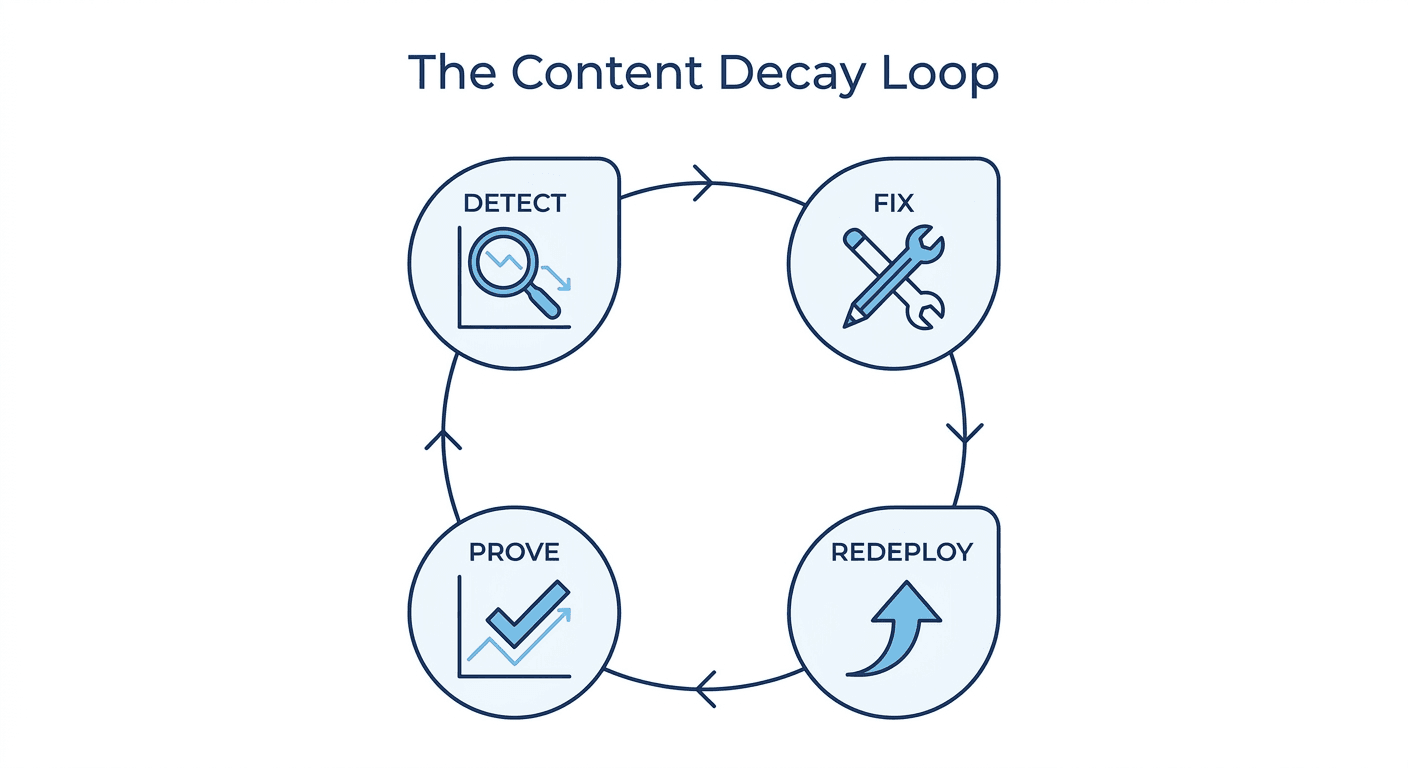
The Detect, Fix, Redeploy, Prove Loop
Reframed as a workflow, recovering a decaying page is four connected steps, and the articles that stop at "here's how to detect it" or "here's what to update" are only covering the first two:
- Detect. Catch the decline in Search Console data early, ideally from the 90-day impression comparison described above, before the drop is large enough to be obvious in a traffic dashboard.
- Fix. Decide which of the four moves applies (update, consolidate, redirect, prune) and make the actual content change: new data, expanded sections, realigned intent.
- Redeploy. Publish the fix to the live page. This sounds trivial and is exactly where manual workflows break down, because it usually means someone with CMS access has to take the writer's draft and actually push it live, on top of everything else on their plate that week.
- Prove. Confirm the ranking and traffic actually recovered, and attribute that recovery to the specific fix you made, not to noise or a coincidental algorithm update. Without this step you cannot tell a real recovery from a random fluctuation, and you cannot make the case for spending more time on refreshes instead of new content.
Most content decay advice, including the well-regarded guides from the big SEO tool blogs, is genuinely strong on steps 1 and 2 and nearly silent on 3 and 4. That is not a criticism of the advice; detection and diagnosis are legitimately useful and worth doing well. But a diagnosis without a reliable path to a redeployed, verified fix is a report, not a recovery. Murkuz was built specifically to close that gap: it runs a daily Google Search Console scan to detect declining pages, turns each one into a task with the actual performance history attached, uses a connected knowledge base to draft a brand-consistent refresh, pushes the fix straight to WordPress, Webflow, or Framer with one click, and then tracks the ranking afterward so you can see, in an auditable scorecard, that this specific fix caused this specific recovery. Detection, fixing, and redeploying stop being three separate tools and three separate handoffs, and become one connected loop.
You do not need Murkuz or any tool to run this loop manually. A spreadsheet, a shared calendar reminder, and someone with standing CMS access can do all four steps by hand. What matters is that all four steps actually happen, in order, for every page that decays, not just the ones someone happens to remember.
Preventing Content Decay Before It Starts
The best content refresh strategy is proactive, not reactive. A few habits meaningfully reduce how much decay accumulates before anyone catches it:
- Monitor your top 20 pages weekly. These pages drive the majority of your organic traffic and justify the closest attention; a small decline here matters more than the same percentage decline on a page nobody visits.
- Set an alert threshold for ranking declines. A sustained 3+ position drop over two weeks is a reasonable trigger to open a review, before it becomes a 10-position drop over two months.
- Run a quarterly content audit across every indexed page, not just the top performers, so slower, quieter decay on mid-tier pages does not go completely unnoticed for a year.
- Track competitor publishing cadence on the topics you rank for. If a competitor just refreshed a page that competes with yours, the clock on your own page's relative freshness just started running again, whether or not anything about your page changed.
Prevention does not eliminate decay. Nothing does; it is a structural feature of how search works, not a mistake you can permanently avoid. What prevention buys you is smaller, cheaper fixes caught early, instead of large recoveries attempted after most of the traffic is already gone.
Content Decay vs. Content Rot
The two terms get used interchangeably, but they describe different problems, and the distinction affects which fix applies. Content decay is a page losing search performance over time even though nothing about the page changed; the world moved and the page did not. Content rot describes content that has become factually wrong, broken, or actively misleading, whether through outdated claims, dead links, or deprecated information, regardless of whether it still ranks. A page can rot without decaying (still ranking well while containing wrong information) and a page can decay without rotting (everything on it is still accurate, it has simply been outpaced). Decaying content deserves a refresh; rotting content deserves urgent correction regardless of its ranking, because the cost of a rotted page is reputational and factual, not just positional.
FAQ
What is content decay?
Content decay is the gradual decline in a page's search rankings and organic traffic over time, even though the page itself has not been changed or penalized. It happens because competitors, search intent, and Google's algorithm keep evolving while a static page does not.
How quickly does content decay happen?
There is no fixed timeline. Some pages hold steady for years; others start sliding within months, especially in fast-moving or highly competitive topics. The average team does not notice decay for three to six months after it begins, mostly because the early signals (falling impressions, a slow position slide) show up in Search Console well before they are obvious in a traffic dashboard.
Should I update or rewrite decaying content?
Update in most cases. A page that already ranked has earned link equity, engagement history, and some existing trust with search engines; refreshing statistics, expanding thin sections, and realigning with current search intent is usually faster and cheaper than starting over. A full rewrite only makes sense if the original angle or structure is fundamentally wrong for how the topic is understood today.
What are the warning signs of content decay?
Falling impressions in Search Console, a slow multi-month slide in average position, a dropping click-through rate at a stable position, and rising bounce rate or falling time on page. Impressions and position typically move before the drop becomes visible in a top-line traffic report.
How do I know if a page needs to be updated, consolidated, redirected, or pruned?
Update if the page still ranks reasonably and the topic remains relevant but the content is stale. Consolidate if it overlaps heavily with another page on your own site targeting the same keyword. Redirect if the topic is no longer relevant to your business or traffic has collapsed with no viable recovery path. Prune only when a page is thin, outdated, has no remaining search demand, and no reasonable page to redirect it to.
Is content decay the same as a Google penalty?
No. A penalty is a direct, often abrupt action tied to a specific violation of Google's guidelines, and it typically comes with a manual action notice in Search Console. Content decay is a gradual, penalty-free performance decline caused by the page's relative position weakening against a moving competitive and algorithmic landscape.
Junaid Khalid is the founder of Ertiqah and the builder of Murkuz. He has run SEO as the first growth channel across his own SaaS products, which meant living through the same slow, invisible slide this article describes on his own pages long before he built a tool to close the loop on it.