Most content refresh advice starts with a checklist: update the stats, fix the links, rewrite the meta description. That is the easy 20% of the job. The hard part, the part that actually determines whether the work pays off, is deciding which pages deserve that checklist at all. Refresh the wrong page and you burn a week of writer time on something that was never going to move. Leave the right page alone and you watch a page that was one edit away from page one keep sliding for another quarter.
A real content refresh strategy is a triage system, not a to-do list. Before anyone touches a headline or swaps a statistic, you need a clear answer to three questions for every page on the list: does this page get updated, cut, or left alone. This guide gives you that decision framework, the specific signals that answer each question, and a walkthrough of what "update" actually means once a page earns it.
Why "just refresh everything" fails
Teams that treat refreshing as a blanket policy, touching every page over a year old on a rolling schedule, waste effort in both directions. They spend hours polishing pages that were never going to rank regardless of freshness, because the real problem was a competitive gap or a wrong search intent, not stale copy. At the same time, they under-invest in the handful of pages sitting at position 8 to 14 that would jump to page one with a focused, 90-minute edit.
The fix is prioritization based on data, not on a page's age. A page published three years ago that still holds position 4 and climbing does not need you. A page published six months ago that has already dropped from position 6 to position 17 needs you today. Calendar age is a terrible proxy for whether a page needs work; ranking trajectory and business value are the real signals, and they are what the framework below is built around.
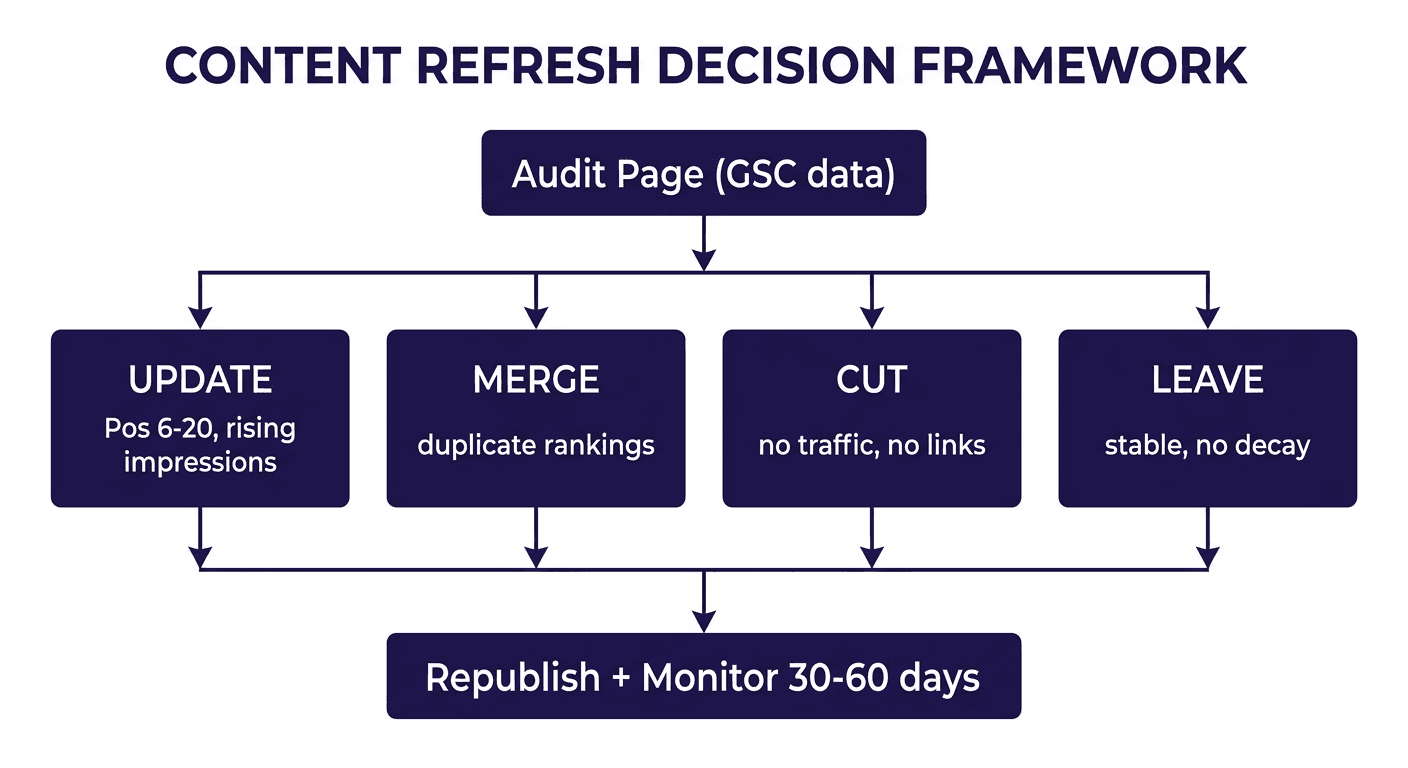
The update, cut, or leave decision framework
Before you refresh a single word, sort every candidate page into one of three buckets using the signals in the table below. Pull the data from Google Search Console (impressions, clicks, average position over the trailing 90 days) and cross-reference with your analytics for engagement and conversions.
| Signal pattern | Verdict | Why |
|---|---|---|
| Position 6-20, stable or rising impressions, real backlinks | Update | The page has authority and visibility Google already trusts. It needs substance, not a rescue. |
| Position 1-5 but CTR falling while impressions hold | Update (title/meta only) | The ranking is fine; the snippet stopped earning the click. A narrow fix, not a rewrite. |
| Two or more pages ranking for the same query, splitting clicks | Merge | Consolidating into one authoritative page usually outperforms fixing either page alone. |
| Near-zero traffic, no backlinks, topic covered better elsewhere on your site | Cut (redirect or remove) | There is nothing here worth saving, and it dilutes topical authority by existing. |
| Stable rankings, no decay signal, matches current intent | Leave | Refreshing a page that is not broken risks introducing errors for zero upside. Log it and revisit next quarter. |
| Time-stamped content (an event recap, a press release, a "state of X in [past year]" piece) | Leave | These pages are supposed to be a snapshot. Updating the date without updating the premise misleads readers. |
A few notes on applying this in practice:
- "Update" is not one action. A page at position 9 needs different work than a page at position 3 with a sinking CTR. Match the fix to the specific signal, not a generic overhaul.
- Cutting is not failure. Removing or merging a thin page is one of the highest-leverage moves in this whole framework, and it is the one teams resist the most because deleting something you wrote feels like admitting defeat. It is not. A messy backlog of thin, overlapping pages actively hurts the pages you are trying to protect.
- "Leave" needs a revisit date, not silence. Pages you decide not to touch this cycle should still land on a quarterly review, because "stable today" is not a permanent state.
The signals behind each verdict
Update: positions 6 to 20 with steady or growing impressions. This is the classic near-miss zone. Google already shows the page for the query; it just is not winning the click or the ranking outright. A focused update, closing content gaps against the current top three and tightening the on-page basics, moves these pages faster than any other category.
Update (meta only): high impressions, falling CTR, stable position. The ranking is fine. The snippet stopped earning the click, often because of an old year in the title or a promise a fresher competitor now states more specifically. This is the cheapest win in the framework: a 20-minute meta rewrite can lift CTR without touching the body.
Update: a drop of five or more positions in 90 days on a page with real backlinks. The authority is intact; something about the substance, structure, or intent match slipped relative to competitors. This page has earned a full refresh, not a light touch.
Merge: two or more of your own pages competing for the same query. Neither page can win while they split clicks and links. <mark class="km-highlight" style="--hl:#FEF08A;background:#FEF08A">Merging into one stronger page usually beats fixing both pages separately</mark>, because the surviving page inherits combined authority instead of two half-strength signals.
Cut: near-zero traffic, no backlinks, topic covered better elsewhere. Pruning is the least popular move in this framework and often the most effective. You have three options here, not one: redirect to the closest strong match if one exists, merge the few useful paragraphs into a stronger page and redirect, or remove and deindex outright if nothing here is worth saving. The risk teams overestimate is losing traffic; in practice, thin and overlapping pages compete with your stronger pages for crawl budget and topical signals, so removing dead weight is usually a net gain.
Leave: stable rankings, healthy engagement, no decay signal. Refreshing a page that is not broken risks introducing an error or shifting an angle away from what is already working, for no measurable upside. Log it and revisit at the next quarterly review instead.
Leave: genuinely time-stamped content. An event recap, an announcement tied to a date, or accurate historical documentation is not decaying just because it looks old; it is doing exactly its job. Changing the publish date without changing the premise misleads readers and fixes nothing, because there was never a freshness problem to begin with.
What "update" actually means once a page qualifies
Once a page lands in the update bucket, the work follows a consistent sequence:
- Reverse-engineer the current top 3 to 5 competitors for the target query. Note what they cover that you do not and where their structure beats yours, before writing a single new sentence. Refreshing blind just adds words without closing the actual gap.
- Replace anything factually stale: outdated statistics, dead links, old screenshots, pricing or product references that no longer match reality.
- Close the content gaps you found in step 1 with real depth (a worked example, a table, a framework), not padding for word count. Competitors out-covering a subtopic is why you are losing the position, not a lack of length.
- Rewrite the title tag and meta description to match current search intent and improve click-through, even when the body change is otherwise light.
- Tighten structure: clear H2/H3 hierarchy, short paragraphs, a scannable list or table, and a short FAQ answering the real "People Also Ask" questions.
- Update internal links both ways: point the refreshed page to your newest relevant content, and make sure other relevant pages link back to it.
- Keep the URL. Refreshing is not relaunching. Preserve the slug so backlink equity and indexing history stay intact; change the publish date only once the content has meaningfully changed.
- Republish and monitor for 30 to 60 days, tracking position, impressions, and CTR. A short dip in week one or two while Google recrawls is normal, not a reason to panic or revert.
How often to run this triage
There is no universal fixed schedule; the right cadence depends on how competitive your topics are. A workable default: monthly, scan your highest-traffic and highest-conversion pages for early decay signals so problems stay cheap to fix; quarterly, run a full triage pass across the library using the table above; as-needed, triage immediately if a revenue page or core topic swings suddenly rather than waiting for the next scheduled pass.
The teams that get the most out of a refresh strategy treat it as a recurring rhythm, not a one-time cleanup project. A page you fix once and never revisit will decay again for the same reasons the first page did: competitors keep publishing, intent keeps shifting, information keeps aging.
Where this fits in a bigger content decay workflow
Triage only works if you are actually catching decay early, which means someone needs to be pulling Search Console data regularly and flagging pages the moment they cross a threshold, not three months after traffic has already cratered. This is the part most teams skip, not because the decision framework is hard, but because the ongoing monitoring is tedious to do by hand every week.
This is the gap Murkuz is built to close. It scans your Google Search Console data daily and automatically flags declining pages, positions 11 to 20 opportunities, and keyword cannibalization, the same signals in the table above, without anyone opening a spreadsheet. Each flagged page comes with a contextual task attached (the problem, the recommended fix, and a priority), so the triage call is already half made before a person looks at it. Once a fix is approved, Murkuz pushes the update straight to WordPress, Webflow, or Framer and tracks whether the ranking actually recovers on its Impact Scorecard, so you can see which specific fix caused which specific ranking change instead of just watching a traffic graph and hoping.
FAQ
How often should I refresh old content?
There is no single fixed interval. Refresh when a page shows a real decay signal (a ranking drop of five or more positions, a falling CTR despite stable impressions, or a competitor gap), not simply because it has passed a certain age. As a baseline, review your highest-value pages every quarter and act sooner if you spot a sudden drop.
Does refreshing content guarantee better rankings?
No. A refresh improves your odds by fixing the specific gap causing the decay, but results still depend on competition, intent shifts, and how thoroughly you close the gap versus the current top-ranking pages. It is a safer bet than starting from zero because you are improving a page Google already trusts, not asking it to evaluate a brand-new URL.
Should I refresh a page or write a new one?
Refresh first if a page already ranks, has backlinks, or sits close to page one; a competing new page would only cannibalize it. Write new content when there is a real topic gap with nothing on your site covering it yet, or when the existing page's core premise no longer matches what searchers want.
What should I do with a post that gets almost no traffic?
Check whether the topic is covered better elsewhere on your site first. If it is, merge the useful parts into that stronger page and redirect. If the topic has no other home and still has some search demand, it may be a genuine update candidate rather than a cut; if it has neither traffic potential nor a home, remove it and redirect to the closest relevant page.
Do I need to change the URL when I refresh a page?
No, and you generally should not. Keep the original slug so the page retains its backlink equity and indexing history. Only change the publish date once you have made a meaningful update to the content itself, not as a way to appear fresh without doing the work.
Junaid Khalid is the founder of Ertiqah and the builder of Murkuz. He has run SEO as the first growth channel across several of his own SaaS products and built Murkuz around the belief that SEO should be treated as an engineering problem: detect what is decaying, fix it, ship the fix, and prove it worked.