Most sites are not missing internal links because nobody thought about linking. They are missing them because nobody has a reliable way to find WHERE a link is actually needed. You end up linking the pages you remember, not the pages that need the help, and the guides on this topic mostly repeat the same three tips (link pillar to cluster, use descriptive anchor text, avoid orphan pages) without ever showing you how to actually surface the opportunities on your own site.
This is that missing step. Below is a repeatable audit that uses data you already have, Google Search Console and your own site crawl, to find three specific things: pages that deserve more internal links than they get, pages competing with each other for the same keyword, and the exact anchor text and source page to use when you fix it.
What Counts as an Internal Linking Opportunity
An internal linking opportunity is a place on an existing page where a link to another page on your site would help a reader, and would help Google understand which page you actually want to rank for a given topic. That second half matters more than most guides admit. A missing link is not just a lost chance to pass authority. It is often the reason two of your pages are quietly splitting the same ranking.
There are three distinct types worth hunting for separately, because each needs a different detection method:
- Orphaned or under-linked pages. Pages that exist, sometimes rank, and get almost no internal links pointing at them, so Google (and readers) rarely find them through your own site structure.
- Missing contextual links. Older articles that never mention a newer, more relevant page you published since, even though the topic overlaps directly.
- Cannibalization-driven gaps. Two or more pages targeting the same keyword with no link between them, so instead of one page consolidating authority, they compete against each other and both underperform.
Step 1: Pull Your Real Internal Link Data (Not a Guess)
Skip the manual clicking-around approach. You need two data sources, both of which are either free or already in your stack:
- A full site crawl with an internal-links report. Screaming Frog's free tier crawls up to 500 URLs and shows "Inlinks" per page, which is the count of internal links pointing to it. Sitebulb and Ahrefs' Site Audit do the same at larger scale if you already pay for them.
- Google Search Console's Links report (Search Console > Links > Internal links). This shows every internal link GSC has indexed, sorted by target page, so you can see at a glance which pages have the fewest incoming links.
Cross-reference the two. A page with high organic traffic potential (it ranks for a decent keyword, or it is a page you want to rank) but a low internal link count is your highest-priority fix. A page with zero internal links showing in either report is an orphan: it may not even be in your sitemap's crawl path, and it is the most urgent kind of gap to close.
Step 2: Find Pages That Are Fighting Each Other, Not Just Under-Linked
This is the step most internal linking guides skip entirely, and it is usually where the real ranking loss is hiding. Open Search Console's Performance report, filter by query, and look for a single keyword generating impressions across two or more different URLs, with neither cracking your usual top positions.
That pattern is content cannibalization, and internal linking is one of its most common invisible causes. When you publish a new article on a topic you have covered before, without linking the old page from the new one (or the reverse), Google has no clear signal about which page you consider the authority. It splits ranking signals between them instead of consolidating on one. A clustering tool that groups your queries by overlap, like Murkuz's free keyword clustering tool, makes this pattern visible in minutes instead of a manual GSC export you sort by hand. Once you can see which pages are actually competing for the same query, the fix is straightforward: pick the stronger page as the target, add a contextual link from the weaker page pointing to it with a keyword-relevant anchor, and consider whether the weaker page should be trimmed, merged, or redirected outright. Our guide on fixing content cannibalization walks through how to decide between merge, redirect, and differentiate once you've found the overlap.
Step 3: Prioritize by Impact, Not by What's Easiest to Fix
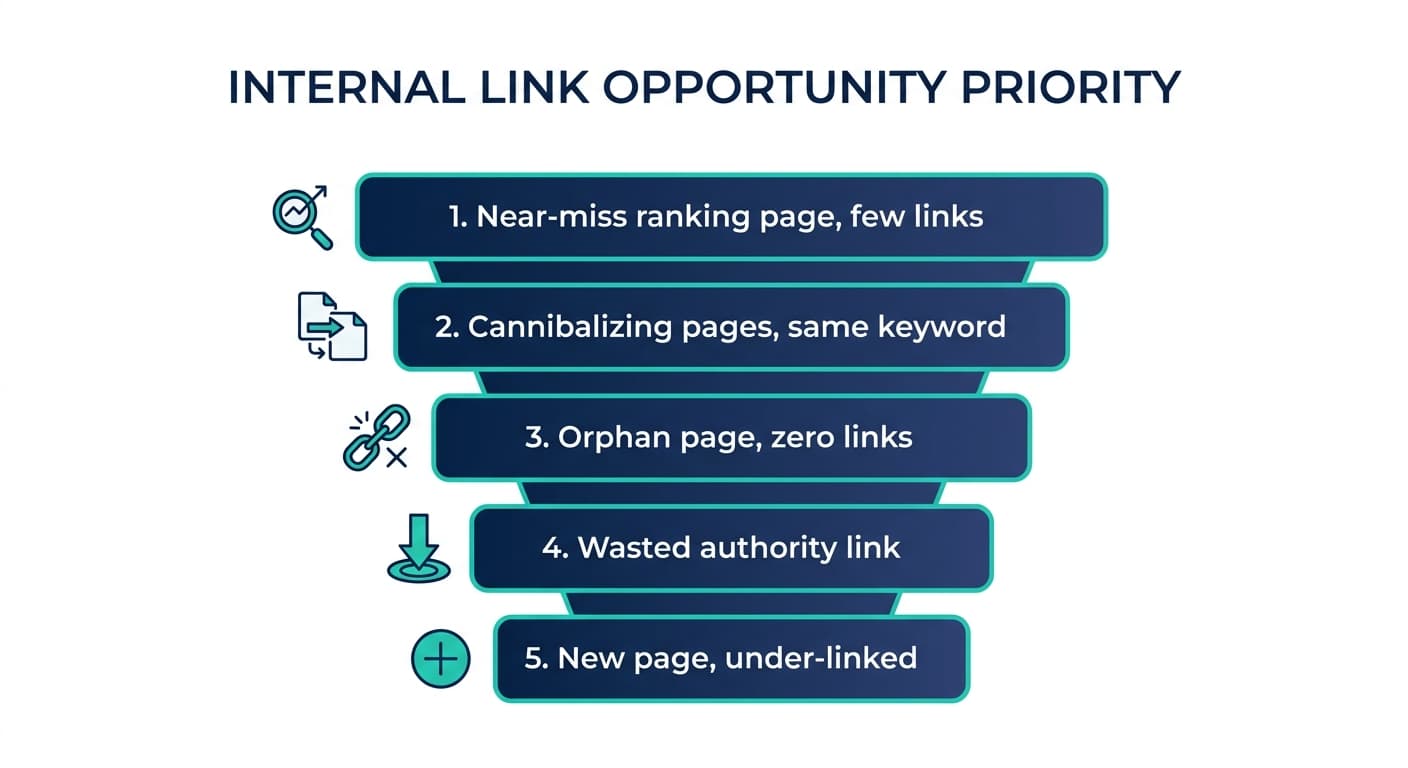
Once you have a list of under-linked pages and cannibalized pairs, do not work top to bottom in whatever order your crawl exported them. Rank the list by potential impact so the first hour of work produces the first real ranking movement.
| Priority | Signal | Why it matters | Typical fix |
|---|---|---|---|
| 1 | Page ranks positions 5-15 for a valuable keyword but has fewer than 3 internal links | Small link boost can be the nudge that moves it into the top 3 | Add 2-3 contextual links from your highest-authority related pages |
| 2 | Two pages competing for the same query in GSC (cannibalization) | Both pages are actively losing ranking power to each other right now | Link weaker page to stronger page, or merge/redirect |
| 3 | Orphan page with zero internal links but real traffic potential | Google may be struggling to find or trust the page at all | Link from your most relevant hub or category page immediately |
| 4 | High-authority page linking only to low-value pages | You are "wasting" your best link equity on pages that do not need it | Redirect some of that link equity to priority pages instead |
| 5 | New content published in the last 90 days with fewer than 5 internal links | New pages need a deliberate push, they will not get discovered organically yet | Add links from 3-5 established, relevant older posts |
Work down this list in order. Fixing five orphan pages that nobody was searching for will not move a single ranking. Fixing three near-miss pages that already rank on page one or two often will, usually within a few weeks of the page being recrawled.
Step 4: Use the Right Anchor Text for Each Link You Add
Once you know where a link needs to go, the anchor text decides how much of the SEO benefit you actually capture. Two rules cover most of it:
- Match the anchor to the target page's actual topic, not to generic phrases like "click here" or "read more." If the target page targets "internal linking audit," an anchor like "run an internal linking audit" tells Google far more than "learn more here."
- Vary the anchor across different source pages. If ten pages all link to the same target with the exact same three words, it reads as manufactured to both Google and to readers scanning the page. Use natural variations: the exact phrase once or twice, a partial match a few more times, and a branded or generic anchor for the rest.
<mark class="km-highlight" style="--hl:#FEF08A;background:#FEF08A">A single well-placed contextual link, with the right anchor text, usually does more for a page's ranking than five generic links buried in a footer.</mark>
Step 5: Rebuild the Habit So This Does Not Pile Up Again
A one-time audit fixes today's backlog. What keeps the backlog from reappearing is a habit built into your publishing workflow:
- Add a "link back" step to your content checklist. Before publishing any new article, spend five minutes searching your own site for 2-3 existing pages that should link to it, and 2-3 pages it should link out to.
- Re-run the link audit quarterly, not annually. Sites that publish weekly accumulate new orphan pages and new cannibalization pairs faster than most teams expect.
- Watch for cannibalization at publish time, not months later. If you already know two pages might overlap before you hit publish, add the cross-link on day one instead of discovering the conflict in a GSC report six months from now. Murkuz's content cannibalization check shortens that wait: ask Claude or ChatGPT which queries have two of your pages competing, and it reads your live Search Console rows and lists the pairs, so you can ask monthly instead of waiting for a quarterly crawl. Adding the links in your CMS is still your job, but the list of where to add them is one question away.
None of this requires expensive tooling to start. A free Screaming Frog crawl plus your existing Search Console account will surface most of the opportunities above. Where a dedicated clustering tool or a Search Console connector for your AI earns its cost is at scale, when you have hundreds of pages and cannibalization pairs stop being something you can hold in your head.
FAQ
How many internal links should a page have?
There is no universal number, but most well-linked pages on a healthy site sit somewhere between 3 and 10 internal links pointing to them, scaled to the size of the site. What matters more than the count is relevance: three highly relevant contextual links from pages your readers actually visit outperform twenty generic footer links.
Do internal links actually help SEO?
Yes, on two levels. They help search engines discover and crawl pages they might otherwise miss, and they help distribute ranking authority from your strongest pages toward the ones you want to rank higher. They also reduce cannibalization risk by giving Google a clear signal about which of two similar pages is the one you consider primary.
What is the difference between internal linking and content cannibalization?
Internal linking is the practice of connecting pages within your own site. Content cannibalization is what happens when you fail to do it well between two pages on the same topic: without a link (or without differentiated targeting) telling Google which page matters more, both pages compete for the same keyword and typically both rank worse than a single consolidated page would.
Can I find internal linking opportunities without paid tools?
Yes. Google Search Console's Links report is free and shows your actual internal link counts per page. Screaming Frog's free tier crawls up to 500 URLs and reports inlinks per page. Combining those two free sources covers most of what a paid crawler adds, until your site grows past a few hundred pages.
How often should I audit internal links?
Quarterly is a reasonable baseline for most sites publishing regularly. Sites publishing weekly or more, or sites that have recently restructured a category or navigation, should check monthly, since new orphan pages and cannibalization pairs accumulate fastest right after a wave of new content or a site restructure.
Junaid Khalid is the founder of Ertiqah, the studio behind Murkuz, and has run SEO as the first growth channel across several of his own SaaS products before building Murkuz, which puts that search data inside Claude and ChatGPT.