Most "SEO workflow" guides stop at the content calendar: research a keyword, write a brief, publish a post, repeat. That covers new content. It says almost nothing about the other half of the job, the pages you already published that are quietly losing ground, and it says even less about what happens after you hit publish on a fix.
A real SEO workflow has to close the loop on both halves. It needs a repeatable way to research and ship new pages, and a repeatable way to catch an existing page before it slides off page one, fix it, get the fix live, and confirm the fix actually worked. Most teams have the first half. Almost nobody has the second, which is exactly where rankings quietly bleed out between now and your next quarterly audit.
This guide walks the full workflow end to end: five stages, what happens at each one, who should own it, and where the process typically breaks down. It also covers a worked example, a comparison of doing this manually versus with a platform built for it, and the honest answer to which parts of this you can hand off and which parts still need a person.
What "SEO Workflow" Actually Means
An SEO workflow is the repeatable sequence of steps a team runs to find, create, and maintain pages that rank, and to catch pages that stop ranking before the traffic loss becomes serious. The word that matters here is repeatable. A one-off audit is not a workflow. A workflow is the same process, run on a schedule, that turns "SEO" from a pile of ad hoc tasks into an operating system for the site.
Two things get conflated under "SEO workflow" and it is worth separating them up front:
- The new-content workflow. Keyword research, a content brief, drafting, on-page optimization, publishing. This is what most existing guides mean when they say "SEO workflow."
- The maintenance workflow. Detecting when an already-published page starts losing rankings, diagnosing why, fixing the specific problem, redeploying the fix, and confirming the ranking recovered. This is the half that decides whether your traffic curve keeps climbing or slowly erodes underneath your new-content efforts.
A complete SEO workflow needs both. Publishing new pages without a maintenance loop is like filling a bathtub with the drain half open: you can out-publish the leak for a while, but the leak never stops.
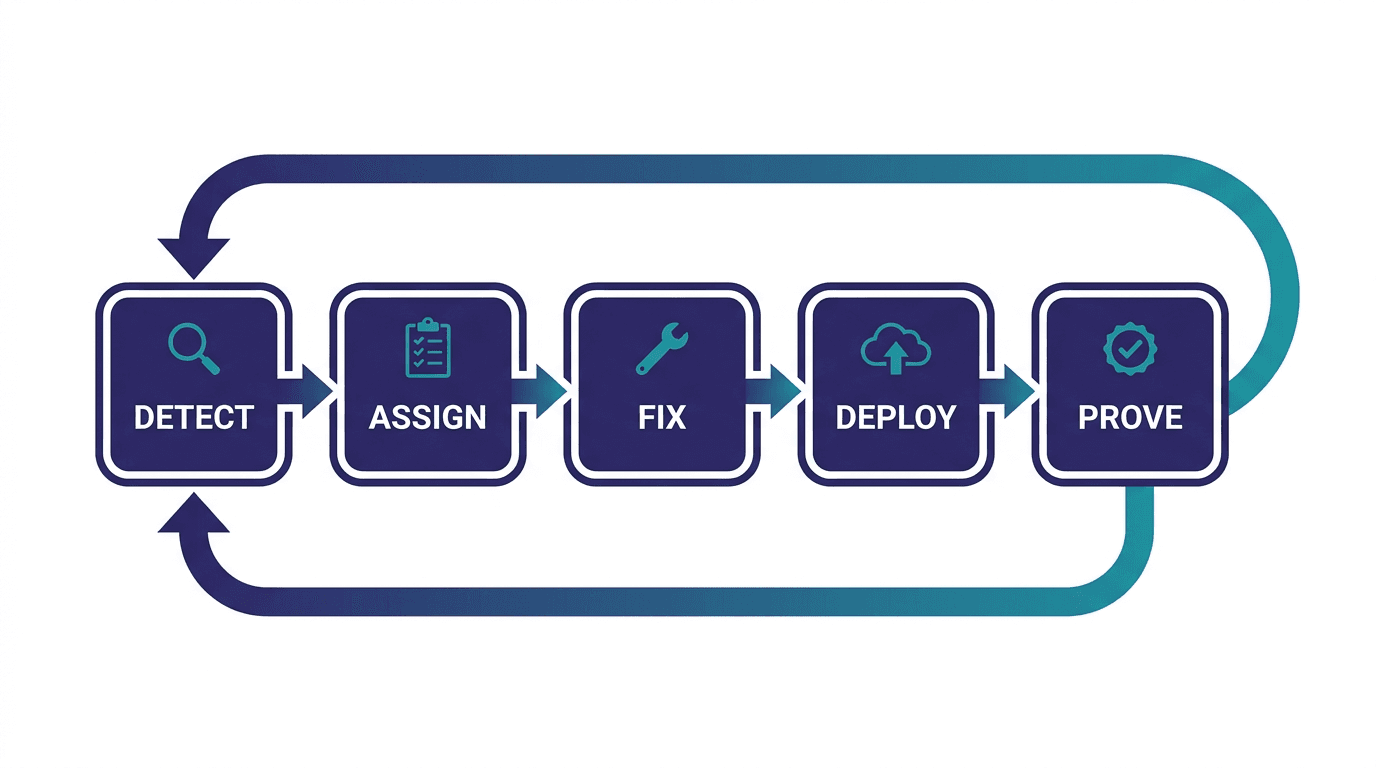
The SEO Workflow Steps: Five Stages That Close the Loop
Strip away the tooling and the SEO workflow steps that actually close the loop look like this, whether a team runs them by hand in spreadsheets or with software built for it.
Stage 1: Detect
Before you can fix anything, you need to know something is wrong, and you need to know early, while it is still cheap to fix. Detection means continuously checking your site's Google Search Console data for signals that a page is losing ground: a slow slide in average position, falling impressions on a page whose ranking looks stable, or a keyword where three of your own pages are now competing against each other.
The mistake most teams make here is checking quarterly, or only when someone happens to notice a traffic dip in an executive dashboard. By the time a drop is visible in monthly traffic, the page has often already slid from position 4 to position 11, and you have lost weeks you could have spent fixing it instead of discovering it.
Stage 2: Assign
Detecting a problem and doing something about it are two different steps, and this is where most manual processes fall apart. A spreadsheet full of declining URLs is not a task list. Someone has to turn "this page dropped from position 6 to position 13" into an assigned, prioritized piece of work: what the likely cause is, what the recommended fix is, and how urgent it is relative to everything else competing for the team's time this week.
Priority matters more than most teams give it credit for. A page that dropped from position 4 to position 9 while pulling 8,000 monthly clicks deserves attention this week. A page that dropped from position 34 to position 41 with 12 monthly clicks does not, and treating every detected issue as equally urgent is how a task queue turns into something nobody opens.
Stage 3: Fix
This is the stage everyone assumes SEO is about, and it is genuinely only one of five. Fixing a decaying page usually means one of a small set of moves: refreshing stale statistics and examples, restructuring a section that no longer matches current search intent, filling a subtopic gap a competitor now covers that you do not, or consolidating two pages that have started cannibalizing each other's rankings.
The part that is easy to get wrong at this stage is brand voice and factual accuracy. A rewritten section that reads like it was written by nobody in particular, or that states something confidently that is not quite true, does more damage than leaving the page alone. Any AI-assisted rewrite needs a human pass before anything goes live, without exception.
Stage 4: Deploy
A fix that lives in a Google Doc or a pending pull request is not a fix. It is a fix that has not happened yet. This stage is the mechanical hand-off: getting the approved change from wherever it was drafted into the live CMS, whether that is WordPress, Webflow, Framer, or something custom, without someone manually copy-pasting HTML and re-checking formatting by hand.
This sounds like a small step. In practice it is where a lot of good fixes die. A content team approves twelve refreshes in a sprint planning meeting and three of them actually go live that month, because publishing competes with everything else on a developer's or a marketer's plate. The gap between "we decided to fix it" and "the fix is live" is often the single biggest source of lost time in the whole workflow.
Stage 5: Prove
The stage almost every workflow skips. After a fix goes live, did the ranking actually recover? Did the traffic come back? Most teams never close this loop; they publish the fix and move to the next task, and nobody circles back in six weeks to check whether it worked.
Proving the fix worked matters for two reasons. First, you learn what actually moves rankings on your site instead of guessing, which makes every future fix better targeted. Second, it is the only real answer to the question every marketing lead eventually asks: is this working? A traffic chart trending upward is a correlation. Tying a specific fix to a specific ranking change, on a specific page, on a specific date, is proof.
Who Owns Each Stage
On a small team, one person often runs all five stages, which is fine as long as all five actually happen. On a larger team or an agency managing several client sites, ownership tends to split along these lines:
| Stage | Typical owner | What breaks without them |
|---|---|---|
| Detect | Whoever monitors Search Console (often the most SEO-literate person on the team) | Problems get discovered late, in the traffic report, months after the slide started |
| Assign | A lead or manager who understands business priority | Every issue looks equally urgent, or nothing gets prioritized at all |
| Fix | A writer or content strategist, ideally with subject familiarity | Refreshes read generically, or introduce factual errors |
| Deploy | Whoever has CMS access, often a developer or ops person | Approved fixes sit in a queue for weeks waiting for a publishing slot |
| Prove | Whoever owns reporting, or nobody | The team never learns which fixes actually work, and stakeholders stop trusting SEO reports |
The "Prove" column having "or nobody" as a common answer is not an accident. It is the stage most workflows quietly drop, because it requires someone to go back and check something weeks after the original task felt finished.
A Worked Example
Say a SaaS company's "project management for remote teams" guide has held position 4 to 6 for a year, driving a meaningful share of its organic signups. Over eight weeks, Search Console shows average position sliding from 5 to 11, with impressions down 22 percent even though nothing on the page changed.
- Detect: The decline shows up in a weekly Search Console comparison: this page's impressions over the last 90 days versus the 90 days before. Position has drifted from 5.2 to 11.4.
- Assign: Given the page's historical traffic share, this gets flagged high priority, ahead of a dozen lower-traffic pages showing smaller declines. The likely cause, based on a quick SERP check, is a competitor's newer guide covering async communication tools, a subtopic this page never addressed.
- Fix: A writer adds a new section on async workflows for distributed teams, refreshes three statistics that are now two years old, and tightens the intro to match how the query is currently being answered on page one.
- Deploy: The updated page goes live the same week, not queued behind three other publishing priorities.
- Prove: Six weeks later, the page has recovered to position 6, impressions are back above their prior baseline, and that specific recovery is logged against that specific fix, not lumped into a general "SEO is working" narrative.
Nothing in that example requires exotic tooling. It requires the workflow actually running end-to-end, on a schedule, instead of stopping after step three.
What to Look for in an SEO Workflow Tool
If you are evaluating software to run this loop instead of doing it by hand, the tool question matters less than which stages it actually covers. Most "SEO tools" on the market, including well-known names like rank trackers, site auditors, and AI writing assistants, are point solutions built for exactly one stage. A workflow tool worth paying for should be judged against the whole loop, not one slice of it:
- Does it detect automatically, or does someone have to remember to check? A tool that requires a manual weekly login is barely better than a spreadsheet.
- Does it prioritize by actual traffic impact, or does it just list every anomaly with equal weight and leave the triage to you?
- Does the fix stay on-brand? Generic AI rewrites that ignore your voice, tone, and facts create a different problem than the one you started with.
- Does it publish directly to your CMS, or does the "fix" end at a Google Doc someone still has to copy into WordPress by hand?
- Does it show causation, not just a traffic chart? Plenty of dashboards show a line going up. Few connect a specific fix to the specific ranking change it caused.
A tool that only does the first of these is a monitoring tool, which is a real and useful category, just not a workflow tool. The gap between "tells you something is wrong" and "closes the loop on fixing it" is the entire distinction worth paying for.
Manual Workflow vs. a Closed-Loop Platform
Most teams start with the manual version of this workflow, and it works, up to a point.
Running this manually means a recurring calendar reminder to check Search Console, a spreadsheet of flagged pages, a Slack message or ticket for each fix, a manual publish through the CMS, and a note to check back on ranking in a month. It costs no software budget and it is genuinely fine for a single site with a small number of pages worth monitoring closely.
Where it breaks down is scale and consistency. The "check back in a month" step is the first one to get skipped when the team gets busy, which quietly kills the Prove stage. Prioritization drifts toward whichever page someone happens to notice, rather than whichever page actually has the most traffic at stake. And on an agency managing a dozen client sites, running this by hand for every client is a full-time job by itself.
This is the specific gap Murkuz is built to close. Rather than reporting that a page declined and leaving the rest of the workflow to you, it runs all five stages as one connected system: it scans Google Search Console daily to detect declining pages and cannibalization, turns each finding into a prioritized, contextual task (24+ task types across six categories, so the task already carries the diagnosis, not just the alert), drafts the fix using a HyBrain knowledge base fed with your brand voice and facts so the rewrite does not read generically, pushes the approved change directly to WordPress, Webflow, or Framer, and then tracks the ranking afterward. The Agentic Impact Scorecard is the Prove stage made visible: it ties a specific fix to the specific ranking change it caused, rather than leaving you to eyeball a traffic graph and guess.
That is the actual difference between Murkuz and a rank tracker or a generic SEO reporting tool. Tools like Ahrefs, Semrush, or Surfer are excellent at the Detect stage. They tell you a page dropped. What happens after that alert, deciding the fix, writing it, getting it live, and confirming it worked, is left entirely to you, in a different tool, usually by hand. The full five-stage loop is what closes that gap, on murkuz.com's own workflow page you can see this laid out as three steps to get started: connect Google Search Console, get your first detections within 24 hours, and review and execute the task queue at your own pace.
Building This Workflow Yourself (Even Without a Platform)
If you are not ready to bring in a dedicated tool, you can still run a real version of this loop with what most teams already have:
- Set a fixed weekly slot for checking Search Console's date-comparison view against every page that matters to the business. Thirty minutes, same day every week, non-negotiable.
- Keep one running list of flagged pages with a priority score based on traffic share, not just how much the position moved.
- Assign a fix within 48 hours of a page being flagged high priority. Speed matters more here than most teams assume; a page in the top 10 that starts sliding tends to keep sliding the longer it is left alone.
- Publish fixes within the same week they are approved, rather than batching them into a monthly content sprint where they compete with net-new articles for a publishing slot.
- Put a six-week follow-up on the calendar the day you publish any fix, specifically to check whether the ranking recovered. This is the step to protect most aggressively, because it is the one every team eventually stops doing under time pressure.
None of this requires software. It requires the discipline to run all five stages every time, especially the follow-up, which is the stage that turns "we made some changes" into "we know what worked."
Common SEO Workflow Mistakes
- Treating detection as a monthly or quarterly task. By the time a monthly report shows a decline, the page has usually been sliding for weeks. Weekly, or automated daily, detection catches problems while they are still cheap to fix.
- Skipping prioritization. Not every declining page deserves the same urgency. A workflow without a priority step treats a page with 10,000 monthly clicks the same as a page with 10, which wastes the team's limited time on the wrong pages.
- Letting approved fixes sit unpublished. The gap between "we decided to fix this" and "this is live" is where a surprising amount of good SEO work quietly dies. If a fix is approved, the publishing step should happen within days, not whenever a slot opens up.
- Never closing the loop. Publishing a fix and moving on without checking whether the ranking recovered means the team never learns which changes actually work, and it means nobody can answer "is SEO working" with anything better than a vague traffic chart.
- Over-automating the judgment calls. Automating detection, tracking, and publishing is close to risk-free. Automating the decision of what a page should say, without a human review pass, is how sites end up with confidently wrong content live on pages that used to rank well.
FAQ
What is the difference between an SEO workflow and an SEO strategy?
A strategy is the set of decisions about what to target and why, which keywords matter, which audience you are writing for, which pages deserve investment. A workflow is the repeatable process that executes that strategy day to day: how a declining page gets detected, fixed, published, and checked. You need both; a good strategy run through no workflow just means good intentions that never quite get executed on schedule.
What are the 4 stages of SEO?
Most SEO guides describe four stages: research (finding the right keywords), on-page (optimizing the content and structure), technical (making sure the site is crawlable and fast), and off-page (links and authority). Those four stages describe what SEO work needs to happen. The five-stage workflow in this guide, detect, assign, fix, deploy, prove, describes how a team actually operationalizes that work on a page that already exists, especially the maintenance half most four-stage breakdowns skip entirely.
What are the 5 components of SEO?
The five components most commonly cited are technical SEO, on-page SEO, content, off-page SEO (links), and user experience. These are the areas SEO work touches, not the process for managing that work over time. A workflow is what turns "we should improve these five components" into pages that actually get checked, fixed, and re-checked on a schedule, rather than a checklist reviewed once and forgotten.
Can I do SEO by myself?
Yes, especially the detection and monitoring half of this workflow, which just requires a regular slot in your calendar and Google Search Console's free comparison view. Where a solo operator hits a ceiling is consistency at scale: remembering to check every page every week, prioritizing correctly under time pressure, and actually following up six weeks later to confirm a fix worked. Those are the exact steps that slip first when you are doing everything yourself, which is the practical argument for automating the detection and follow-up stages even if you keep writing and judgment calls in your own hands.
How often should I run through the SEO workflow?
Detection should run continuously or at minimum weekly, since the earlier a decline is caught, the cheaper it is to fix. Assigning and fixing priority issues should happen within days of detection, not batched into a monthly cycle. The follow-up check to confirm a fix worked should be scheduled for four to eight weeks after deployment, which is roughly how long a ranking recovery takes to show up clearly in Search Console.
Can the entire SEO workflow be automated?
Most of it can, but not all of it safely. Detection, tracking, prioritization by traffic impact, and publishing an approved change are mechanical enough to hand off entirely. Deciding why a page declined, writing the actual fix, and judging whether a rewrite matches your brand voice still need a human reviewing the output, every time, before it goes live.
What tools do I need to run an SEO workflow?
At minimum, Google Search Console for detection and a CMS you can publish updates to quickly. Beyond that, the tooling question is really about how much of the workflow you want connected versus manual: a rank tracker plus a spreadsheet plus a CMS login works, it just puts the connective tissue between stages entirely on you to maintain by hand.
Why do SEO workflows break down in practice?
Almost never because a team does not understand the five stages. It is because one stage quietly stops happening under time pressure, usually detection frequency slipping to monthly, or the post-fix follow-up never getting scheduled at all. The workflow itself is simple. Running all five stages consistently, every cycle, is the actual discipline.
Junaid Khalid is the founder of Ertiqah, the studio behind Murkuz, and has run SEO as the first growth channel across his own SaaS products rather than treating it as a reporting exercise handed to an agency.