Content pruning is the process of auditing your existing pages and deciding, one by one, whether to cut, merge, or refresh them, so the pages Google actually sees are your strongest ones. If you have ever wondered whether deleting old blog posts helps SEO, the honest answer is: sometimes, but pruning is not really about deletion. It is a triage decision, and getting that decision wrong for even a handful of pages can cost you more traffic than it saves.
Most guides on this topic stop at "audit your content, then remove what's weak." That advice is true and useless at the same time, because the hard part was never knowing pruning exists. The hard part is the decision itself: this specific page, right now, cut it, merge it into something else, or spend the afternoon refreshing it. This guide gives you the actual decision logic, a scoring method you can run in a spreadsheet this week, and the mistakes that turn a pruning project into a self-inflicted traffic drop.
What content pruning actually means in SEO
Content pruning is a maintenance process, not a one-time cleanup. You periodically review your published pages against real performance data (organic traffic, rankings, backlinks, conversions) and route each underperforming page into one of three buckets:
- Cut: remove the page (delete and 404, or noindex it, or redirect it to the closest relevant page).
- Merge: combine it with a stronger page covering the same or overlapping topic, then 301 redirect the old URL.
- Refresh: keep the page and its URL, but rewrite the thin or stale parts so it earns its ranking again.
The goal is not a smaller site. The goal is a site where every indexed page is doing a job. Search engines allocate a finite crawl budget and use overall site quality as a signal, so a large tail of thin, outdated, or overlapping pages drags down pages that would otherwise rank well. This is well documented as part of Google's broader guidance on helpful, reliable content, and it is why pruning shows up in almost every technical SEO audit for sites over a couple hundred pages.
Why pruning gets skipped (and why that is expensive)
Nobody wakes up excited to delete their own writing. Pruning gets postponed because it feels like admitting a page failed, and because "just write something new" always feels more productive than fixing something old. But three specific costs build up the longer you wait:
- Cannibalization. Two pages that both loosely target the same keyword split ranking signals between them. Google sees two mediocre candidates instead of one strong one, and often neither ranks well.
- Crawl and quality dilution. On larger sites, a long tail of thin or duplicate pages competes for the same crawl budget as your best content, and can contribute to a broader "low average quality" signal across the site.
- Compounding decay. A page that quietly slipped from position 4 to position 14 eighteen months ago is now buried in page two, still costing you the original writing and editing time, earning nothing back.
<mark class="km-highlight" style="--hl:#FEF08A;background:#FEF08A">A page that isn't earning its keep isn't neutral. It is actively working against the pages around it.</mark>
The decision framework: cut, merge, or refresh
Here is the logic that should drive every pruning decision, in order. Run each candidate page through these questions in sequence and stop at the first "yes."
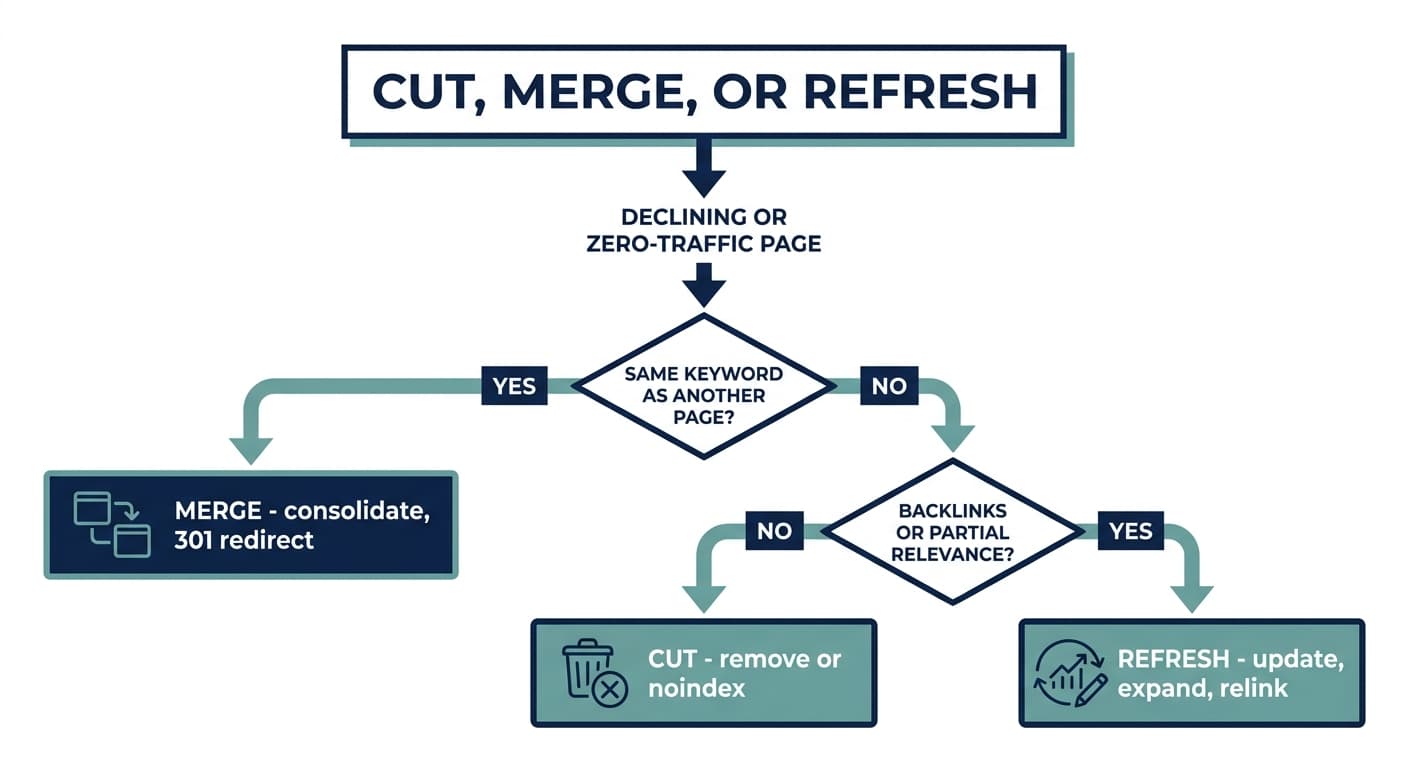
Step 1: Does another page on your site already target this same keyword or intent?
If yes, this is a cannibalization case, not a decay case. Merge the weaker page into the stronger one (based on backlinks, historical traffic, and depth), fold in any unique subtopics the weaker page covered, and 301 redirect the old URL to the surviving page. Do not leave both live "just in case."
Step 2: Does the page have meaningful backlinks or residual traffic, even if it is not ranking well for its main target?
If yes, and no other page owns the topic, refresh it. A page with external links pointing at it, or one still pulling a trickle of impressions in Google Search Console, has equity worth preserving. Update outdated statistics, expand thin sections, fix structure, and rebuild internal links pointing to it.
Step 3: Is the page thin, outdated, off-strategy, or getting zero traffic and zero links?
If yes, cut it. Choose the removal method based on whether it has any residual value:
- Zero traffic, zero links, no topical relevance to anything current: delete and let it 404, or serve a 410 if you want to signal permanence.
- Zero traffic but some topical relevance to a live page: 301 redirect it there instead of a bare 404, so any residual link equity is not wasted.
- Content you want gone from search results but still need to exist on the site (an old landing page, for instance): noindex it rather than deleting the URL.
The table below is the version of this logic you can hand to a teammate.
| Signal | Verdict | Action |
|---|---|---|
| Same keyword/intent as an existing stronger page | Cannibalization | Merge into the stronger page, 301 redirect |
| Declining rank, but has backlinks or residual traffic | Recoverable decay | Refresh: update facts, expand, relink |
| Zero traffic, zero links, no topical fit anywhere | Dead weight | Cut: delete/404 or 410 |
| Zero traffic, zero links, but topically close to a live page | Salvageable equity | Cut with a 301 redirect to the related page |
| Needed on-site but shouldn't rank | Non-indexable | Noindex, keep live |
How to score pages before you decide anything
Before you can apply the framework above, you need a defensible list of candidate pages, not a gut-feel list. Pull this from Google Search Console (or your analytics stack) for a trailing 12-month window:
- Export every URL with impressions, clicks, average position, and last-modified date.
- Flag decliners: pages where clicks or average position dropped meaningfully year over year, even if the page still gets some traffic. This is the earliest and most reliable pruning signal, well before a page falls off page one entirely.
- Flag zero performers: pages with near-zero impressions for the full window, which usually means the content never found an audience or has been fully deindexed by decay.
- Cross-check backlinks for every flagged page. A backlink checker (Ahrefs, Semrush, or your GSC-adjacent tool) will show you which "zero traffic" pages are still quietly passing link equity, which changes a cut decision into a merge-with-redirect decision.
- Check keyword overlap across your flagged pages and your top performers. This is where cannibalization hides: two pages ranking for close variants of the same query, neither cracking the top five.
Batch this work. Reviewing pages one at a time as you happen to notice them is how pruning projects die halfway through. Most teams that do this well run it as a recurring quarterly pass on larger sites, or once or twice a year on smaller ones, because the process itself does not need to be dramatic to be effective, it just needs to be consistent.
Common pruning mistakes that backfire
- Deleting pages with backlinks instead of redirecting them. You lose the link equity for nothing. Always check backlinks before choosing 404 over 301.
- Pruning in one giant batch with no monitoring. If you cut or merge dozens of pages in a single day and traffic dips afterward, you have no way to isolate which change caused it. Stage changes in smaller batches and watch Search Console for a few weeks between rounds.
- Treating "low traffic" as automatically "prunable." A low-traffic page that ranks for a high-intent, low-volume commercial query can be worth more per visit than a high-traffic informational page. Weigh intent and conversion potential, not just raw clicks.
- Merging into the wrong page. The "winner" in a cannibalization merge should be chosen by actual signal strength (backlinks, historical rank, depth), not by which page is newer or which one you personally prefer.
- Forgetting internal links. After a merge or cut, other pages on your site may still link to the old URL. Update those internal links to point at the surviving page instead of relying on the redirect chain to carry the weight forever.
- Pruning without a rollback plan. Keep a record of exactly what you changed and when, so if a cut page turns out to matter more than the data suggested, you can restore it quickly.
Where pruning fits inside content decay recovery
Pruning is really a specific, disciplined response to a more general problem: content decay, the slow, often invisible loss of rankings that happens to almost every page over time as competitors publish fresher material, statistics go stale, and Google's understanding of a topic shifts. Not every decaying page should be pruned. Many should simply be refreshed and left exactly where they are. Pruning is the subset of decay-response decisions where the honest answer is "this page should stop existing in its current form," whether that means merging it away or cutting it outright.
The same audit that surfaces pruning candidates will also surface a related problem worth checking at the same time: content cannibalization, where two or more pages compete for the same keyword and split ranking power between them. If you are pulling a Search Console export to look for prune candidates, you are one filter away from finding your cannibalization cases too, so it is worth doing both passes in the same sitting.
Manually running this audit quarter after quarter is exactly the kind of repetitive, data-heavy work that is easy to get right once and hard to keep doing consistently. Murkuz's features include automatic content cannibalization detection, which scans your Google Search Console data for keywords triggering impressions across multiple URLs and flags the overlap for you, and its content decay detection catches declining pages before the drop is visible in your regular analytics. Instead of building the spreadsheet in step one above from scratch every quarter, the workflow surfaces prioritized pruning and refresh candidates as a standing task list, so the audit becomes something you review rather than something you have to remember to run.
FAQ
Does content pruning actually help SEO?
Yes, for the specific pages it targets. Removing or consolidating thin, outdated, or cannibalizing pages tends to improve rankings for the remaining strong pages on the same topic, because it removes competing or low-quality signals and can free up crawl budget on larger sites. It is not a guaranteed traffic boost on every site, and it will not fix a page that has other underlying issues like poor backlinks or the wrong search intent.
Should I delete old content that gets no traffic?
Not automatically. First check whether it has backlinks (redirect instead of deleting), whether it is thin but topically relevant (refresh instead), and whether it targets a low-volume but high-intent query that converts well even at low traffic. Only cut pages that clear all three checks: no links, no relevance, no strategic fit.
How often should you prune content?
Larger, frequently-publishing sites typically review pruning candidates every one to three months in batches. Smaller sites can usually do a full pass once or twice a year. The exact cadence matters less than doing it consistently, since decay is continuous and a page that looked fine six months ago may already be sliding.
What is the difference between pruning and a content refresh?
A refresh keeps the page and its URL and updates the content in place. Pruning is the broader decision process that decides whether a page should be refreshed, merged into another page, or removed entirely. Every refresh is technically a pruning outcome, but not every pruning outcome is a refresh.
Will pruning hurt my rankings if I get it wrong?
It can, mainly through two mistakes: deleting a page with real backlinks instead of redirecting it, and merging into the wrong "winner" page in a cannibalization case. Both are avoidable by checking backlink data before you act and staging changes in small batches so you can monitor the effect before moving to the next round.
Content pruning is not glamorous work, and it will never feel as satisfying as shipping something new. But a site where every page is pulling its weight will consistently outrank a bigger site full of half-finished, half-forgotten pages. Treat it as a recurring discipline, not a one-time spring clean, and the compounding effect on your strongest pages is real.
Junaid Khalid is the founder of Ertiqah, the company behind Murkuz, and has run SEO as the first growth channel across his own SaaS products.