Most ecommerce SEO checklists give you fifty tasks with no order, which is exactly what makes them impossible to actually finish. You open a tab, read step 12 of 45, and close it again because there is no signal for what actually needs to happen this week versus what can wait until next quarter.
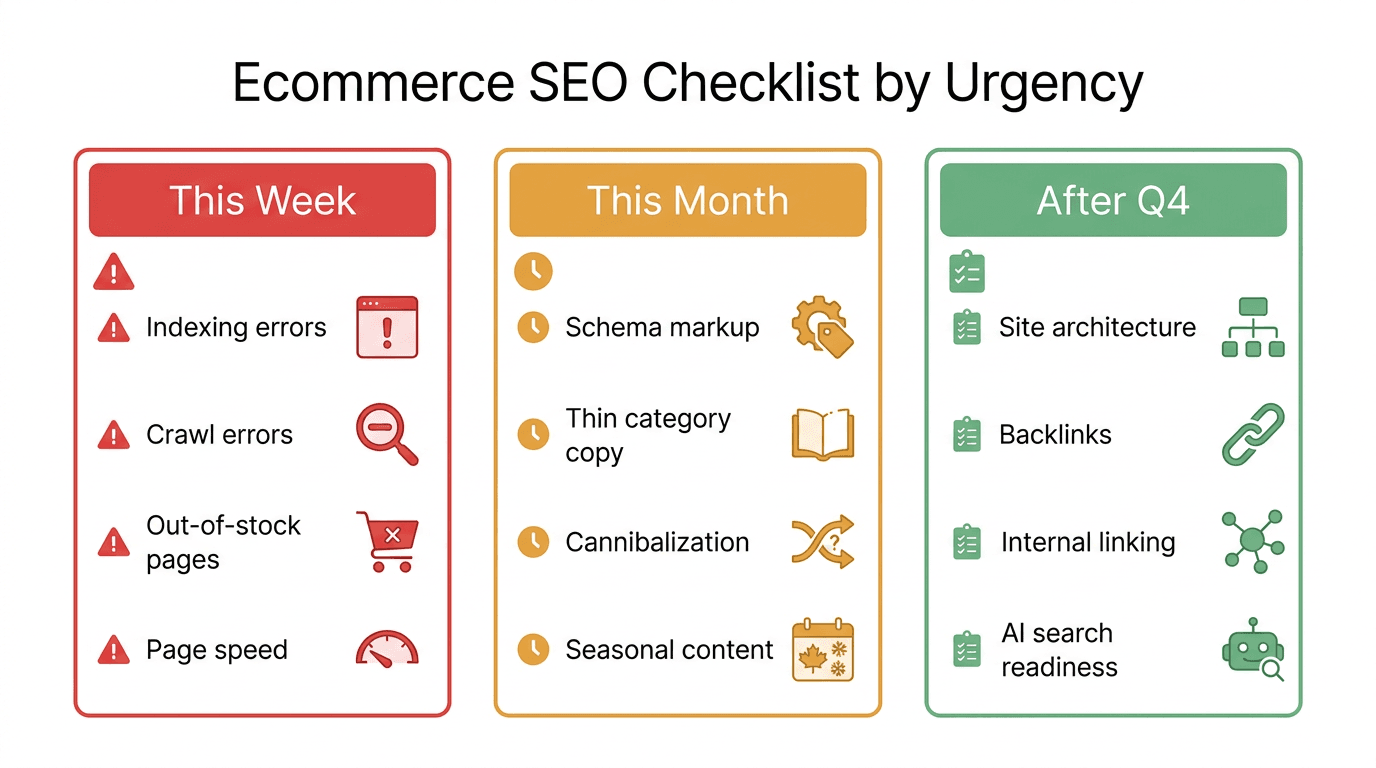
This checklist is ordered by urgency, not by category. Q4 is the highest-traffic, highest-revenue quarter for most online stores, and the fixes below are grouped into what breaks your Q4 if left alone, what compounds if you delay it, and what to schedule for after the rush. Work through them in order. You do not need all 25 done by Friday, you need the first eight done before your traffic starts climbing.
Fix This Week: 8 Issues That Actively Cost You Sales
These are the fixes where every week of delay has a direct, measurable cost, either because Google cannot see a page it should rank, or because a page that used to convert has quietly stopped.
- Fix "Not Indexed" errors in Google Search Console. Open the Page Indexing report and sort by "Discovered, currently not indexed" and "Crawled, currently not indexed." These are pages Google has seen and chosen not to rank, usually because of thin content or duplication. A product page sitting in this bucket during Q4 is a page that cannot earn you a single organic sale.
- Audit your top 20 product pages by traffic against last year. Pull the last 12 months of Search Console data and sort by clicks. Any page down more than 20 percent year over year, especially a page that historically drove Q4 revenue, needs attention before the season starts, not after.
- Check response codes on your highest-traffic URLs. A batch of 5xx server errors or soft 404s (pages that return a 200 status but show "out of stock" or empty content) can silently remove pages from the index during your busiest crawl period.
- Confirm out-of-stock pages are still live, not deleted. A permanently removed product page loses every backlink and every bit of ranking history it built. For temporarily out-of-stock items, keep the page live, show similar in-stock alternatives, and offer a back-in-stock email signup instead of pulling the page.
- Re-check canonical tags on filtered and faceted URLs. Color, size, and sort-order filters generate thousands of near-duplicate URLs on most catalogs. If those aren't canonicalized back to the main category page, you are burning crawl budget on pages that will never rank, right when Googlebot's attention is most valuable.
- Run your homepage, top category pages, and top product templates through PageSpeed Insights. Google's Core Web Vitals thresholds affect ranking, and a slow product page also converts worse in the exact weeks it matters most.
- Update titles and meta descriptions on pages that are ranking but not getting clicked. In Search Console's Performance report, filter for pages with high impressions and low click-through rate. A rewritten title or description is one of the fastest wins available because the ranking already exists, you are only fixing the pitch.
- Verify your XML sitemap only contains canonical, indexable URLs. A sitemap padded with redirected, noindexed, or duplicate URLs wastes crawl budget and can make Google trust the sitemap less overall.
Fix This Month: 9 Issues That Compound If You Wait
These will not sink a single week of sales, but every month you leave them, the gap between you and competitors who have already fixed them gets wider.
- Audit product page structured data. Implement or repair Product, Offer, and AggregateRating schema so eligible pages can show price, availability, and star ratings directly in search results. Missing or broken schema is one of the most common reasons a technically fine product page underperforms competitors with a worse page but valid markup.
- Rewrite thin category page introductions. A category page with zero unique copy above the product grid is competing purely on internal links and domain authority. A genuinely useful 150 to 250 word intro that answers what the shopper is actually trying to decide (which size, which use case, which price band) gives Google unique text to rank and gives shoppers a reason to trust the page.
- Consolidate cannibalizing pages. Search "site:yourdomain.com [your top category]" and check whether two or more of your own pages are competing for the same query. This commonly happens after a Shopify or platform migration that leaves old collection URLs live alongside new ones. Merge or redirect the weaker page into the stronger one.
- Refresh seasonal buying guides from last year. "Best gifts for [X]" and holiday buying-guide content decays fast between seasons: prices go stale, discontinued products stay listed, and last year's guide often outranks this year's simply because it has more backlinks. Update it in place rather than publishing a fresh URL from scratch.
- Clean up broken internal and outbound links. A broken link on a product or category page is a small trust signal against you and, on a product page, an actual dead end for a shopper mid-purchase.
- Improve product titles using a consistent formula. Brand plus product type plus the two or three attributes shoppers actually search on (size, material, color) reads naturally to both Google and a human, and it standardizes titles across a catalog that may have been built by five different people over three years.
- Add or rewrite image alt text across your top-selling products. Rename image files descriptively and write alt text that describes the actual product, not just "product photo 3." This is a genuine ranking factor for Google Images, which drives real traffic for visually-driven categories like apparel and home goods.
- Check mobile usability on your checkout and product pages specifically, not just your homepage. Most ecommerce traffic and the majority of Q4 traffic arrives on mobile, and a product page that renders fine on desktop but breaks a tap target or image gallery on mobile is losing both rankings and conversions.
- Audit hreflang implementation if you sell in more than one country or language. Broken or missing hreflang tags cause Google to show the wrong country's page to the wrong shopper, which quietly caps international revenue that a fully working setup would capture.
Schedule for After Q4: 8 Structural Fixes
These matter for long-term growth, but they are lower urgency and, in several cases, riskier to touch during your highest-traffic weeks. Schedule them for November-to-January, once the immediate revenue pressure eases.
- Do a full site architecture review. Confirm every product is reachable within three clicks of the homepage and that no pages are orphaned (unlinked from any category or navigation path). This is worth doing carefully, not rushed in Q4, because it touches your whole nav and can temporarily disrupt crawling if done poorly.
- Consolidate or prune low-value pages. Old blog posts, discontinued product pages with no redirect target, and abandoned landing pages dilute your site's overall quality signal. A post-Q4 cleanup sprint is the right time, not mid-holiday.
- Run a backlink audit. Identify toxic or spammy links pointing at your domain and disavow where genuinely necessary (this is rarely as urgent as most audits imply, but worth a quarterly look).
- Build out a proper internal linking strategy between related products and categories. "Customers also viewed" and contextual in-copy links between complementary categories spread authority and keep shoppers browsing longer, but this is an architecture project, not a one-week fix.
- Evaluate whether your URL structure needs a cleanup. Deeply nested or parameter-heavy URLs (
/shop/cat/123/filter?color=red&size=m) are worth flattening, but a URL restructure needs redirects planned carefully and should never happen in the run-up to your biggest sales weeks. - Set up (or repair) local SEO if you have physical stores. Google Business Profile accuracy, location pages, and local schema matter for any retailer with brick-and-mortar locations, and this work is independent of your Q4 online traffic cycle.
- Review your product review and UGC strategy. Reviews feed AggregateRating schema and build the trust signals both Google and AI answer engines increasingly weight, but building a review pipeline is a program, not a checklist item you finish in an afternoon.
- Audit AI search visibility. Check whether your top category and buying-guide pages actually get cited in ChatGPT, Perplexity, and Google's AI Overviews for the questions your shoppers ask before they search by brand. This is genuinely new territory for most stores and worth a dedicated look once the holiday dust settles.
Ecommerce SEO Checklist at a Glance
Use this table as the print-and-pin version. It maps each urgency tier to what actually breaks if you skip it and roughly how long it takes a small team to work through.
| Tier | Focus | What breaks if skipped | Typical time to clear |
|---|---|---|---|
| This week (1 to 8) | Indexing, crawl errors, out-of-stock pages, Core Web Vitals, CTR | Pages that cannot rank or convert during peak traffic | 1 to 2 days |
| This month (9 to 17) | Schema, thin category copy, cannibalization, seasonal content, mobile UX | Slower growth, competitors who already fixed these pull ahead | 1 to 3 weeks |
| After Q4 (18 to 25) | Site architecture, backlinks, internal linking, AI search readiness | Long-term ceiling on growth, not immediate revenue loss | 1 to 2 months, ongoing |
<mark class="km-highlight" style="--hl:#FEF08A;background:#FEF08A">The single highest-leverage move on this list is fixing indexing and crawl errors on your highest-traffic pages first</mark>, because nothing else on the checklist matters if the page Google should be ranking is not indexed in the first place.
The Part of This List Nobody Has Time to Actually Do
Here is the honest problem with every ecommerce SEO checklist, including this one: a catalog with a few hundred SKUs generates dozens of these issues simultaneously, and by the time you manually re-check them next quarter, new pages have decayed while you were fixing the last batch. The checklist itself is not the hard part. Rechecking it every month, on every product and category URL, without it eating a full day of someone's week, is the hard part.
This is the specific gap Murkuz is built to close. Instead of manually re-running this checklist against Search Console data every month, Murkuz scans your GSC data daily and auto-detects declining pages, positions-11-to-20 opportunities, and content cannibalization across your whole catalog, then turns each one into a prioritized, contextual task instead of a spreadsheet you have to triage yourself. For a store with thousands of product and category pages, that is the difference between catching a decaying category page in week one and finding it after a full quarter of lost Q4 traffic. You can see the full breakdown of how the detection-to-fix loop works on the Murkuz workflow page, whether your catalog runs on Shopify, WooCommerce, or a custom platform.
If your catalog is large enough, or your team stretched thin enough, that this checklist realistically will not get rechecked next quarter without help, it is worth reading the honest comparison of hiring an ecommerce SEO agency versus doing it yourself before you decide how to close that gap. And if you want the full picture of what a tool built specifically for catalogs like yours looks like, the ecommerce use case page walks through product page protection, seasonal decay prevention, and multilingual expansion in more depth than a single checklist can.
FAQ
How often should I run an ecommerce SEO audit?
Run the "fix this week" tier monthly at minimum, and the full 25-item list quarterly. Ecommerce catalogs change constantly (new products, discontinued SKUs, seasonal pages), so an audit done once a year is stale within weeks of publishing it.
What is the most important item on an ecommerce SEO checklist?
Indexing. A product or category page that Google has crawled but chosen not to index cannot rank for anything, no matter how well-optimized the on-page content is. Check the Page Indexing report in Search Console before touching anything else.
Does Shopify handle SEO automatically, or do I still need this checklist?
Shopify handles some technical basics (SSL, a default sitemap, reasonably clean URLs) but does nothing about content quality, schema completeness, thin category pages, cannibalization, or seasonal content decay. Every item in this checklist still applies to a Shopify store.
Should I delete product pages for discontinued items?
No, unless the product is permanently gone and you have a genuinely relevant replacement to 301 redirect it to. Deleting the page without a redirect throws away every backlink and ranking signal that page has accumulated. For temporarily out-of-stock items, keep the page live and offer alternatives or a restock alert instead.
How long does it take to see results after fixing ecommerce SEO issues?
Indexing and crawl-error fixes can show movement within days to a couple of weeks, since they mainly unblock pages Google already wanted to rank. Content-quality fixes (thin category copy, schema, cannibalization) typically take 4 to 8 weeks to show ranking movement, which is why the "this month" tier needs to start well before Q4, not during it.
Junaid Khalid is the founder of Ertiqah, the company behind Murkuz, and has run SEO as the first growth channel across several of his own SaaS products before building a tool to automate the parts of the process that used to eat a full day every week.