Most "free SEO automation tool" lists are just free-tool directories with automation mentioned once in the intro. They point you to a keyword generator, a robots.txt tester, and a sitemap validator, then call it a day. None of that is wrong, but none of it actually automates a recurring job the way the phrase implies.
This list only includes tools that do something on a schedule or in bulk, without you re-doing the manual work every time: tracking rankings automatically, crawling a whole site instead of one URL, flagging technical issues in bulk, or generating structured data instead of you writing it by hand. Seven tools, what each one actually automates, where the free tier stops, and what to do once your site outgrows all of them.
What "Free SEO Automation" Actually Means
Before the list, a quick filter. A tool only counts as automation here if it removes a repeated manual step, not just a single lookup.
- Automation: Google Search Console emailing you when your sitemap has errors, a crawler that re-scans your whole site on a schedule, a script that pulls ranking data every day without you opening a dashboard.
- Not automation: a one-off keyword volume checker, a single-page readability score, a manual backlink lookup. Useful tools, but you are still the one doing the work every time.
That distinction matters because most "free SEO tools" roundups (including the big ones from Ahrefs and Moz) are really free-tool directories: a collection of one-shot utilities bundled under their own brand, not automation. They are worth using, but they will not save you the recurring hour you spend every week on the same task.
The 7 Tools
| Tool | What it automates | Free tier limit |
|---|---|---|
| Google Search Console | Daily crawl, index, and ranking data collection | Fully free, no page cap |
| Screaming Frog SEO Spider | Site-wide technical crawl (broken links, redirects, missing tags) | Free up to 500 URLs per crawl |
| Google Looker Studio | Auto-refreshing SEO reporting dashboards | Fully free |
| Merkle's Schema Markup Generator | Structured data generation without hand-coding JSON-LD | Fully free |
| Ubersuggest (free tier) | Scheduled rank tracking for a small keyword set | Free for limited daily searches and tracked keywords |
| n8n (self-hosted) | Custom SEO workflow automation (alerts, scrapers, data pipelines) | Free if self-hosted; paid for their cloud |
| IFTTT / Google Apps Script | Simple trigger-based automations (new GSC error to email/Slack) | Fully free within usage limits |
1. Google Search Console
Search Console is the closest thing to a free SEO automation tool that Google itself ships, because it runs constantly in the background without you asking it to. It crawls your site, tracks your indexing status, and records your ranking, impression, and click data for every query every day, automatically. Set up email alerts for coverage issues and manual actions and it will tell you when something breaks before you notice a traffic drop yourself.
The catch: it only shows you what already happened. It will not tell you why a page's rankings slipped, and it does nothing about it. Diagnosis and fixing are still on you.
2. Screaming Frog SEO Spider
The free version crawls up to 500 URLs and remains the standard for catching the boring, high-impact technical stuff automatically: broken links, redirect chains, duplicate title tags, missing meta descriptions, oversized images. Point it at your site, click crawl, and it flags every issue in one pass instead of you clicking through pages one at a time.
The catch: 500 URLs runs out fast for anything beyond a small site, and it is a point-in-time crawl. You have to remember to re-run it; it will not watch your site continuously the way a paid crawler subscription does.
3. Google Looker Studio
Reporting eats more SEO time than almost anything else, and Looker Studio is the free way out of manually rebuilding a slide deck every month. Connect it to Search Console and Google Analytics and it auto-refreshes a live dashboard: no more copy-pasting numbers into a spreadsheet before a client call.
The catch: you have to build the dashboard yourself the first time, and it only visualizes data you already have. It will not surface which pages need attention; you still have to know what to look for.
4. Merkle's Schema Markup Generator
Structured data is one of the easiest wins in technical SEO and one of the most tedious to hand-code. This free tool generates valid JSON-LD for FAQ, Article, Product, LocalBusiness, and other common schema types from a simple form, which removes the manual step of writing (and debugging) the markup yourself.
The catch: it generates the markup once. It does not detect when your existing schema breaks after a site redesign, and it will not tell you which pages are missing schema in the first place.
5. Ubersuggest (free tier)
Ubersuggest's free plan gives you a capped number of daily searches and a small set of tracked keywords, which is enough for a solo site or a side project to get scheduled rank tracking without paying for a full rank tracker. It checks your positions on a schedule so you are not manually searching your own keywords in an incognito window.
The catch: the free tier's daily search cap and keyword limit make it impractical the moment you have more than a handful of pages to watch, and reporting is basic compared to a real platform.
6. n8n (self-hosted)
If you can tolerate a bit of setup, self-hosting n8n turns "free automation" into something genuinely custom: a workflow tool you can wire up to scrape your Search Console API, check for ranking drops, and post an alert to Slack, all on a schedule, all for the cost of hosting it yourself. It is the same idea behind every closed-loop SEO platform, minus the pre-built interface, the pre-built detection logic, and the support.
The catch: you are building and maintaining the automation yourself. Every workflow, every edge case, every broken API connection is your problem to debug, and there is no packaged "detect a declining page" logic waiting for you. You are assembling the parts, not buying the machine.
7. IFTTT or Google Apps Script
For the simplest automations, a short Apps Script tied to your Search Console API or an IFTTT applet can do one thing reliably: fire off an email or Slack message the moment a specific condition is met, like a new crawl error or a ranking drop past a threshold you set. It is the lowest-effort way to stop manually re-checking a dashboard.
The catch: these are trigger-response tools, not analysis tools. They tell you something changed; they cannot tell you what to do about it or draft the fix.
Where Free Tools Stop Working
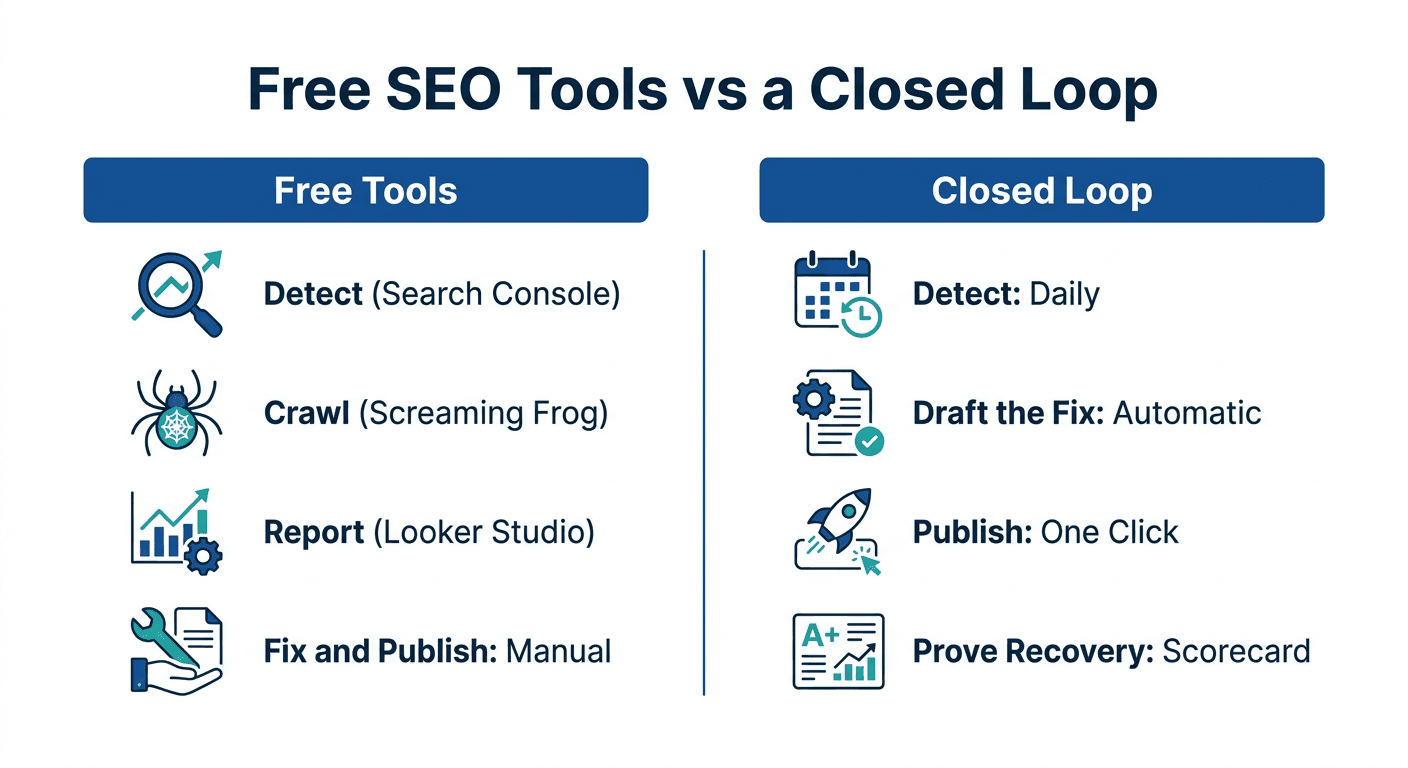
Every tool above automates a single step: crawling, reporting, tracking, or alerting. None of them chains those steps together, and that gap is exactly where SEO time actually disappears.
Here is the pattern once a site grows past a handful of pages:
- Detection scatters across five tabs. Search Console flags the ranking drop, Screaming Frog flags the broken link, Looker Studio shows the trend, but nothing connects them into one prioritized list. You are the integration layer, checking each tool by hand.
- Free tiers cap out fast. Screaming Frog's 500-URL limit and Ubersuggest's daily search cap both stop being "free" the moment your site has real page volume; you either pay for the next tier or start skipping checks.
- Nothing drafts or publishes the fix. Every free tool stops at telling you something is wrong. Writing the updated content, matching your brand voice, and pushing it live to your CMS are still fully manual steps, every single time.
- No tool proves the fix worked. Even after you fix something by hand, you are back in Search Console three weeks later, manually comparing before-and-after numbers yourself, with no record of which change caused which result.
<mark class="km-highlight" style="--hl:#FEF08A;background:#FEF08A">Free tools are genuinely good at detecting and reporting. None of them close the loop from "we found a problem" to "we proved it is fixed."</mark>
That gap is what Murkuz is built to close. Instead of stitching together Search Console for detection, a writer for the fix, and a manual CMS login to publish it, Murkuz runs the same five steps as one connected workflow: it auto-detects declining pages and positions 11-20 opportunities from your GSC data every morning, turns each one into a task with the fix already drafted in your brand voice (via its HyBrain knowledge base, so it does not read like generic AI output), pushes the approved fix live to WordPress, Webflow, or Framer with one click, then tracks the ranking daily afterward and shows you, in an Agentic Impact Scorecard, whether that specific fix actually caused the recovery.
If your SEO work is still scattered across the free tools above and a to-do list of manual follow-ups, that is the exact gap worth automating next. Every tier can be trialed before you commit, and the current plans are listed on the Murkuz pricing page.
Free tools are also a good place to start if keyword research and clustering is your current bottleneck rather than technical crawling: our own keyword clustering tool is free to use and turns a messy keyword export into pillar-and-spoke topic clusters in minutes. For a deeper framework on deciding what to automate versus what to keep manual across your whole SEO workflow, see our guide to SEO automation tools.
FAQ
Is there any free SEO tool that actually automates work?
Yes. Google Search Console automates data collection and alerting, Screaming Frog automates a full-site technical crawl instead of manual page-by-page checks, and Looker Studio automates reporting. None of them automate the full chain from detecting a problem to fixing it and proving the fix worked; that requires a paid closed-loop platform.
Can I do SEO automation myself for free without any paid tools?
For a small site, yes, for a while. Search Console plus a free Screaming Frog crawl plus a Looker Studio dashboard covers detection and reporting at zero cost. The limits show up once your site grows past a few hundred pages or once you need the fix drafted and published automatically, not just the problem flagged.
What's the difference between a free SEO tool and a free SEO automation tool?
A free SEO tool usually does one manual lookup at a time, like checking one keyword's search volume. A free SEO automation tool runs on a schedule or across your whole site without you repeating the action, like Search Console's daily data pulls or a full-site Screaming Frog crawl.
Do free SEO automation tools have any real limits?
Yes, and they are usually about scale, not features. Screaming Frog's free crawl caps at 500 URLs, Ubersuggest's free tier caps daily searches and tracked keywords, and none of the free options here connect detection to an automated fix and publish step. Those caps are exactly where teams start looking at a paid platform.
Can ChatGPT replace SEO automation tools?
Partly. ChatGPT is useful for drafting content ideas, meta descriptions, and schema explanations, but it cannot crawl your live site, pull your actual Search Console data, or detect a ranking drop on its own. It is a drafting aid inside a workflow, not a replacement for the tools that watch and measure your site. Give it a connector to your own Search Console, though, and it can read your real numbers: that is how you turn ChatGPT or Claude into an SEO agent without building a pipeline yourself.
Junaid Khalid is the founder of Ertiqah and the builder of Murkuz. He has run SEO as the first growth channel across his own SaaS products, and started most of them on exactly the free-tool stack above before building Murkuz to close the gap those tools leave open.