Most "how to update old blog posts" advice stops at "add more words and a new date." That is not what moves rankings. What moves rankings is knowing which post to touch, which section is actually the weak link, and what to change without breaking the URL that already earned its place in Google's index.
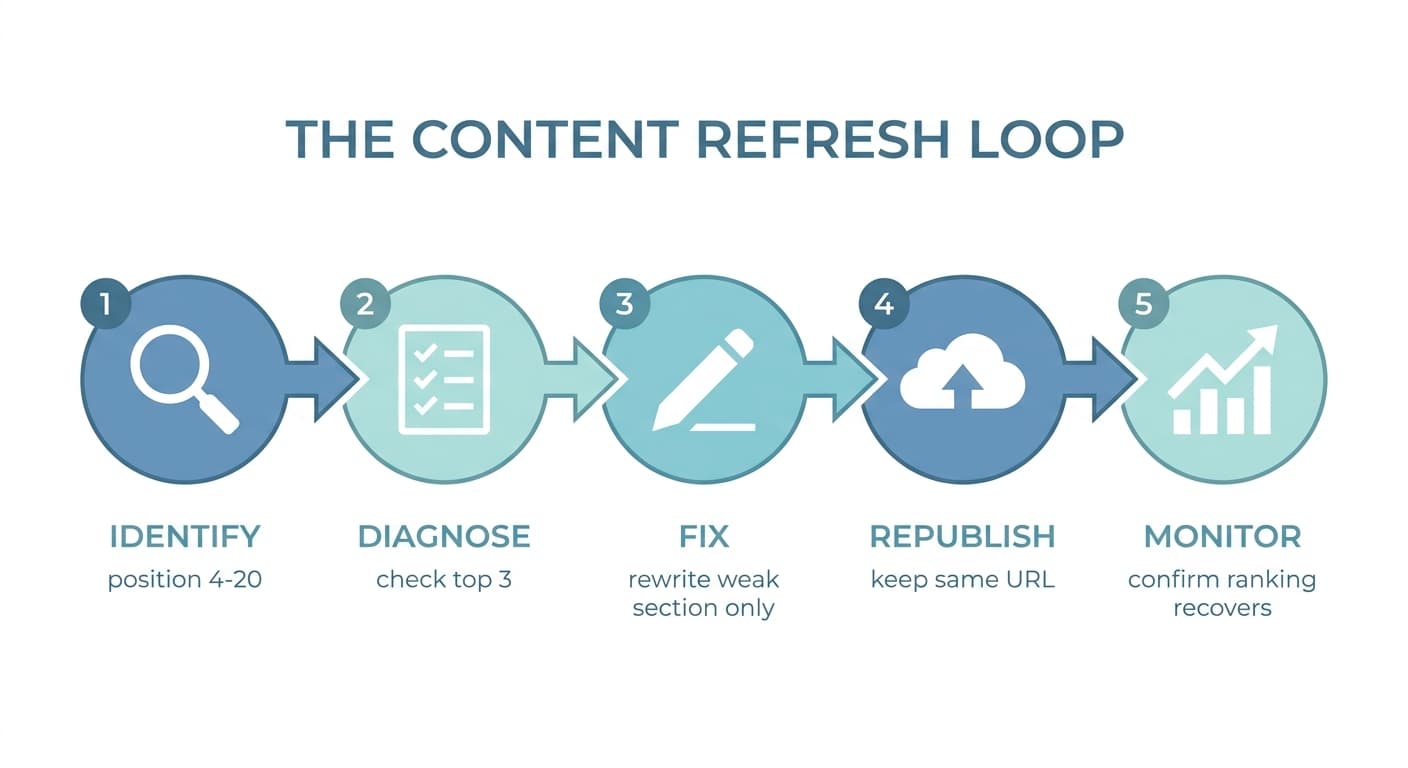
This is the order of operations, in the sequence that actually works: pick the right post, diagnose the real problem, fix only what is weak, and confirm it worked before you move to the next one.
Which Old Posts Are Worth Updating
Not every old post deserves your time. Updating a page nobody is searching for wastes an afternoon. The posts worth updating fall into two buckets.
Posts ranking positions 4 to 20 for a keyword with real search volume. These are the closest to a page-one jump. Pull this list from Google Search Console: Performance report, filter by page, sort by impressions, then check average position. A page getting 2,000 impressions a month at position 14 is a much better bet than a page at position 45, because it is already relevant enough to show up, it just is not strong enough to rank higher yet.
Posts that used to rank well but are sliding. Compare the trailing 90 days against the prior 90 days in Search Console's date comparison. A page that went from position 6 to position 17 over six months did not get worse by accident. Something changed: a competitor published something newer, your stats aged out, or the page just sat still while the topic moved on. That is content decay, and it is exactly the pattern worth fixing before the slide continues.
Skip posts with genuinely zero search demand, posts that are outdated because the underlying product or event no longer exists (redirect or retire those instead), and posts already ranking position 1 to 3 with a stable trend. There is more value in the ten posts stuck at position 12 than in polishing something already winning.
The Update Process, Step by Step
Once you have a shortlist, work through each post in this order. Skipping steps is how people end up rewriting a page that did not need it, or losing the ranking it already had.
1. Read it like a stranger, not like the author
Open the live URL and read the whole thing as if you found it in a search result with no prior context. Note where it feels dated: a "current in 2023" stat, a screenshot of a UI that has since changed, a "best tools" list missing anything from the last two years, a claim that was true then and is not true now. This single pass usually tells you more than any tool.
2. Check what is now ranking above you
Search the exact keyword and open the top 3 to 5 results. What do they cover that you do not? What questions do they answer that your post ignores? This is the single most skipped step in every "content refresh" guide, and it is the difference between guessing what to add and knowing what to add.
3. Rewrite the weak sections, not the whole page
Full rewrites are sometimes warranted, but most posts only need their weakest third replaced: the outdated stat, the thin middle section that never actually answered the question, the missing example. Rewriting a page that mostly works risks losing what was already ranking it. Target the specific gap you found in steps 1 and 2.
Concrete things to check and fix, in the order they usually matter:
- Outdated facts and numbers. Replace any stat, price, or "as of [year]" claim with current data, and cite the source.
- Thin or missing sections. If competitors answer a subtopic you skip entirely, add a real section, not a sentence.
- Headings. Make sure your primary keyword and its close variants appear naturally in the H1 and at least one H2, without forcing it into every heading.
- Internal links. Add links to newer, more relevant pages you have published since the original went live, and fix any that now point to a dead or moved page.
- External links. Swap outdated sources for current ones; a five-year-old cited statistic undermines the whole page's credibility.
- Images and screenshots. Update any screenshot of a product UI, dashboard, or interface that has since changed.
- Meta title and description. Rewrite these to reflect what actually changed, since a stale meta description that no longer matches the content hurts click-through rate even if rankings hold.
- FAQ section. If the page does not have one and the topic has real "People Also Ask" questions, add a short, genuine FAQ (see the end of this article for the pattern).
4. Leave the URL alone
This is the rule most new writers get wrong, and it is the one that costs the most when broken. The URL has already accumulated backlinks, internal links, and index history. Changing the slug, even slightly, forces a redirect and a re-crawl, and in practice a meaningful share of that authority gets lost in the handoff even when the redirect is done correctly. Update the title tag and the headline all you want. Do not touch the address bar.
5. Update the publish date honestly
If you rewrote a meaningful portion of the page, updating the visible "last updated" date is fair and often improves click-through, because readers and Google's freshness signals both respond to genuinely current content. What is not fair, and what Google has explicitly warned against, is changing the date on a page you did not substantively change just to appear fresh. That is a signal Google actively watches for and it can backfire.
6. Re-publish and re-request indexing
Push the update live, then use Search Console's URL Inspection tool to request indexing on that specific URL. This does not guarantee a fast re-crawl, but it moves you into the queue instead of waiting for Google to notice on its own schedule, which can take weeks for a page that was not getting crawled often.
7. Give it time, then check the result
Ranking changes from a content update typically show up over two to eight weeks, not two to eight days. Set a calendar reminder to check Search Console for that specific page 30 and 60 days out. If it moved, you have your proof this was worth doing again. If it did not, the problem was probably not content quality: check for a technical issue (a bad canonical, a noindex tag, a broken redirect) or a stronger competitor that simply outranks you on backlinks, not content.
A Real Before/After
A software company had a 2022 post targeting "project management templates" sitting at position 16, getting a trickle of impressions but almost no clicks. The fix was not a full rewrite. It kept roughly 70% of the original text, which still answered the core question well, and changed three things: replaced two outdated template screenshots with current ones, added a genuine six-question FAQ pulled straight from the "People also ask" box for that keyword, and added one new section covering a subtopic ("free vs. paid templates") that the top 3 results all covered and the original post did not.
The URL, title, and most of the body stayed untouched. Six weeks later the page had moved to position 8, and organic clicks to it had roughly tripled. Nothing about that result required new content strategy or a bigger team. It required picking the right page and fixing the specific thing that was actually weak.
How Often to Revisit an Updated Post
| Post type | Recheck cadence |
|---|---|
| High-traffic evergreen guide | Every 6 to 12 months, or immediately if you spot a ranking drop |
| Post with dated stats or "best of" lists | Every 6 months minimum, since these decay fastest |
| Post tied to a product feature or pricing | Whenever the product changes, not on a schedule |
| Post already stable at position 1 to 3 | Light touch only: fix broken links, leave the rest alone |
| Post with zero search demand | Retire or consolidate, don't keep updating it |
Where This Fits Into a Bigger System
Doing this for one post by hand is a couple of hours of work. Doing it for the 40 or 200 old posts sitting in a typical blog, on a repeating schedule, without losing track of which ones you already touched, is where most teams quietly give up and just keep publishing new content instead. That is also exactly why old posts keep decaying in the first place: nobody is watching them.
This is the specific gap Murkuz is built to close. It scans your connected Google Search Console data every day, flags pages that are declining or sitting in the position 11 to 20 range described above, and turns each one into a task with the actual problem and a recommended fix attached, instead of a spreadsheet you have to build yourself. Its AI content engine drafts the specific section that needs rewriting using your stored brand voice and facts, and can publish the fix directly to WordPress, Webflow, or Framer without you touching the CMS by hand. Then it keeps watching the page and reports whether the specific fix actually moved the ranking, which is the step most teams skip because it is tedious to track manually. If you would rather see the detection and fix loop applied across your whole site than do it post by post, the pricing page breaks down what is included at each tier.
For the fuller diagnostic playbook on what to do when a page's rankings have already dropped rather than just aged, read our guide on how to recover lost rankings.
FAQ
How often should you update old blog posts?
There is no universal schedule. Update a post whenever data tells you to: it is declining in Search Console, it sits at position 4 to 20 with real search volume, or you notice it is factually out of date. High-traffic evergreen guides are worth a light check every six months even without a visible problem, since decay is often gradual and does not show up as a sudden drop.
Does updating old blog posts actually help SEO?
Yes, when the update fixes a real weakness (an outdated fact, a missing subtopic competitors cover, a thin section) rather than just changing the date. Search engines reward pages that stay genuinely current and useful; they do not reward a cosmetic timestamp change on unchanged content, and can penalize sites that game the "last updated" date without substantive edits.
Should you change the URL when updating a blog post?
No. Keep the exact same URL. It has already built up backlinks, internal links, and crawl history. Changing it, even to fix a typo, forces a redirect and typically loses some of the accumulated authority in the process, even when the redirect is set up correctly.
How long does it take to see results after updating a post?
Most updates take two to eight weeks to show a ranking change, depending on how often Google crawls the page and how competitive the keyword is. Requesting indexing through Search Console's URL Inspection tool after publishing can help the recrawl happen sooner, but it does not guarantee a specific timeline.
Is it better to update an old post or write a new one?
If a relevant post already exists and ranks anywhere on page one or two, updating it is almost always faster than starting over, because it keeps the existing backlinks and index history that a brand-new URL would have to earn from zero. Write a new post only when no existing page reasonably covers the topic, or when the old page's core premise no longer applies at all.
Junaid Khalid is the founder of Ertiqah and the builder of Murkuz. He has run SEO as the first growth channel across his own SaaS products, which is the reason Murkuz treats content decay as a detect-fix-prove loop rather than a one-time audit.