Most "pillar page best practices" articles stop at word count and header tags. That gets you a page that looks like a pillar page. It does not get you one that actually pulls its cluster up the rankings. The difference is in five things almost nobody writes about: the link ratio between hub and spokes, the maintenance cadence that keeps a 4,000-word page from decaying into a liability, the scoring criteria search engines and reviewers actually check, the exact point where a pillar becomes too broad to rank, and how to structure a pillar so it survives an AI Overview summarizing it into three bullet points. If you are still deciding which keywords belong under which pillar, a free tool that groups a keyword list into topic clusters gives you the starting map.
If you already know what a pillar page is, skip the definition and go straight to the checklist below. If you need the fundamentals first, our topic clusters and pillar pages primer covers the hub-and-spoke architecture from scratch.
The pillar page best practices checklist that actually moves rankings
Here is the condensed version. Each row is expanded in its own section below.
| Practice | What most guides say | What actually matters |
|---|---|---|
| Length | "3,000-5,000 words" | Long enough to cover every H2 a cluster page would otherwise duplicate, not a word-count target |
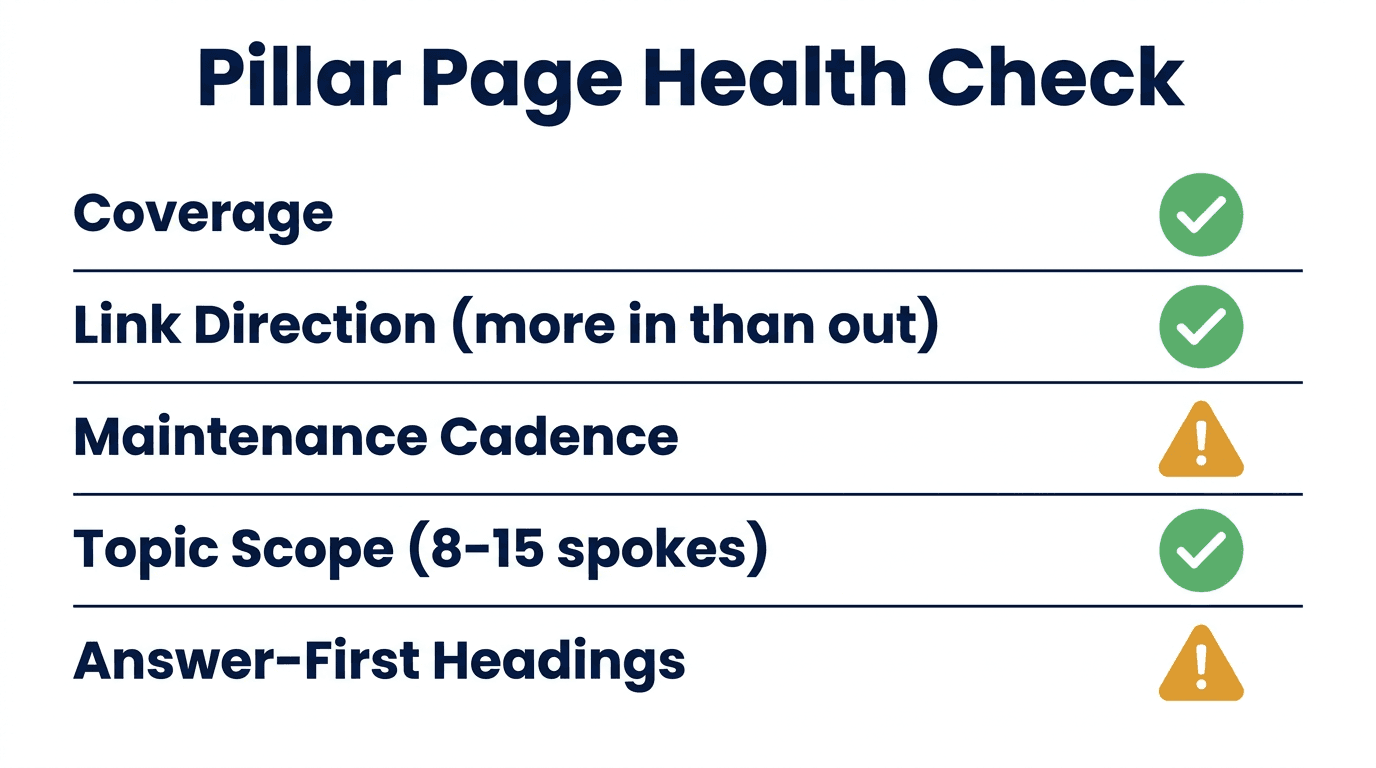
| Linking | "Link to your cluster pages" | More links should flow INTO the pillar than out of it |
| Maintenance | "Keep it updated" | A dated re-audit cadence, not a vague intention |
| Scope | "Pick a broad topic" | Broad enough for 8-15 spokes, narrow enough to rank inside 12 months |
| AI/SERP features | Rarely mentioned | Structure for extractability: one clear answer per H2, before the elaboration |
1. Stop optimizing for word count. Optimize for coverage gaps.
The 3,000-to-5,000-word range you see everywhere is a correlation, not a cause. Google does not have a word minimum. What actually happens is that a page comprehensive enough to be a genuine hub for 10+ subtopics tends to land in that range naturally.
Work backward instead. List every cluster article you plan to publish under this pillar. For each one, write the single sentence that answers its core question. Your pillar page's body is the union of those sentences, organized under H2s, each expanded to two or three paragraphs, no more. If that lands you at 1,800 words because your cluster only has six spokes, 1,800 words is correct. If it lands you at 6,000 because you are covering a genuinely broad topic like "content marketing," that is also correct. Padding a thin cluster to hit a word target produces filler sections that hurt dwell time and give away that the page was written to a checklist rather than to a reader's question.
2. Get the link direction right, not just the link count
This is the most commonly skipped rule in every "pillar page best practices" list, and it is the one with the clearest mechanical logic behind it.
Your pillar page should receive more internal links than it sends out. If you have 10 cluster articles, each linking once to the pillar, that pillar accumulates 10 internal links. The pillar itself only needs to link out to each cluster page once, ideally from the relevant H2, using the cluster page's actual title (or close to it) as anchor text, not "click here" or "read more."
Two failure modes to check for:
- Orphaned pillar. The pillar links out to every spoke, but none of the spokes link back yet because they were not written yet, or the links were forgotten during publishing. Audit this quarterly: crawl the pillar URL and confirm every live cluster article has at least one link pointing to it.
- Competing pillars. Two pages on the same site both try to rank for the parent keyword because a second "overview" article got written later without checking what already existed. This is content cannibalization, and it splits the authority both pages could have had individually. Before writing anything new under a cluster, check what already targets that keyword on your own site.
3. Build a maintenance cadence, not a maintenance intention
A pillar page is a bigger investment than a normal article, and it decays the same way any evergreen page does: statistics go stale, screenshots show old UIs, a competitor you named has since rebranded, and Google's own guidance shifts underneath you. The guides that mention "keep it updated" almost never say how often or what to check.
A workable cadence for a single pillar page:
- Every 90 days: skim for factual staleness. Any stat, price, or screenshot older than a year gets flagged.
- Every 6 months: re-run the keyword research. New subtopics or PAA questions that did not exist at launch usually mean a new cluster spoke is needed, or an existing H2 needs expanding.
- After any core algorithm update: check the pillar's ranking and traffic in Search Console. A pillar that drops after an update is a strong signal that either the content or the E-E-A-T signals around it (author credentials, citations, freshness) need work before the drop compounds. If you want to see exactly which pages on a site are quietly decaying like this without waiting for a manual quarterly check, that ongoing detection is the specific problem Murkuz's detect-fix-prove workflow is built to automate.
4. Scope the topic so it can actually rank within a year
"Pick a broad topic" is true but useless advice on its own. The real question is how broad. Too narrow, and you do not have enough legitimate subtopics to justify calling it a pillar (you have written a slightly longer blog post). Too broad, and you are competing against pages with a decade of backlinks and domain authority you do not have yet.
A practical scoping test: can you list 8 to 15 cluster articles under this topic where each one has genuine standalone search demand, and none of them substantially overlaps another? To find those candidates in a big keyword export, run it through one of these keyword grouping tools first and count the clusters that survive an intent check. If you can only find 3 or 4, the topic is too narrow for a pillar treatment; write it as a single strong article instead. If you can list 30+, the topic is too broad for a new site to win quickly; split it into two or three narrower pillars that can each rank in a more realistic timeframe, then link them to each other as related hubs later once each has independently earned some authority.
5. Structure every H2 to survive being summarized by an AI Overview
This did not matter in 2020. It matters now. When an AI Overview, ChatGPT, or Perplexity answer pulls from your pillar page, it is almost always extracting the first one to three sentences under a heading, not the elaboration that follows. If your H2 opens with throat-clearing ("There are many factors to consider when thinking about...") instead of the actual answer, the extraction either grabs nothing useful or skips your page for a competitor's tighter paragraph.
Practical fix: under every H2 and H3, put the direct answer in the first sentence, then use the following two or three sentences for the "why" and the nuance. This also happens to be the exact structure that wins the "People Also Ask" box, since PAA snippets are pulled the same way. It costs nothing to write this way once it is a habit, and it is the single highest-leverage change you can make to an existing pillar page without touching its length or its links.
A worked example: turning a thin pillar into a real one
Say your pillar page is "Email Marketing for SaaS." It currently sits at 2,200 words with five H2s: what email marketing is, why it matters, tools, best practices, and a short FAQ. It ranks page two.
Applying the checklist above: the "why it matters" section is generic filler that could apply to any industry, so it gets cut to two sentences and folded into the intro. The "tools" section becomes a genuine subtopic list (five cluster articles: onboarding sequences, deliverability, segmentation, A/B testing subject lines, churn win-back emails), each with its own dedicated cluster article linking back with the article title as anchor text. The FAQ gets rebuilt from actual "People Also Ask" data for the parent keyword instead of three invented questions. Word count ends up around 3,400, not because a target was hit, but because five real subtopics with real depth naturally land there. That is the difference between padding a page and actually building one.
Common pillar page mistakes worth naming directly
- Gating any part of the pillar. A pillar behind an email capture form cannot be crawled or ranked properly, and it signals to readers that the "comprehensive guide" was really a lead magnet. Keep it fully ungated.
- Making it look like a landing page. A pillar page dressed up with hero banners, pricing callouts, and multiple CTAs above the fold reads as a sales page to both readers and crawlers. Use your site's normal blog or resource template.
- Writing the pillar before the cluster is planned. If you draft the hub first and figure out the spokes later, you end up retrofitting links and often duplicating content between the pillar and its own children. Map the full cluster, spokes included, before writing a single word of the pillar.
- No sticky navigation on a long page. Past roughly 2,500 words, a reader needs a way to jump to the section they actually want. A simple anchor-linked table of contents at the top, or a sticky side nav, keeps scroll depth and time-on-page healthy instead of watching readers bounce after the intro.
FAQ
How long should a pillar page be?
Long enough to cover every subtopic your cluster pages will address, at a summary level, without needing to pad it. In practice this is usually 2,000 to 5,000 words, but the number is a byproduct of coverage, not a target to hit directly.
How many cluster pages does a pillar need?
Most working topic clusters land between 8 and 25 cluster articles. Fewer than that and the "cluster" is really just a couple of related posts; a broad or competitive topic can support significantly more.
Should cluster pages link to each other, or only to the pillar?
Primarily to the pillar. A cluster page can link sideways to a closely related sibling where it genuinely helps the reader, but the majority of internal link equity should flow up to the hub, since that is the page you want ranking for the competitive head term.
Does a pillar page need to be gated behind a form to be worth the investment?
No. Gating it blocks crawling and indexing, which defeats the SEO purpose of writing one in the first place. Save gated long-form assets for a separate whitepaper or ebook, and keep the pillar page itself fully public.
How often should an existing pillar page be updated?
A light staleness check every 90 days, a full keyword and subtopic re-check every six months, and an immediate review after any major search algorithm update. Pillar pages carry more link equity than a normal article, so letting one quietly decay costs more than letting a single blog post slip.
Junaid Khalid is the founder of Ertiqah and the builder of Murkuz, an SEO platform built around running SEO as a product's first growth channel rather than a report nobody reads. He has run pillar-and-cluster content strategy as the primary acquisition channel across his own SaaS products before building Murkuz to automate the detection and maintenance side of it. See how the full detect-fix-prove workflow applies to an existing pillar cluster, or check current plans if you are managing this across more than a handful of sites.