Many of the "best keyword clustering tools" lists ranking today put the publisher's own product or an affiliate pick first, quote undated prices, and skip the one spec that decides whether a tool fits: how it groups keywords. This comparison fixes those three things. Every price below was checked on the vendor's own pricing page on October 12, 2026, every tool is labeled by its clustering method, and the tool we make (Murkuz's free one) sits in the list with its limits stated plainly.
If you came here for the step-by-step process rather than a tool, our guide on how to do keyword clustering walks through it from raw list to finished plan.
What Is Keyword Clustering, and What Does a Tool Add?
Keyword clustering (also called keyword grouping) is sorting a keyword list into groups that one page can rank for, so you write one strong page per group instead of one thin page per keyword. A cluster about "keyword grouping tools" might hold "keyword grouper", "free keyword grouping tool" and "group keywords tool"; a separate cluster holds "what is keyword clustering" and "keyword cluster meaning", because those searchers want a definition, not software.
By hand, this is fine for 50 keywords. Past a few hundred, a tool earns its keep in three ways: it groups the list in seconds, it applies one rule consistently, and the better ones attach data (search volume, intent, difficulty) so you can pick the pillar keyword in each cluster without a second export. For what the finished groups look like on real lists, see these keyword clustering examples.
SERP-Based vs Semantic vs Lexical: The Spec That Matters Most
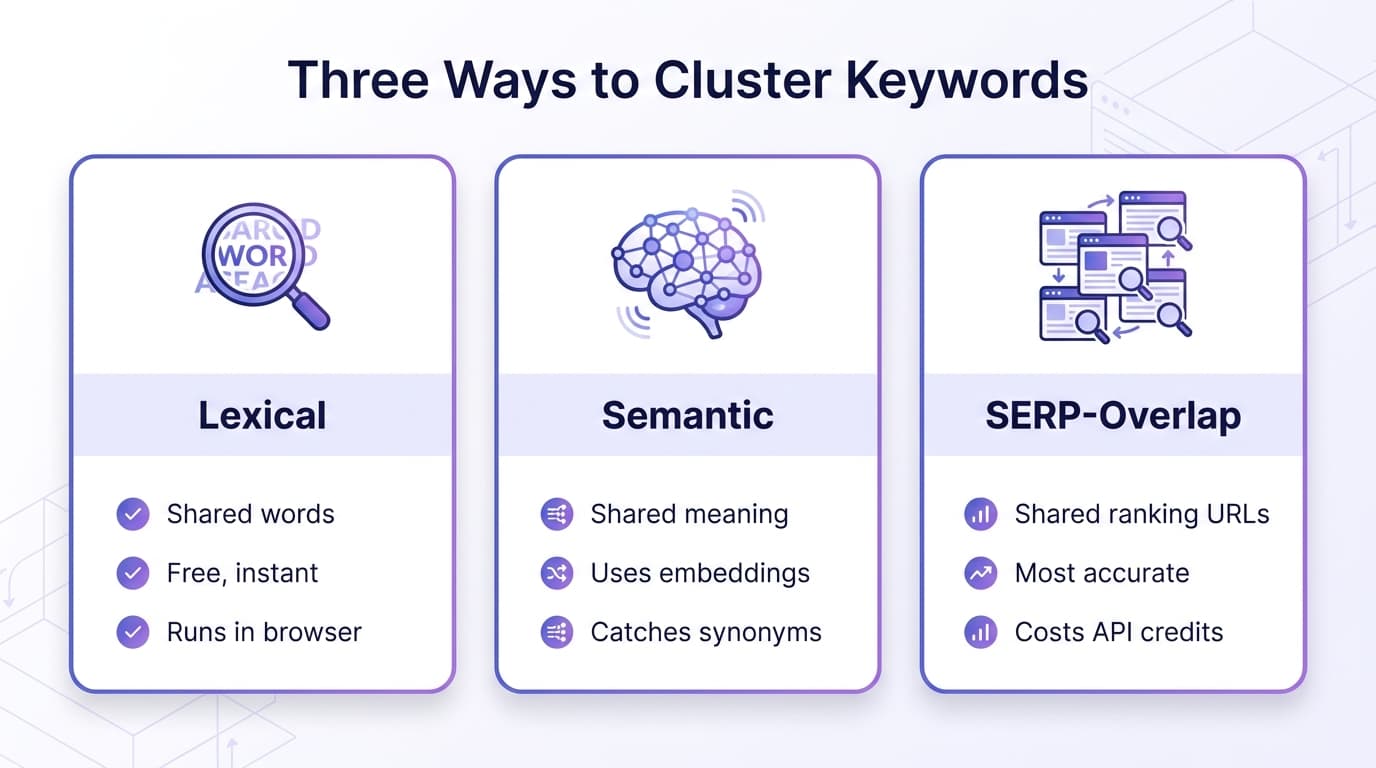
Every tool below uses one of three methods, and the method decides the output more than the brand does.
- SERP-based (shared ranking pages). The tool searches Google for every keyword and groups keywords whose top 10 results overlap. KeyClusters groups keywords that share 3 or more of the same pages; Keyword Insights defaults to a 30% overlap of the top 10 (also 3 of 10) and lets you change it. This is the closest thing to Google's own opinion of which searches one page can serve. It costs real money per keyword because every keyword is a live search.
- Semantic (shared meaning). The tool uses embeddings or a language model to group keywords that mean the same thing, even with no shared words. Good with synonyms and question phrasing. It cannot see what Google actually ranks, so it can merge two searches Google treats differently.
- Lexical (shared words). The tool groups keywords that share meaningful terms (often n-grams). It is fast, free and private, and it misses synonyms with no word in common.
Here is why the difference is not academic. On October 12, 2026 we pulled the US top results for "keyword clustering tool" and "keyword grouping". They share <mark class="km-highlight" style="--hl:#FEF08A;background:#FEF08A">zero of their top 8 URLs</mark>: the first is all "best tools" roundups, the second is a mix of forum threads, guides, a few roundups and tool feature pages. A lexical or semantic tool would almost certainly put those two keywords in one cluster. A SERP-based tool would split them, and the SERP-based tool would be right: one page will not rank for both.
The 10 Keyword Clustering Tools at a Glance
Prices are the vendor's published US list prices on October 12, 2026, in USD, monthly billing unless noted. They change; click through before you buy.
| Tool | Method | Free option | Paid entry point (vendor page) | How you pay |
|---|---|---|---|---|
| Murkuz Keyword Clustering Tool | Lexical | Yes, no login, no cap | None, it is free | Free |
| KeyClusters | SERP (3+ shared top-10 pages) | No | $19 for 2,500 keywords | One-time credit packs |
| Keyword Insights | SERP (30% default overlap) | $1 seven-day trial | $58/mo (10,000 credits) | Monthly credits, 1 per keyword |
| Keyword Cupid | SERP plus neural network | Trial (terms not listed) | $9.99/mo (500 keyword credits) | Monthly credits |
| SE Ranking Keyword Grouper | SERP (min. matching URLs setting) | 14-day trial | $129/mo Core ($103.20/mo billed annually) | Inside a platform plan |
| Semrush Keyword Strategy Builder | Not named by Semrush | No (paid SEO Toolkit only) | $139/mo SEO plan | Clustering actions per month |
| Ahrefs Keywords Explorer | Parent Topic or terms | No | $249/mo Standard (not on Lite) | Inside a platform plan |
| SEO Scout Keyword Grouping Tool | Lexical (n-gram) | Yes, free tool | $49/mo for Keyword Groups | Inside a platform plan |
| Answer Socrates | Machine learning (intent and meaning) | 500 credits/mo | $19/mo Socrates Lite | Monthly or yearly credits |
| KeywordClustering.net | Semantic (AI) | Yes, with a Keywords Everywhere API key | Keywords Everywhere plans from $84/yr | Daily limit set by your plan |
Which Keyword Clustering Tool Should You Pick?
Answer two questions first: how many keywords you cluster a month, and whether you already pay for an SEO suite. Then:
| Your situation | Pick | Why |
|---|---|---|
| Under 500 keywords, no budget | Murkuz free tool, then the SERP spot-check below | Instant first pass, and the formula catches the merges lexical grouping gets wrong |
| Free, but you want intent-aware groups | Answer Socrates free plan or KeywordClustering.net | 500 free credits a month, or free semantic clustering with volume attached |
| A few thousand keywords now and then, hate subscriptions | KeyClusters | SERP-based, pay per pack, credits never expire |
| Content team that also writes briefs | Keyword Insights | SERP clustering with adjustable overlap, plus briefs on the same credits |
| Agency clustering 20,000+ keywords a month | Keyword Cupid Agency or a KeyClusters 100,000 pack | Both bring SERP clustering to $7.50 or less per 1,000 keywords; the KeyClusters pack is the cheapest here at $3.50 |
| You already pay for Semrush, Ahrefs or SE Ranking | The clustering built into your suite | You are already paying for it; test it before adding another bill |
If you are still choosing a suite, our Ahrefs vs Semrush comparison covers the rest of what each one does.
The 10 Tools, Reviewed
1. Murkuz Keyword Clustering Tool (free, lexical)
Disclosure: we make this one. The Murkuz keyword clustering tool groups keywords by shared meaningful terms after stripping stop words. It runs entirely in your browser, so nothing is uploaded, and it needs no login, email or credits. Paste one keyword per line (or a seed topic) and you get clusters, a suggested pillar keyword with spokes for each, and a CSV export.
- Good at: a fast, private first pass on lists of any size with no artificial cap.
- Watch out for: it is lexical. It does not fetch SERP data or search volume, so synonyms with no shared word stay apart and same-word, different-intent keywords can land together.
- Best for: turning a raw export into a draft plan in a minute, then checking the doubtful clusters with the SERP overlap formula further down.
2. KeyClusters (SERP-based, pay as you go)
KeyClusters runs each keyword through Google, reads the top 10, and groups keywords that have 3 or more of the same pages in common. Pricing is one-time packs with no subscription: $19 for 2,500 keywords, $110 for 20,000 and $350 for 100,000, and the credits never expire.
- Good at: honest SERP clustering for people who cluster in bursts, not every month.
- Watch out for: it only clusters. Keyword research, briefs and tracking happen in other tools.
- Best for: freelancers and small teams who want SERP accuracy without a monthly bill.
3. Keyword Insights (SERP-based, credits)
Keyword Insights compares the top 10 results for each keyword and puts keywords sharing at least 30% of their URLs in one cluster. You can raise or lower that threshold and switch between centroid and agglomerative algorithms. Language processing is used to show how clusters relate to each other, not to form them. Per its pricing page, Basic is $58/mo for 10,000 credits and Professional is $99/mo for 20,000, with clustering at 1 credit per keyword. A $1 seven-day trial includes 5,000 credits, enough for up to 500 keywords of clustering.
- Good at: control over how strict "same intent" is, plus intent labels on each cluster.
- Watch out for: credits are shared with briefs and writing features, so heavy brief use eats your clustering budget.
- Best for: content teams that cluster, then brief, in one place.
4. Keyword Cupid (SERP-based with a neural network)
Keyword Cupid calls itself a SERP-based clustering platform, and every plan includes its neural network clustering. Plans: Starter $9.99/mo (500 keyword credits, up to 2,000 keywords per report), Freelancer $49.99/mo (5,000), Agency $149.99/mo (20,000) and Enterprise $499.99/mo (80,000).
- Good at: large reports, up to 80,000 keywords per report on the Enterprise plan.
- Watch out for: the Starter plan's 500 monthly credits run out fast on a real export.
- Best for: agencies that cluster every month at volume.
5. SE Ranking Keyword Grouper (SERP-based, inside the suite)
The SE Ranking Keyword Grouper lets you set the minimum number of matching URLs and the clustering method; a higher accuracy setting means fewer keywords per group. It lives inside the SE Ranking platform, whose plans page lists Core at $129/mo ($103.20/mo billed annually) with a 14-day free trial. The grouper page names one extra charge: an optional search volume check at $0.005 per query.
- Good at: clustering next to rank tracking and audits you may already use.
- Watch out for: it is a suite purchase, not a clustering purchase.
- Best for: teams already on SE Ranking.
6. Semrush Keyword Strategy Builder (inside the SEO Toolkit)
The Keyword Strategy Builder groups a list into topics, then suggests pillar pages and subpages. Semrush does not name the clustering method. It needs a paid SEO Toolkit subscription: its knowledge base lists 10 to 50 clustering actions a month depending on tier, up to 2,000 keywords per manual import, and 200,000 keywords stored across all lists. The Semrush pricing page lists the SEO plan at $139/mo on monthly billing.
- Good at: going from seed keywords to a pillar-and-subpage outline with Semrush volume and difficulty attached.
- Watch out for: the limit is counted in actions per month, not keywords, so many small lists burn it faster than one big one.
- Best for: existing Semrush subscribers.
7. Ahrefs Keywords Explorer (clusters by Parent Topic or terms)
Ahrefs Keywords Explorer can cluster a keyword list by Parent Topic or by related terms. The Ahrefs pricing page lists keyword clusters from the Standard plan at $249/mo; the Lite plan ($129/mo) does not list them.
- Good at: clustering inside the same report where you found the keywords, with Ahrefs metrics already attached.
- Watch out for: Ahrefs does not publish how Parent Topic is chosen, so treat it as a strong hint, not a SERP-overlap check.
- Best for: teams already on Ahrefs Standard or higher.
8. SEO Scout Keyword Grouping Tool (free, lexical)
SEO Scout's free keyword grouping tool clusters keywords "based on n-gram word similarities". Its paid plans, listed from $49/mo on the pricing page, include Keyword Groups as part of a wider research platform.
- Good at: a free second opinion next to any other lexical tool.
- Watch out for: the same blind spot as every lexical method: synonyms and intent.
- Best for: quick, free grouping when you want a different lexical algorithm to compare.
9. Answer Socrates (machine learning, free tier)
The Answer Socrates clustering tool groups keywords by search intent and meaning using machine learning. Its pricing page lists a free plan with 500 cluster credits a month and paid plans from $19/mo (Socrates Lite). The per-keyword credit rate is not published; the tool shows the cost before each run.
- Good at: free, intent-aware grouping for small lists.
- Watch out for: it does not say it checks live SERPs, so verify clusters you are about to write against.
- Best for: bloggers and small sites on a zero budget.
10. KeywordClustering.net (semantic AI, free with Keywords Everywhere)
KeywordClustering.net is a free tool from Keywords Everywhere. It clusters by semantic intent using an OpenAI model, handles up to 10,000 keywords per job, and attaches search volume and CPC to each cluster. You sign in with a free Keywords Everywhere API key; your daily keyword limit (5,000 to 200,000) depends on your Keywords Everywhere plan, and those plans are billed annually starting at $84 a year.
- Good at: free semantic clustering with volume data in one pass.
- Watch out for: semantic grouping cannot see the SERP, so it merges keywords like "keyword clustering tool" and "keyword grouping" that Google treats differently.
- Best for: question-heavy or synonym-heavy lists.
What Clustering 1,000 Keywords Actually Costs
Monthly plans hide the number you care about. Here it is per 1,000 keywords, from the prices above.
| Tool | Cost per 1,000 keywords | Basis |
|---|---|---|
| Murkuz, SEO Scout free tool | Free | Browser tools, no credits |
| KeywordClustering.net | Free with a Keywords Everywhere key | Daily limit depends on your plan |
| KeyClusters | $7.60 / $5.50 / $3.50 | 2,500, 20,000 and 100,000 packs |
| Keyword Insights | $5.80 | Basic plan, all 10,000 credits used on clustering |
| Keyword Cupid | $19.98 / $10.00 / $7.50 / $6.25 | Starter to Enterprise, one keyword credit per keyword, all credits used |
| Answer Socrates | Not published | First 500 credits a month free |
| Semrush, Ahrefs, SE Ranking | Not sold per keyword | Part of a suite subscription |
The pattern: at small volume, <mark class="km-highlight" style="--hl:#BBF7D0;background:#BBF7D0">pay-per-pack beats a subscription</mark> you will not use up. At agency volume the gap narrows: KeyClusters' biggest pack and the top credit plans all land between $3.50 and $7.50 per 1,000.
How to Test Any Two Tools in 15 Minutes
Vendor claims are cheap to check. Run the same list through two tools and score them with this.
1. Paste this test list into both tools. It contains deliberate traps: synonyms with no shared word, same words with different intent, and definitions mixed with tool searches.
keyword clustering tool
keyword grouping tool
keyword grouper
free keyword clustering tool
best keyword clustering tools
keyword grouping
what is keyword clustering
keyword cluster meaning
how to group keywords
how to do keyword clustering
topic cluster examples
pillar page examples
keyword cannibalization
how to fix keyword cannibalization
serp overlap
search intent types
2. Check the traps by hand with the SERP overlap formula. For any two keywords a tool merged (or split) that you doubt, search each one in a private window, paste the top 10 URLs for the first keyword into A2:A11 of a Google Sheet and the second into B2:B11, then put this in C1:
=SUMPRODUCT(--ISNUMBER(MATCH(A2:A11,B2:B11,0)))
A result of 3 or more means the two keywords share at least 3 of 10 ranking pages, the same line KeyClusters uses and Keyword Insights' 30% default. They belong on one page. Below 3, they need separate pages, whatever the tool said.
3. Score each tool on five checks.
- Did it keep definitions ("what is keyword clustering") apart from tool searches ("keyword clustering tool")?
- Did "keyword grouping" end up apart from "keyword clustering tool", matching what the SERP shows?
- Did it group near-synonyms ("keyword grouper", "keyword grouping tool") together, and does the SERP check agree?
- Did it name a sensible pillar keyword for each cluster?
- Can you export the result (CSV or sheet) without retyping?
The tool that scores higher on your own keywords is the right tool, whatever any roundup (this one included) ranks first.
How to Group Keywords With Any of These Tools (Short Version)
The workflow is the same whichever tool you pick:
- Export your keywords from Search Console and your research tool into one list, one keyword per line.
- Remove duplicates and anything you would never write about.
- Run the list through a clustering tool.
- Read every cluster and split any that mixes intents, using the overlap formula on the doubtful pairs.
Doing step 3 by hand means sorting rows in a spreadsheet and eyeballing shared words for an hour, then doing it again when the list grows.
A free keyword clustering tool that suggests the pillar and spokes for each group does that part in seconds, and the time you save goes into step 4, which no tool fully automates.
Then turn each cluster into one page, with the strongest keyword as the pillar. The full process, including intent splits and mapping each cluster to one URL, is in the step-by-step guide linked at the top of this page, and the pillar page best practices cover how to build the hub page once the clusters are set.
Frequently Asked Questions
What is the best keyword clustering tool?
There is no single best one; it depends on volume and budget. For SERP accuracy without a subscription, KeyClusters. For clustering plus content briefs, Keyword Insights. For agencies at high volume, Keyword Cupid. For free, start with a lexical tool such as Murkuz's or SEO Scout's, or a semantic one such as KeywordClustering.net, and check doubtful clusters with the SERP overlap formula above.
Is there a free keyword clustering tool?
Yes. Murkuz's tool and SEO Scout's keyword grouping tool are free lexical tools, KeywordClustering.net is free with a Keywords Everywhere API key, and Answer Socrates gives 500 free cluster credits a month. Keyword Insights has a $1 seven-day trial that covers up to 500 keywords.
Should I use SERP-based or NLP-based keyword clustering?
Use SERP-based clustering for anything you are about to spend writing time on, because it groups by what Google actually ranks. Semantic (NLP) clustering is cheaper and handles synonyms well, but it cannot see the SERP. A good middle path: cluster semantically or lexically for free, then SERP-check only the clusters you are unsure about.
What is keyword grouping, and is it the same as keyword clustering?
In SEO, the two terms mean the same thing: sorting keywords into groups that one page can target. Some PPC tools use "keyword grouping" for building ad groups, which follows the same logic with ad copy instead of pages.
How many keywords should be in one cluster?
There is no fixed number. A cluster should hold every keyword one page can genuinely rank for, which can be 3 or 30. If a cluster spans clearly different questions, split it; if three keywords total almost no searches, fold them into a related cluster.
Can ChatGPT cluster keywords?
It can group keywords by meaning, which is semantic clustering (KeywordClustering.net runs on an OpenAI model). What it cannot do on its own is see which pages Google ranks for each keyword, so it has the same blind spot as any semantic tool. Treat its groups as a draft and check the doubtful ones against the SERP.
How often should I re-cluster my keywords?
Re-check when you add a batch of new keywords, and whenever two of your pages start showing up for the same queries in Search Console. SERPs shift, so a cluster that was right a year ago can drift.
Pick by Method First, Brand Second
Decide how you want keywords grouped (by SERP, by meaning or by shared words), then pick the cheapest tool that does it at your volume. Run the 15-minute test before you commit to a subscription.
Clustering is the planning half. The other half is noticing when two published pages start competing anyway, months later. That is where Murkuz comes in after the free tool: you connect your own Google Search Console, GA4 and Bing Webmaster Tools, and it flags pages that are splitting the same queries or losing ground, across Google and Bing in one place.