Most SEO content audit guides hand you a seven-step checklist and leave you alone with a spreadsheet. You build the inventory, pull the metrics, sort the tabs, and then stare at 200 rows with no clear answer to the actual question: which five pages do I fix first, and why those five?
This is the process we actually run, in the order we run it, built around one rule: an audit that does not end in a prioritized, dated action list is not an audit. It is a spreadsheet. Below is the full sequence, the scoring method that turns a pile of URLs into a ranked worklist, a checklist you can lift directly, and the parts every other guide on this topic skips.
What an SEO Content Audit Actually Is
An SEO content audit is a structured review of your existing pages to decide, page by page, whether to leave it alone, refresh it, merge it with another page, or remove it, based on how it is actually performing in search today versus how it performed when you published it.
That definition matters because it rules out two things people often confuse with an audit:
- A content inventory. A spreadsheet listing every URL, its title, and its publish date is an inventory, not an audit. It is the raw material an audit runs on, not the audit itself.
- A technical SEO audit. Crawl errors, broken canonicals, and indexation problems are a different, narrower exercise. A content audit assumes the technical plumbing works and asks a content question: is this page still good, and is it still winning?
Run a content audit when site-wide traffic feels flat despite regular publishing, before a redesign or migration, after a merger reconciling two content libraries, or on a standing quarterly schedule. Most teams wait for a traffic drop to trigger this. The teams who protect their rankings run it on a calendar instead.
Step 1: Build the Inventory (Wider Than You Think)
Start by pulling every indexed URL, not just your blog. Use a crawler like Screaming Frog, or export your sitemap and cross-reference it against Google Search Console's indexed pages report, since a URL can be crawled without being genuinely indexed.
For each URL, capture:
- Title, meta description, and target keyword (if one was ever assigned)
- Publish date and last-modified date
- Word count and content type (blog post, landing page, glossary entry, product page)
- Organic clicks, impressions, average position, and CTR for the trailing 90 days, pulled from Search Console
- Backlink count, if you have access to a backlink tool
Do this in one spreadsheet, one row per URL. Resist the urge to filter anything out yet. The page that looks irrelevant now is sometimes the one quietly ranking for a keyword you forgot you targeted.
Step 2: Pull Performance Data Year-over-Year, Not Just Trailing 90 Days
This is the step most audit guides underweight. Pull two comparison windows for every page: trailing 90 days versus the prior 90 days, and trailing 12 months versus the 12 months before. A page can look stable in a 90-day window while it has quietly lost a large share of its traffic over 18 months, because decay is gradual by nature. Comparing only the most recent quarter hides exactly the slow slide you are trying to catch.
Watch for three separate signals, because they point to different fixes:
- Falling average position with stable impressions. The page is losing the ranking battle for keywords it already earned. This usually means a content or authority gap versus a specific competitor.
- Falling impressions with stable position. The page is becoming less relevant to how people now phrase the query, or search volume for the underlying topic is genuinely declining. Check Google Trends for the core keyword before assuming decay; sometimes the topic itself just cooled off.
- Falling CTR at a stable position. Someone else's result got more clickable: a richer title, review stars, an AI Overview eating the space above you. This is a metadata and SERP-feature problem, not necessarily a content depth problem.
Step 3: Score Every Page (This Is the Part Most Guides Skip)
A list of 200 URLs with traffic numbers next to them is not a plan. You need one number per page that tells you what to do next, or you will spend more time debating priority than actually fixing anything.
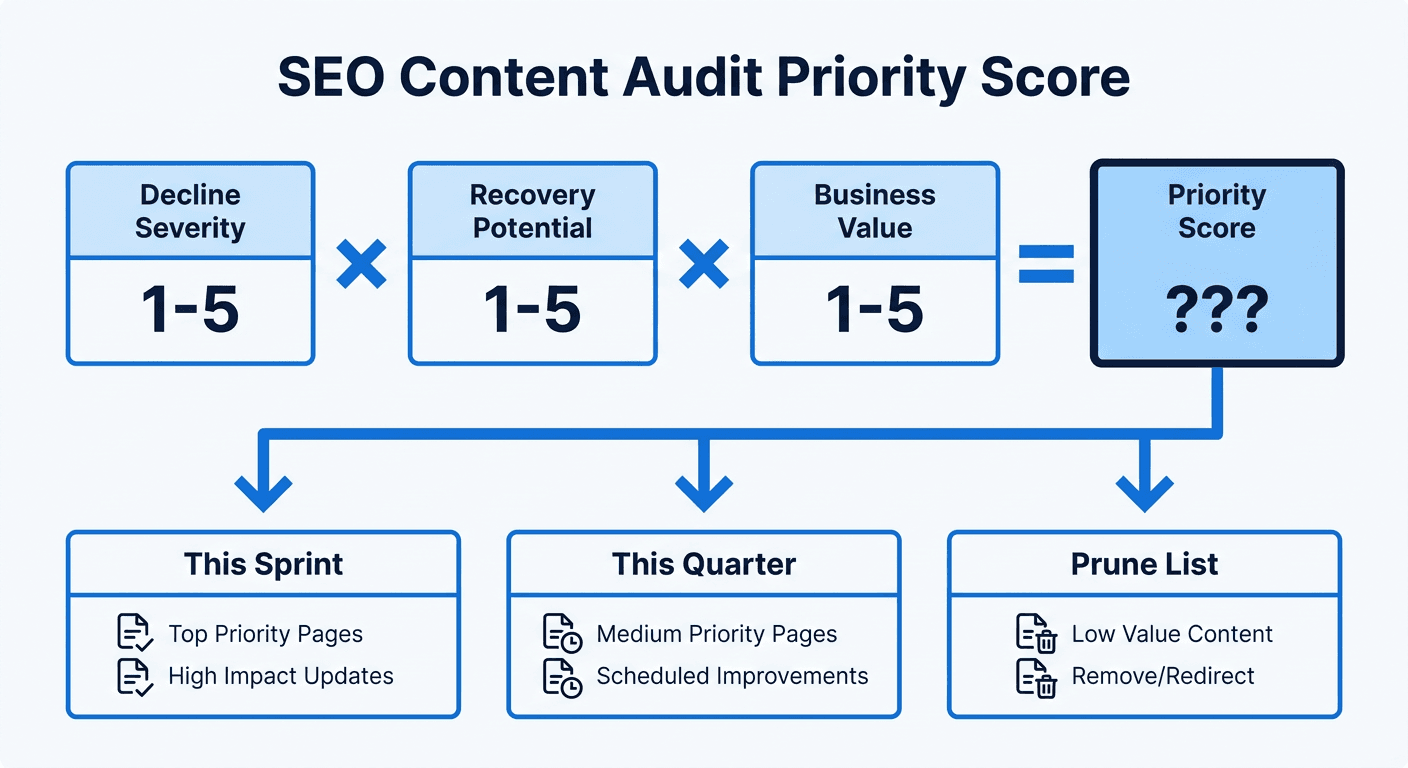
Score each page on three factors, one to five each:
- Decline severity. How far and how fast has position or traffic fallen versus 12 months ago? A page that dropped from position 3 to 9 scores higher urgency than one that drifted from 3 to 5.
- Recovery potential. How winnable is the gap? Read whatever currently outranks the page. If the page ahead of you is thin, dated, or clearly weaker on a specific subtopic, potential is high. If three authoritative, comprehensive competitors have pulled ahead, potential is lower, and the honest move might be to deprioritize rather than sink more hours into it.
- Business value. Does this page's keyword sit near a buying decision, feed a product page, or serve a strategic topic cluster? A commercial-intent page worth real pipeline outranks an informational page with more raw traffic.
Multiply, don't average: Decline severity x Recovery potential x Business value gives you a single priority score per page, and multiplying (rather than averaging) correctly punishes a page that scores a 1 on any factor, since a page nobody will ever recover, or one with zero business relevance, should not out-rank genuinely urgent work just because its other two scores are high.
| Action | When to use it | Typical trigger |
|---|---|---|
| Keep as-is | Page is stable or growing, no decay signal | Position steady or improving over 12 months |
| Refresh | Page is decaying but the keyword is still worth winning | Falling position or impressions, recovery potential 3+ |
| Consolidate | Two or more pages compete for the same query | Overlapping rankings, cannibalization in Search Console |
| Prune (redirect or remove) | Page has no traffic, no backlinks, no strategic value | Near-zero organic sessions for 12+ months, low business value |
Step 4: Read the Page Against What Currently Outranks It
For every refresh candidate, do the one step a spreadsheet can't do for you: open the exact keyword in an incognito search, and read whatever sits above your page today, section by section.
You are looking for the specific gap, not a general impression that "their page is better." Almost always it is one or two things: a subtopic you cover in a thin paragraph that a competitor covers in three well-structured ones, a statistic that is years out of date, or a search intent that has shifted (informational to commercial) since you first wrote the page. Write that gap next to the row. This single sentence is what turns the audit into a usable brief instead of a vague instruction to "improve" the page.
Step 5: Turn the Audit Into a Dated Action Plan
An audit that ends as a color-coded spreadsheet and nothing else is the single most common failure mode in this entire process. The output has to be a list, sorted by priority score, with an owner and a target date attached to each row, because "we should get to this eventually" is where audits go to die.
Group the sorted list into three simple buckets so a team can actually work through it:
- This sprint. The top decile of priority scores. These are the pages actively losing meaningful traffic where the fix is well understood.
- This quarter. Meaningful decay, but recovery potential or business value is more moderate. Batch these into a steady refresh cadence rather than tackling them all at once.
- Prune list. Pages that scored low across the board. Redirect or remove them; don't leave them to quietly drag down your site's average content quality.
<mark class="km-highlight" style="--hl:#FEF08A;background:#FEF08A">The whole point of scoring is to make the "this sprint" bucket obvious without an argument.</mark> If your top ten rows are not clearly more urgent than row 150, the scoring weights need adjusting before you start fixing anything.
Why the Audit Itself Is Usually the Easy Part
Here is the part almost nobody writes about, and it is the actual reason so many audits produce a spreadsheet that never turns into shipped fixes: the audit is a one-time analysis, but content decay is a continuous process. New pages start decaying the moment a competitor publishes something fresher or your stats age another quarter. An audit run once a year catches the damage months after it started, and by the time the spreadsheet is built, sorted, and assigned, some rows have already slipped further.
The mechanical parts of this process (pulling Search Console data daily instead of quarterly, reading what currently outranks each page, scoring the gap, generating the brief) are exactly the kind of repetitive analysis that does not need a human doing it by hand every time. That is the specific gap Murkuz is built to close: instead of an audit you run once and hope holds, Murkuz scans your Search Console data every morning, automatically surfaces the pages that would score high on decline severity and business value in the manual process above, and turns each one into a task with the performance history and a recommended fix already attached. Approve a fix and it publishes straight to WordPress, Webflow, or Framer, then keeps watching that specific page to confirm the ranking actually recovered.
Running the manual audit above once is still worth doing, especially the first time, because it teaches you what decay looks like on your specific site before you automate anything. But an audit you run quarterly will always be reacting to damage that is, on average, six weeks old by the time you catch it. If you want the deeper case for why this needs to be a continuous workflow rather than a periodic project, our content decay guide covers the full mechanics of how pages decay and what closing that loop looks like end to end. For teams managing this across many client sites, Murkuz's workflow shows how the detect-to-prove sequence runs without the manual handoffs.
SEO Content Audit Checklist
Use this as the condensed version once you have run the full process once:
- Inventory every indexed URL, not just blog posts
- Pull trailing 90-day AND trailing 12-month comparisons for each page
- Flag the specific signal: falling position, falling impressions, or falling CTR
- Score each page: decline severity x recovery potential x business value
- Read what currently outranks every refresh candidate and name the specific gap
- Sort into keep, refresh, consolidate, or prune
- Assign an owner and a target date to every row in the top decile
- Set a recurring date for the next audit before you close this one out
FAQ
How often should you do a content audit?
Quarterly for a fast-moving site publishing weekly, twice a year for a smaller or slower-moving one. The right cadence is whatever keeps the gap between "a page starts decaying" and "you notice it" under a couple of months, since letting it stretch to a year means you are always fixing damage that has already compounded.
What is the difference between a content audit and a content inventory?
An inventory is the raw list: every URL, its metadata, and its metrics. An audit is the analysis layered on top: scoring each page, deciding what action it needs, and turning that into a dated plan. Plenty of teams build a thorough inventory and stop there, which is why so many audits never produce a shipped fix.
How many pages should a content audit cover?
All of them, at least at the inventory stage. You can triage quickly, since a page with near-zero traffic and no backlinks needs thirty seconds of judgment, not a deep dive. Reserve the detailed scoring and competitor read-through for pages that show any real signal, whether that is meaningful traffic, a clear decline, or strategic importance to a topic cluster you are trying to own.
What tools do you need to run a content audit?
At minimum, Google Search Console and a spreadsheet. A crawler like Screaming Frog speeds up the inventory step on a large site, and a backlink tool helps you judge recovery potential more accurately. None of this requires paid software to get started; the scoring method above works from Search Console data alone.
Should I update the page or write a new one?
Update the existing page in almost every case where it already ranks or has backlinks pointing to it. A page that has earned some trust and link equity is expensive to rebuild from a blank URL. Write a genuinely new page only when the existing one targets the wrong intent entirely, not just when it is thin or dated.
Junaid Khalid is the founder of Ertiqah and the builder of Murkuz. He has run this exact audit process by hand across his own SaaS products' content libraries, long before building a tool to run the detection and scoring automatically.