Shopify gets you most of the technical SEO basics for free: canonical tags, an auto-generated sitemap, SSL, and product schema baked into every theme. That is exactly why most "Shopify SEO" advice online stops at "connect Google Search Console" and calls it done. It is not done. The platform handles the plumbing; it does not handle your URL structure, your collection page content, your duplicate variant problem, or the fact that nobody is watching your rankings after launch week.
This is a step-by-step setup guide for getting SEO right on a Shopify store, in the order you should actually do it: store-level settings first, then product and collection pages, then the technical traps specific to Shopify (variants, pagination, apps), then what to monitor once the store is live. If you already have a live store and are trying to fix it rather than launch it, the same steps apply, just start wherever the gap is.
Step 1: Fix the Store-Level Settings Before Touching a Single Product Page
Everything downstream inherits from these four settings, so get them right first.
- Buy a real domain and set it as primary. A
.myshopify.comsubdomain will index, but it signals "unfinished store" to both shoppers and, indirectly, to the trust signals Google weighs. Set your custom domain in Settings > Domains and confirm it, not the myshopify subdomain, is marked primary. - Set your title and meta description templates. Under Online Store > Preferences, Shopify lets you set a homepage title (under 60 characters, primary keyword near the front) and meta description (150-160 characters). This is the one global setting most stores never touch after the default theme install.
- Submit your sitemap in Google Search Console. Shopify auto-generates
yourstore.com/sitemap.xml. Submit it in GSC under Sitemaps, then actually check back in a week to confirm pages are being indexed, not just submitted. - Turn on structured data validation. Most 2026 Shopify themes ship product schema automatically, but theme customizations and some apps break it silently. Spot-check a handful of product URLs in Google's Rich Results Test after any theme change.
Step 2: Get Your URL Structure Right Before You Launch, Not After
Shopify's default URL structure is /products/product-name, /collections/collection-name, and /blogs/blog-name/post-name. You cannot change the /products/ and /collections/ prefixes without an app or custom code, so the decision that actually matters is what comes after them.
- Keep product handles short, descriptive, and hyphenated:
/products/organic-cotton-tote-bag, not/products/product-847-final-v2. - Fix handles before you get backlinks or rankings on them. Changing a URL later means a 301 redirect, and Shopify auto-creates one when you edit a handle, but any external link or bookmark still takes a hop, and internal links you forgot to update will not.
- Build collections around how people actually search, not how your warehouse is organized internally. A collection for "organic cotton totes" ranks; a collection named "SKU Group 4" does not.
Step 3: Write Product and Collection Pages That Can Actually Rank
This is the step most Shopify SEO checklists rush past, and it is the one with the most upside because it is the one your competitors are also skipping.
Product pages. The manufacturer description copy-pasted from a supplier's spec sheet is duplicate content across every store selling that product. Rewrite the first 2-3 sentences in your own words, even if the rest stays similar, and lead with the thing a buyer actually wants to know (fit, material, use case) before the technical specs. Fill in every image alt attribute with a real description, not "product-image-1.jpg."
Collection pages. A collection page with zero body copy above the product grid is one of the most common gaps on Shopify stores, and it is also one of the easiest fixes. A few paragraphs above the fold, written for the person searching "best [category] for [use case]," gives Google something to rank the page for beyond the product grid alone. This is also where a lot of stores' best long-tail traffic actually lives, not on individual product pages.
Buying guides and blog content. Product and collection pages target commercial, ready-to-buy searches. Informational searches, "how to choose X," "X vs Y," "how to care for X," need a blog post, because trying to force that content onto a product page usually hurts both the page's conversion rate and its ability to rank for the informational query. Shopify's built-in blog (/blogs/) is enough; you do not need a separate CMS to do this well.
Step 4: Handle the Shopify-Specific Technical Traps
These are the issues generic SEO advice does not mention because they are specific to how Shopify's platform is built.
| Shopify-specific issue | Why it hurts SEO | Fix |
|---|---|---|
| Product variants create near-duplicate URLs | Each variant can generate its own indexable URL with a ?variant= parameter, splitting ranking signals across near-identical pages | Confirm your theme uses a single canonical URL per product (most 2026 themes do this by default); verify with a site: search for a few variant products |
| Faceted navigation / filter URLs | Filtering by size, color, or price can generate thousands of crawlable, thin, duplicate URLs | Check robots.txt and canonical tags handle filter parameters; do not let filters get indexed as separate pages |
| Pagination on collection pages | Page 2, 3, 4 of a large collection can dilute the ranking signal of page 1 if not handled correctly | Confirm rel=canonical points paginated pages appropriately, or use view all where catalog size allows |
| Apps injecting render-blocking scripts | Every SEO, reviews, or upsell app you install adds JavaScript that can slow page load, which is a ranking factor and a conversion factor | Audit installed apps quarterly; remove ones you are not actively using, even if "disabled" |
| Duplicate content from multiple sales channels | Syncing the same product description to Amazon, a marketplace, and your Shopify store creates duplicate content across the web | Write Shopify-first copy and let marketplace listings differ, or accept the marketplace will not out-rank a differentiated store page |
Step 5: Do Not Stop at Launch. This Is Where Most Shopify Stores Actually Lose Ground
Here is the part every generic Shopify SEO checklist skips: getting the setup right is maybe a third of the job. The other two-thirds is what happens after launch, when a category page that ranked at position 6 in March quietly slides to position 14 by June because a competitor updated their content, a seasonal collection's copy went stale, or an app update broke your schema markup. Nobody notices until the sales report looks worse, by which point the fix takes just as long as the original build did.
This is the specific gap Murkuz is built to close for stores with a lot of product and category URLs to keep an eye on. It connects to your Search Console data and runs a daily scan across six problem types that matter most for a catalog: declining pages, positions-11-to-20 opportunities sitting just off page one, content cannibalization between similar collections, content that has gone stale, missing topics competitors rank for that you do not, and pages that are not showing up well in AI answers from ChatGPT or Google's AI Overviews. Instead of a spreadsheet of URLs to manually triage, it turns each finding into a prioritized, contextual task, and once you approve a fix it can publish straight to your storefront's connected CMS rather than leaving the content sitting in a draft somewhere. You can see the current state of your own store's rankings by connecting Search Console; every plan can be tried before you commit, which is a reasonable way to see what is actually declining before committing to a monitoring routine.
If you would rather build that monitoring habit manually first, at minimum put a recurring calendar reminder to check Search Console's Performance report monthly, sorted by biggest position drops, so a slipping category page does not sit unnoticed for a full quarter. And if your catalog has grown to the point where "one person checking monthly" is no longer realistic, the decision between hiring an agency and staying DIY comes down mostly to catalog size and how much internal bandwidth you actually have.
A Simple Order of Operations
If you are setting up a brand-new store, do the steps in this order. If you are fixing an existing one, start at whichever step matches your biggest gap:
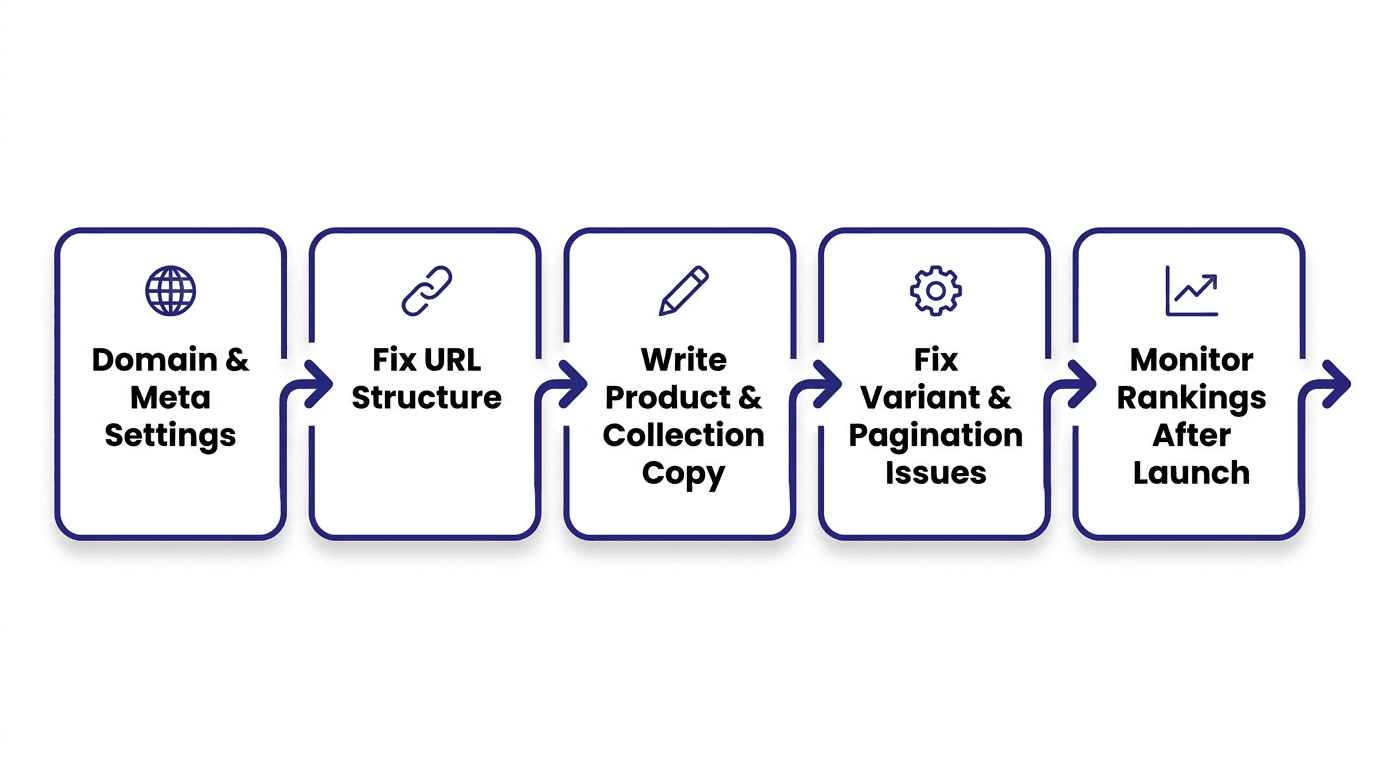
- Custom domain, title/meta templates, sitemap submitted to GSC.
- URL handles fixed for products and collections before you start earning links.
- Product and collection page copy rewritten in your own words, with real alt text.
- Variant, pagination, and app-script issues checked and cleared.
- A recurring process, manual or automated, for catching decay after launch.
Skipping straight to step 5 without steps 1-4 in place just means monitoring a store that was never fully set up to rank. Do them in order.
FAQ
Does Shopify have good SEO out of the box?
Shopify handles the technical foundation well: SSL, canonical tags, an auto-generated sitemap, and basic product schema come standard on every theme. What it does not do for you is write unique product and collection copy, structure your URLs around what people actually search, or notice when a previously ranking page starts losing position months later.
How long does it take for a new Shopify store to rank on Google?
Most new stores see initial indexing within days to a few weeks, but meaningful ranking movement on competitive product terms typically takes 3 to 6 months, the same timeline as any new site regardless of platform. Long-tail collection and blog content can rank faster because there is less competition for those specific phrases.
Do I need an SEO app for my Shopify store?
Not necessarily. Shopify's native settings cover title tags, meta descriptions, and alt text without a third-party app. Apps become useful for bulk edits across a large catalog, structured data beyond the theme default, or ongoing rank monitoring, but installing several overlapping SEO apps on a small store often costs more in page speed than it gains in optimization.
Why did my Shopify store's rankings drop after months of doing well?
The most common causes are a competitor refreshing their content, a collection page's copy going stale (outdated seasonal language, old pricing mentions, broken internal links), a theme or app update that altered structured data, or cannibalization from a newer, similar collection page competing for the same search term. Checking Search Console's Performance report for position drops, sorted by page, is the fastest way to catch which of these happened.
Should I use Shopify's blog for SEO content?
Yes, for informational searches that do not fit naturally on a product or collection page, like buying guides, comparisons, and how-to content related to what you sell. It also gives you internal linking opportunities into your collections that pure product pages cannot provide on their own.
Junaid Khalid is the founder of Ertiqah and the builder of Murkuz. He has run SEO as the first growth channel across his own SaaS products before building the platform to automate the parts of that process that used to require a full-time hire.