You checked your rankings this morning and something you used to rank for is gone, or slipping, or sitting five spots lower than yesterday. Your stomach drops before your brain even starts working. That reaction is normal. What you do in the next thirty minutes is what actually matters.
Most guides on this topic hand you a long list of every possible cause and let you figure out where to start. That is the wrong order when you are panicking. This is a diagnostic, not an encyclopedia: a fixed sequence of checks, fastest and most likely first, so you know what actually happened before you touch a single page. Work through it in order. Do not skip to the fix until you know the cause.
Step 1: Confirm It Is Real, Not Noise (5 minutes)
Before anything else, rule out a false alarm. Rankings wobble by one or two positions constantly, and a single rank-tracker snapshot can be wrong.
- Check more than one data point. Look at Google Search Console's Performance report (Search results, filtered to the page or query), not just a third-party rank tracker. If GSC's average position agrees with the tool that scared you, the drop is real.
- Check the date range. A 28-day average can hide a one-day dip that already recovered. Switch to a daily view and look at the last 7 days specifically.
- Check if it is one keyword or many. One keyword sliding two spots is normal fluctuation. Ten keywords across multiple pages all dropping the same week is a signal, not noise.
- Rule out a tracking bug first. A misconfigured GA4 property, a rank tracker pointed at the wrong domain, or a location mismatch (checking rankings for the wrong country) causes more false "ranking drop" panics than actual ranking drops do. Confirm your tracking setup is correct before you diagnose anything else.
If the drop holds up across GSC, a second tool, and more than a couple of keywords, move to Step 2.
Step 2: Check for a Google Algorithm Update (2 minutes)
This is the fastest check with the highest hit rate, so it goes first.
Google runs core updates and smaller spam or product-review updates throughout the year, and a wide core update can move rankings across your whole site within a day or two of rolling out.
- Check Google's own Search Status Dashboard for a confirmed update rolling out around the date your rankings moved.
- Cross-check the date against a third-party volatility tracker (most major SEO tools publish one) to see if the whole industry, not just your site, saw turbulence that week.
- If your drop lines up with a confirmed update, and it affected many pages at once rather than just one, an algorithm update is the most likely cause. Skip to the "What Actually Happened" section below for what this specifically means for what you do next.
If there is no update on the timeline that matches your drop, keep going. Something more specific to your site changed.
Step 3: Rule Out a Technical Break (10 minutes)
Technical issues cause the most dramatic, sudden drops, and they are the fastest to fix once found, so check them before you touch a single word of content.
| Check | How | What it means if you find it |
|---|---|---|
| Accidental noindex | View source or a crawler tool for a noindex meta tag or header on the affected page | The page dropped because Google was told not to rank it. Remove the tag, request reindexing. |
| Robots.txt block | Fetch yoursite.com/robots.txt and check the affected URL path isn't disallowed | A recent deploy blocked crawlers from the page. Fix the rule, resubmit the sitemap. |
| Broken or changed canonical tag | Check the canonical URL in the page source points to itself, not another page | Google may be indexing a different URL than the one you're tracking. Correct the canonical. |
| Site-wide server errors | Check Search Console's Crawl Stats report and Coverage report for a spike in 5xx errors | If Googlebot couldn't reliably reach your site during a deploy or migration, rankings can slip until crawling stabilizes. |
| A recent migration or redesign | Check if a URL, template, or redirect structure changed around the drop date | Migrations are one of the single riskiest events in SEO; a broken redirect map alone can tank a whole section. |
A technical break is good news, relatively speaking: it is usually the fastest thing on this list to fix, and rankings often recover within one to two crawl cycles once it is corrected.
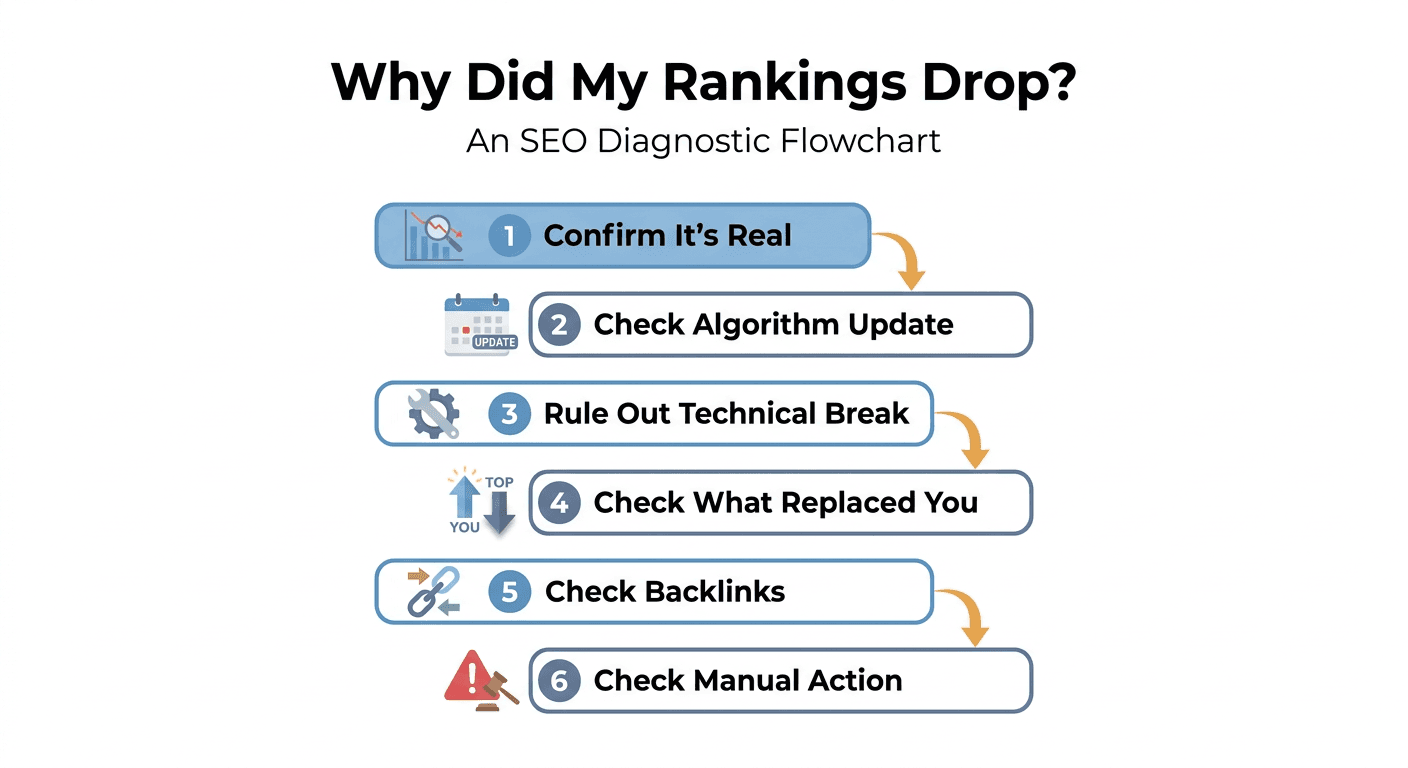
Step 4: Check What Replaced You in the Results (10 minutes)
If it is not an update and not a technical break, look at what is now sitting where you used to be.
- Search the exact keyword and read what outranks you now. Is it a competitor's page, a different page from your own site (cannibalization), or a new SERP feature like an AI Overview, a featured snippet, or a video carousel that pushed organic results down?
- If a competitor took the spot, read their page. Did they publish something more current, more thorough, or better structured than yours? This is the single most common quiet cause of a ranking drop: a page ages in place while a competitor's newer, deeper page slowly earns the position instead. Nobody broke your page. A better one showed up next to it.
- If it's your own page, you may be cannibalizing yourself. Two pages on your own site competing for the same keyword often rank worse combined than either would alone. Check whether a newer article you published is now competing with the one that dropped.
- If a new SERP feature appeared, your ranking might not have actually changed. Your position label could read the same while your visible click share shrank because an AI Overview or a snippet now sits above the organic results. This shows up as a traffic drop with a stable or barely-moved ranking, which is a different problem with a different fix than an actual position drop.
Step 5: Check Your Backlink Profile (5 minutes)
Backlinks remain one of the strongest ranking signals, and they decay quietly.
- Check whether any high-value linking pages were removed, redirected, or deindexed recently. A domain that shut down or a page that got pruned during someone else's cleanup can take your link equity down with it.
- Check for a sudden spike of low-quality or spammy inbound links, which can occasionally trigger algorithmic devaluation even without a manual action.
- If you see a real, meaningful loss of quality referring domains around the timeframe of the drop, that is a plausible contributing cause, though it is rarely the sole one for a single page.
Step 6: Check for a Manual Action (2 minutes)
This is rare, but it is the one cause that requires a completely different response, so confirm it either way.
Open Search Console's Manual Actions report. If it is empty, you do not have a penalty, full stop, and you can stop worrying about this specific cause. If there is an entry, it names the exact violation. A manual action needs a fix followed by a reconsideration request, not a content refresh, and recovery timelines are different (weeks, tied to Google's review process, not the normal re-crawl cycle).
What Actually Happened: Reading Your Results
By this point you have one of a handful of answers. Here is what each one means for what you do next:
- A confirmed algorithm update, site-wide. This is rarely about one broken thing. It usually means Google re-evaluated quality signals across many pages at once. The fix is raising overall content quality and E-E-A-T signals, not a single tweak, and recovery is measured in weeks to the next update cycle, not days.
- A technical break. Fix the specific issue (noindex, robots.txt, canonical, server errors, broken redirect). This is the fastest recovery path on this list once the root cause is found.
- A competitor outranked you, or content aged. This is content decay: your page didn't get worse, the competitive bar around it got higher. The fix is a genuine content refresh, not a resubmission. This is usually a gradual problem, so if your drop was sudden, look harder at Steps 2 and 3 first.
- Cannibalization. Consolidate the competing pages into one, or clearly differentiate their target keywords and internal linking.
- A new SERP feature. Your actual ranking may be fine. The real problem is visibility and click-through rate, and the fix is winning the featured snippet or structuring content to appear in the AI Overview, not chasing a position number that hasn't moved.
- Lost backlinks. Rebuild or replace the lost links; this is a slower recovery path measured in weeks to months.
- A manual action. Fix the specific violation named in Search Console, then file a reconsideration request.
The Part Nobody Tells You: Most Drops Are Never Actually Diagnosed
Here is what the guides that rank above this one for this exact question tend to skip. Knowing this six-step sequence is one thing. Actually running it, on the specific page that dropped, before the trail goes cold, is another.
In practice, most ranking drops get a shrug, not a diagnosis. Someone notices, means to check Search Console, gets pulled into something else that afternoon, and by the time anyone circles back the data has scrolled past the window where the cause was still obvious. The page that needed a five-minute technical check three weeks ago now needs a much longer investigation, if anyone investigates at all.
This is the same gap that shows up across content decay generally: the problem was never a mystery, it was a workflow that didn't survive contact with a busy week. Detecting a drop the day it happens, not the month after, is most of the battle. Murkuz runs this diagnostic automatically in the background: it scans your Google Search Console data daily, flags a page the moment its position or impressions start sliding, and hands you the specific performance history behind that page so you are not starting Step 1 of this checklist from scratch weeks later. If the cause turns out to be content decay rather than a technical or algorithmic event, the same workflow helps you draft the refresh, push it live, and then track whether the fix actually brought the ranking back, instead of hoping and forgetting to check. You can read the full breakdown of that loop on the content decay and rank recovery use case page.
You do not need a tool to run this diagnostic once. You do need some system, even a recurring calendar reminder and a spreadsheet, to make sure it actually gets run every time a page slips, not just the one time you happened to notice.
FAQ
Why did my SEO rankings drop overnight?
The most common overnight causes are a confirmed Google algorithm update rolling out, a technical break introduced by a recent deploy (an accidental noindex tag, a robots.txt change, a broken canonical), or a competitor's page overtaking yours right around that date. True content decay is usually gradual, so if the drop was sudden and dramatic, check Steps 2 and 3 above first.
How long does it take to recover lost rankings?
It depends entirely on the cause. A technical fix (removing a noindex tag, correcting a canonical) can recover within one to two crawl cycles, often days. A content refresh addressing decay or a competitor's stronger page typically takes several weeks for Google to re-crawl, re-evaluate, and adjust. Recovery from a confirmed algorithm update can take until the next related update rolls out. A manual action penalty requires a reconsideration request and generally takes the longest, often several weeks tied to Google's review queue.
Is a ranking drop always a bad sign?
No. If a new SERP feature (an AI Overview, a featured snippet, a video carousel) pushed organic results down the page, your actual ranking position may not have meaningfully changed even though your visible click share did. That is a different problem, with a different fix, than genuinely losing a ranking position to a competitor.
How do I know if it's a Google algorithm update or something on my site?
Check the date of your drop against Google's Search Status Dashboard and a third-party SEO volatility tracker. If the timing lines up and the drop affected many pages across your site rather than just one, an update is the likely cause. If only one or two specific pages dropped while the rest of the site held steady, look at that page specifically: a technical issue, a stronger competitor, or content decay is more likely than a broad update.
Should I rewrite the page or just update it?
Update in almost every case. A page that already ranked has earned link equity, engagement history, and some existing trust with search engines, which is expensive to rebuild from a blank page. Refresh the outdated statistics, expand the sections a competitor now covers better, and realign with current search intent. A full rewrite only makes sense if the original structure or angle is fundamentally wrong for how the topic is understood today.
Junaid Khalid is the founder of Ertiqah and the builder of Murkuz. He has spent years running SEO as the first growth channel for his own SaaS products, which meant sitting through more than a few of these exact ranking-drop mornings himself before building a tool to catch them earlier.