Most "SEO tools for small business" lists are the same 20 to 24 tools in a different order, with no real answer to the question you're actually asking: which of these do I need, and which am I paying for out of guilt? You don't have a marketing department. You have a website, maybe a hundred pages, and an afternoon a month to spend on this.
Here is the short version. You need one free analytics tool (Google Search Console, no substitute), one keyword or audit tool sized to your budget, and a plan for the part almost nobody talks about: keeping the pages you already have from quietly losing rank while you're busy running the business. Below is the honest breakdown, sorted by what job each tool actually does, not by affiliate commission.
What "SEO tools for small business" should actually mean
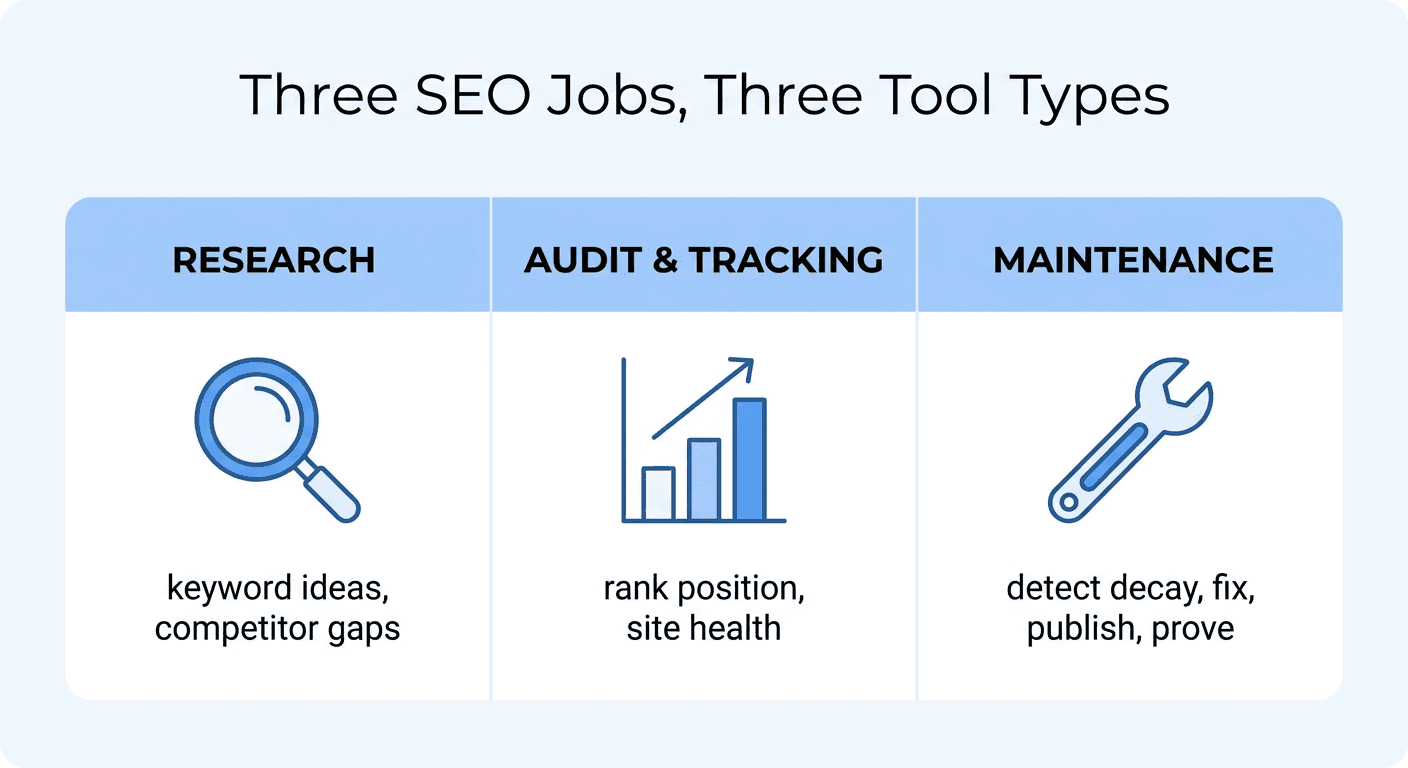
Every roundup lumps together three completely different jobs and calls them all "SEO tools":
- Research tools that tell you what to write and which keywords are winnable (keyword research, competitor gap analysis).
- Audit and tracking tools that tell you what's broken or where you rank right now (site audits, rank trackers).
- Maintenance tools that keep pages you already published from decaying, going stale, or losing rank silently over the following 12 months.
A small business with one website and no dedicated SEO hire usually has research and tracking covered by a free tool or two. What almost never gets covered is maintenance, because it requires someone to actually notice a page slipped and then go fix it. That gap is where most small-business traffic quietly leaks away, and it's the piece this guide spends the most time on.
Start here: the free tools that cover 80% of small-business SEO
Skip straight past any list that puts a $99/month platform first. These four are free, and for a site under a few hundred pages they cover research, technical health, and local visibility without a subscription.
- Google Search Console. The one non-negotiable tool on this entire list. It shows the exact queries bringing you traffic, your average position for each one, and technical issues Google found on your site. If you install nothing else on this list, connect this.
- Google Analytics (GA4). Pairs with Search Console to show what happens after someone lands: which pages convert, where visitors drop off, which channel actually drives inquiries or sales.
- Google Business Profile. If you have any local footprint at all (a storefront, a service area, a single office), an optimized, actively-updated profile is usually the single highest-return SEO action a small business can take, and it costs nothing.
- Screaming Frog (free tier). A desktop crawler that finds broken links, duplicate titles, and missing meta descriptions, free for up to 500 URLs, which covers most small-business sites outright.
The paid tools worth their price, by budget
Once you've outgrown the free stack (usually because you want keyword difficulty scores or ongoing rank tracking without checking Search Console by hand), here's where the actual paid categories split.
| Budget tier | Tool examples | What you get | What you still do yourself |
|---|---|---|---|
| $0 to $30/mo | Ubersuggest, Mangools (KWFinder) | Keyword research, basic rank tracking, simple site audits | Content writing, technical fixes, ongoing monitoring |
| $50 to $90/mo | SE Ranking, Surfer SEO | Daily rank tracking + keyword research (SE Ranking), or real-time on-page scoring against top-ranking pages while you write (Surfer) | Noticing which existing pages are declining; publishing the fix |
| $130 to $250/mo | Ahrefs, Semrush | The deepest backlink and competitor data, content gap analysis, technical audits at scale | Writing the fix and getting it live; most of this data goes unused by a one-person team |
| Any budget | Murkuz | Daily scans of your Search Console data for pages losing rank, an AI-drafted fix, and one-click publishing straight to WordPress, Webflow, or Framer | Approving the fix, or letting it run on autopilot |
A few honest notes on that table, because a chart without context is exactly the kind of thin content this space is full of:
- Ubersuggest and Mangools are fine if your only need is occasional keyword research. Neither one watches your existing content for you.
- SE Ranking is a solid all-in-one at a fair price if you want keyword tracking, on-page audits, and competitor snapshots without the $150/month tier. It still requires you to log in, read the dashboard, and act on what you see.
- Surfer SEO is an optimization tool, not a detection tool. It makes you better at writing a page once you already know which page needs the work. It won't tell you your top service page quietly dropped from position 4 to position 14 last quarter; you'd need to notice that yourself.
- Ahrefs and Semrush are built for agencies and marketing teams who spend real hours per week in the tool. For a solo owner, you're often paying for a backlink database and competitor intelligence you'll open twice a year.
The gap almost every "best tools" list skips: who's watching what you already published?
Here's the part that rarely gets said out loud: writing content isn't the bottleneck for most small businesses anymore. AI made a first draft cheap. The actual bottleneck is that nobody is watching the pages you already have.
A service page that ranked well 18 months ago doesn't stay there by default. A competitor refreshes their page and takes your spot. A stat you cited goes stale. A service you no longer offer is still the H1. <mark class="km-highlight" style="--hl:#FEF08A;background:#FEF08A">Most small business owners find out only when a slow month makes them ask why the phone stopped ringing</mark>, and by then the decline has usually been running for weeks.
This is exactly the handoff most tools on this list leave you holding. A rank tracker will show you the graph going down. An audit tool will list the problem. None of them draft the fix, publish it to your CMS, and then check whether it actually worked, which is the entire second half of the job.
Murkuz was built around closing that specific gap for teams without a dedicated SEO hire. It connects to your Google Search Console, scans daily for pages losing position or sitting on page two (positions 11 to 20, one push from page one), and generates a task with the problem and a recommended fix already attached. Approve it and Murkuz publishes the fix directly to WordPress, Webflow, or Framer, no copying between five tabs. It then tracks whether the ranking actually recovers, so you're not left guessing if the fix worked. See how the full workflow runs end to end.
Do you actually need a paid tool, or can you do this yourself?
This is the most common question small business owners ask before spending anything, and the honest answer is: yes, you can do a meaningful amount of SEO yourself with free tools, especially in year one. Where a paid tool starts earning its cost is the maintenance problem above, because "checking on old content" is the task that never survives a busy quarter.
A reasonable sequence:
- Month 1: Connect Search Console and Google Business Profile. Free, and this alone tells you more than most paid tools will in the first 90 days.
- Month 2 to 3: Add one budget research tool (Mangools or Ubersuggest) if you're actively publishing new pages and need keyword ideas.
- Month 4 onward, once you have 15 to 20+ published pages: this is when content maintenance becomes the real cost. Old pages start decaying faster than you can manually check them, and this is the point where a tool that watches your existing content for you (rather than one more dashboard you have to remember to open) starts paying for itself. Pricing for that tier starts at under $100/month for a full detect-and-fix loop, not just another report.
Quick recommendations by situation
- You're pre-revenue or bootstrapped with no marketing budget: Google Search Console, GA4, Google Business Profile, Screaming Frog free tier. Genuinely enough for the first 6 to 12 months.
- You publish content regularly and need keyword ideas: add Mangools or Ubersuggest ($15 to $30/mo).
- You have 20+ pages live and haven't checked half of them in months: this is the maintenance gap. Look for a tool built to detect decay and publish fixes, not just another audit dashboard.
- You're an agency managing several small-business clients: Ahrefs or Semrush earn their keep at this scale, where the backlink and competitor data gets used weekly across multiple accounts.
FAQ
Which SEO tool is best for small businesses?
There isn't one tool that covers everything, and any list claiming otherwise is oversimplifying. Start free with Google Search Console and Google Business Profile. Add a budget keyword tool if you're publishing regularly. Once you have enough content that you can't manually check it for decay every month, that's the point to add a tool built specifically for ongoing detection and fixes rather than one more audit report.
Can ChatGPT do SEO for a small business?
ChatGPT and similar tools are genuinely useful for brainstorming topics, drafting outlines, and organizing keywords by intent. They have no connection to your actual Search Console data, so they can't tell you which of your live pages is losing rank, and they can't publish anything to your site. Treat them as a writing assistant, not a monitoring system.
Which SEO tools are actually free?
Google Search Console, Google Analytics (GA4), and Google Business Profile are free and cover the majority of what a small business needs early on. Screaming Frog's free tier crawls up to 500 URLs. Ahrefs Webmaster Tools also offers free basic site audit and backlink data if you verify site ownership.
Can I do SEO myself without hiring an agency?
Yes, especially in the first year. The technical and research side of SEO is well within reach using free tools and a few hours a month. The part that's hardest to do yourself long-term is consistently checking older pages for decay, because it's easy to keep deprioritizing a task with no obvious deadline. That's usually the first thing worth automating or outsourcing once your site has enough pages to make manual checks impractical.
How much should a small business spend on SEO tools?
Most small businesses can run entirely on free tools for the first 6 to 12 months. Once you're publishing regularly, budget $15 to $90/month for a research or tracking tool. A maintenance tool that actively detects and fixes decaying content is a separate line item, usually starting under $100/month, and it replaces the manual hours you'd otherwise spend auditing old pages by hand.
Junaid Khalid is the founder of Ertiqah, the studio behind Murkuz. He has run SEO as the first growth channel across several of his own SaaS products before building a tool to automate the maintenance work he kept doing by hand.