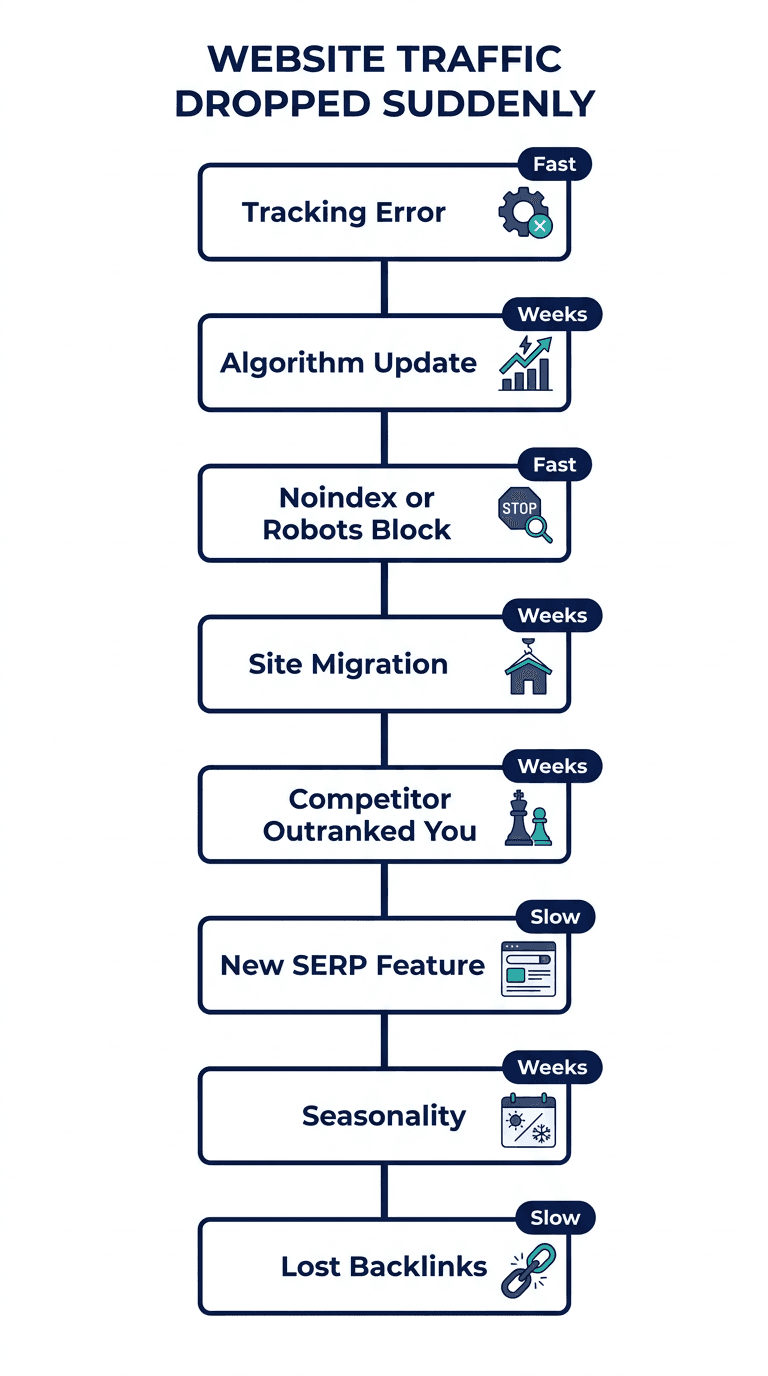
Your traffic chart fell off a cliff and you have no idea why. Before you panic or start rewriting pages at random, work through the causes below in order. Most sudden drops trace back to one of eight things, and most of them take five to fifteen minutes to rule in or out. Start at the top. The first few checks catch the majority of cases.
First, confirm it's actually a drop
Open Google Search Console's Performance report and switch to a daily view instead of the default 28-day average, which can hide a one or two day dip inside a smoother-looking trend line. Compare the same metric (clicks, not impressions) across the exact days in question. If the dip only shows up in one analytics tool and not in GSC or your server logs, you may be looking at a tracking problem, not a traffic problem. That possibility alone is common enough to rule out first, before you touch a single page.
The 8 causes, in order of likelihood
1. A tracking or analytics error
This is the most common false alarm in this entire list, and it wastes more panic than any real cause. A site migration, a cookie-consent banner update, a theme change, or a tag manager edit can quietly break the analytics snippet while the site itself keeps performing exactly as before.
Check: Open your site in an incognito window and watch the real-time report in your analytics tool while you browse a few pages yourself. If your own visit doesn't register, the tracking code is broken, not your traffic.
Fix: Reinstall or re-verify the tracking tag, check Google Tag Manager for a container that failed to publish, and confirm the consent-mode settings aren't blocking the pageview event by default.
2. A confirmed Google algorithm update
Google rolls out several core updates a year, plus smaller spam and content-quality updates, and a broad one can move traffic across an entire site within a day or two of finishing its rollout.
Check: Compare the date your traffic dropped against Google's Search Status Dashboard, which lists confirmed update rollout windows. If the timing lines up and the drop hit many pages at once rather than just one, an update is the likely cause.
Fix: There usually isn't a quick fix for a core update. Google's own guidance is to wait for the rollout to finish, then assess whether the pages that dropped are genuinely thinner or less useful than what now outranks them, and improve accordingly. Chasing a fix mid-rollout on incomplete data tends to waste effort.
3. Accidental noindex, robots.txt block, or broken canonical
Technical breaks cause some of the most dramatic, sudden drops, because a single deploy can accidentally block or de-rank a page overnight, and they're usually the fastest thing on this list to fix once found.
Check: View the page source for a stray noindex meta tag or X-Robots-Tag header, fetch yoursite.com/robots.txt and confirm the affected path isn't disallowed, and check that the canonical tag points to itself rather than another URL.
Fix: Remove the tag or rule, then request reindexing in Search Console. Recovery from a purely technical break is often the quickest on this list, sometimes within a single crawl cycle.
4. A site migration, redesign, or URL change
Migrations are one of the single riskiest events in SEO, and a broken redirect map alone can tank a whole section of a site.
Check: Did a URL structure, domain, subdomain, or CMS change around the date of the drop? Spot-check a sample of your previously top-performing URLs to confirm they still resolve, and that old URLs 301 to the correct new ones rather than a blanket homepage redirect.
Fix: Rebuild the redirect map one-to-one where possible, resubmit an updated sitemap, and monitor the Coverage report for a spike in 404s or "page with redirect" errors.
5. A competitor's page overtook yours
Nobody broke your page. A better one showed up next to it. This is content decay in its most common form: your page didn't get worse, the competitive bar around it quietly got higher while nobody was watching.
Check: Search the exact keyword your dropped page targets and read what's now sitting above you. Is it more current, more thorough, or better structured?
Fix: Refresh the outdated sections, add what the competing page covers that yours doesn't, and update any statistics or examples that have aged. This is a gradual-recovery fix, typically several weeks, not an overnight one. If you want the fuller playbook for this specific cause, SEO Rankings Dropped? A Fast Diagnostic to Find the Cause walks through the full six-step sequence.
6. A new SERP feature ate the click, not the ranking
Your position may not have moved at all. An AI Overview, a featured snippet, or a video carousel pushed the organic results further down the page, so your visible click share shrank even though your ranking held.
Check: Search the keyword yourself and count how far down the page organic result 1 actually sits. If there's a large AI Overview or several rich features above it, that's likely eating clicks regardless of your position.
Fix: This isn't a ranking problem, it's a visibility problem. Structuring content to answer the query directly and concisely near the top of the page gives you a better shot at being the source an AI Overview cites, which recovers some of that lost visibility even without a position change.
7. Seasonality or a demand shift
Some of the calmest explanations are the easiest to miss when you're staring at a scary chart. Search demand for many topics rises and falls with the calendar: gift guides fall off after the holidays, tax content spikes and drops around filing deadlines, back-to-school terms fade every autumn.
Check: Compare the current drop against the same period last year. If last year's chart shows a similar dip around the same date, seasonality is the likely explanation, not something broken on your end.
Fix: Nothing to fix. Plan content and campaigns around the known cycle instead of reacting to it as an emergency each year.
8. Lost or devalued backlinks
Backlinks remain one of the strongest ranking signals, and they decay quietly when a linking domain shuts down, redirects, or gets deindexed.
Check: Review your backlink profile for a recent, meaningful loss of referring domains, particularly ones that were sending meaningful authority to the page that dropped.
Fix: Rebuild or replace the lost links with outreach to similar or better sources. This is one of the slower recovery paths on this list, typically weeks to months, and it's rarely the sole cause for a single page unless the loss was unusually large.
Which one is it? A quick reference
| Cause | Fastest tell | Typical recovery time |
|---|---|---|
| Tracking/analytics error | Your own incognito visit doesn't register | Immediate once fixed |
| Algorithm update | Drop date matches Google's Status Dashboard, site-wide | Weeks, tied to next update cycle |
| Noindex / robots.txt / canonical | Tag or rule found in page source | Days, one to two crawl cycles |
| Migration / URL change | Old URLs 404 or redirect wrong | 1-4 weeks once redirects are fixed |
| Competitor overtook you | A newer, deeper page now outranks yours | Several weeks after a real refresh |
| New SERP feature | Organic result 1 sits far down the page | Varies, often a visibility fix not a ranking one |
| Seasonality | Same dip visible in last year's data | None needed, self-corrects |
| Lost backlinks | Referring domains dropped around the same date | Weeks to months |
Why most drops don't get diagnosed until it's too late
Here's the part almost nobody says out loud: even after reading a list like this, most traffic drops never actually get investigated. Someone notices the chart, means to check Search Console that afternoon, gets pulled into something else, and by the time anyone circles back the trail has gone cold. On the pages Murkuz has tracked, teams typically don't notice a page has started losing rankings for three to six months, and by that point roughly 60 to 80 percent of the clicks it used to get are already gone.
That's not a reason to panic about every page on your site. It's a reason to treat detection as a system, not a one-time reaction to a scary chart. Murkuz scans your Google Search Console data every morning and flags a page the moment its position, impressions, or clicks start sliding, before it's the kind of drop you'd notice by eyeballing a dashboard. If the cause turns out to be a stale or outranked page rather than something technical, the same workflow helps draft the refresh, push it live to WordPress, Webflow, or Framer, and then track whether the fix actually brought the traffic back. You can see the fuller version of that loop on the content decay and rank recovery use case page.
You don't need a tool to run through the eight causes above once. What's harder to do without one is catching the next drop on day one instead of month three, on every page, not just the one you happened to notice this time.
FAQ
Why is my website traffic suddenly down?
The most common causes, in rough order of likelihood, are a broken analytics tag, a confirmed Google algorithm update, an accidental technical block (noindex, robots.txt, or canonical issue), a recent migration, a competitor's page overtaking yours, a new AI Overview or SERP feature absorbing clicks, seasonality, or lost backlinks. Work through them in that order since the fastest and most common causes come first.
How long does it take for website traffic to recover?
It depends entirely on the cause. A technical fix (removing a noindex tag, correcting a redirect) can recover within a single crawl cycle, often days. A content refresh addressing a stronger competitor typically takes several weeks. Recovery from a confirmed algorithm update can take until the next related update rolls out. Lost backlinks are usually the slowest, often weeks to months.
Is a traffic drop always a ranking problem?
No. If your rankings haven't actually moved but an AI Overview, featured snippet, or video carousel now sits above your result, your visible click share can drop even though your position is unchanged. Check your actual ranking position before assuming you lost the spot.
Can a website traffic drop fix itself?
Sometimes, yes. Seasonal dips reverse on their own once the relevant period returns, and some algorithm-related fluctuations settle out as a rollout finishes. Technical breaks, lost backlinks, and being outranked by a better page generally do not fix themselves and need direct action.
Should I check Google Analytics or Search Console first?
Search Console first, for organic traffic specifically. It shows you clicks, impressions, and average position by exact page and query, which tells you whether the drop is a ranking problem, a visibility problem, or isolated to a handful of pages. Google Analytics is useful for confirming whether the drop is organic-only or across all channels, which helps rule out a site-wide tracking issue.
Junaid Khalid is the founder of Ertiqah, the studio behind Murkuz. He has spent years running SEO as the first growth channel for his own SaaS products, which meant learning to tell a real traffic drop from a tracking glitch the hard way, more than once.