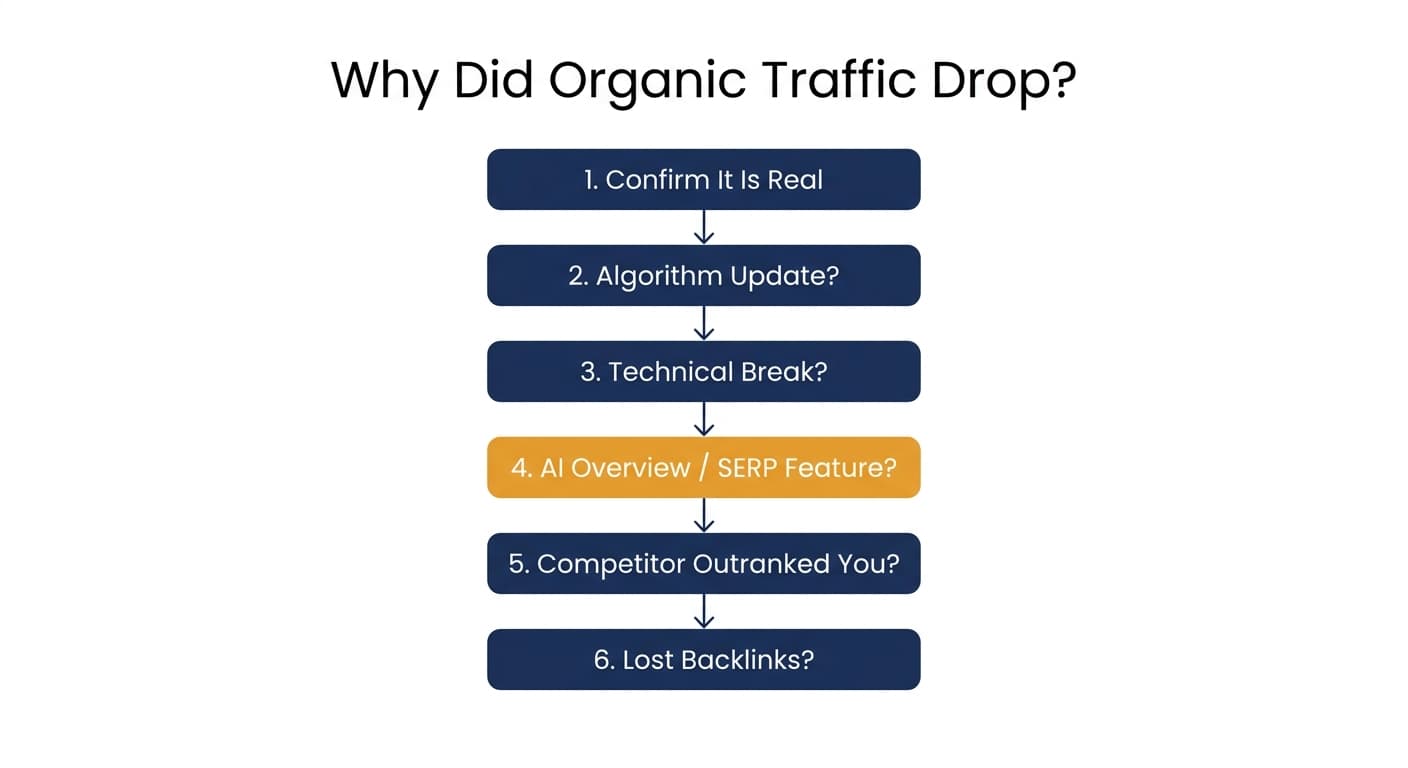
Your traffic graph has a cliff in it, and you need to know why before you can fix anything. The short answer: it's almost always one of six things: a tracking error that isn't a real drop at all, a Google algorithm update, a technical break on your site, an AI Overview or other SERP feature eating your clicks, a competitor's page overtaking yours, or a genuine loss of backlinks. This checklist walks through all six in the order that finds the answer fastest, so you spend your first hour diagnosing instead of guessing.
Work through it in sequence. Most people jump straight to "did Google update the algorithm again," which is only the right answer maybe a third of the time. The other causes need to be ruled in or out just as fast, and the order below is built so you never waste time investigating the wrong one first.
Step 1: Confirm the Drop Is Real (5 minutes)
Before you diagnose anything, rule out a false alarm. A huge share of "my traffic dropped" panics turn out to be a measurement problem, not a ranking problem.
- Check Google Search Console first, not just Google Analytics. GSC shows clicks and impressions per query and per page; GA4 shows sessions and can be skewed by consent-mode sampling, tagging bugs, or a bot-traffic spike that recently got filtered out. If GSC and GA4 disagree sharply, trust GSC for the SEO question.
- Compare like periods. A week-over-week dip that vanishes when you compare month-over-month, or a dip that lines up exactly with a holiday or weekend, is often a seasonal pattern, not a decline. Check the same period last year if your traffic has any seasonality at all.
- Rule out a tracking break. A GA4 property change, a new consent banner blocking the tag, a canonical or redirect change that split your data across two URLs, these create traffic "drops" that never touched a single ranking. Confirm your tags are firing correctly before you look anywhere else.
- Check whether it is brand or non-brand traffic. A dip in branded search (people searching your company name) points to demand or marketing changes, not an SEO problem. A dip concentrated in non-brand, informational queries points at rankings or SERP layout.
If the drop holds up in GSC, across more than a couple of pages, and isn't explained by seasonality or brand traffic, it's real. Move on.
Step 2: Check for a Google Algorithm Update (2 minutes)
This is the fastest check with the highest hit rate for a broad, multi-page drop.
Google ships core updates and smaller ranking-system updates throughout the year, and a wide core update can move traffic across dozens of pages within days of rolling out.
- Check Google's Search Status Dashboard for a confirmed update around the date your traffic moved.
- Cross-reference the timing against a third-party SEO volatility tracker to see whether the wider industry, not just your site, felt turbulence that week.
- If the timing lines up and the hit spans many pages and templates rather than one URL, an algorithm update is the likely cause. That means the fix is raising content quality and E-E-A-T signals broadly, not patching one page.
If nothing on the timeline matches, keep going. Something more specific happened.
Step 3: Rule Out a Technical Break (10 minutes)
Technical issues cause some of the most sudden, dramatic drops, and they are usually the fastest to fix once you find them, so check them before touching any content.
| Check | How to check it | What it means if you find it |
|---|---|---|
| Accidental noindex | View source or a crawler for a noindex tag on affected pages | A recent deploy told Google not to rank the page. Remove the tag, request reindexing. |
| Robots.txt block | Fetch yoursite.com/robots.txt, confirm the affected paths aren't disallowed | Crawlers got blocked from the section. Fix the rule, resubmit the sitemap. |
| Broken canonical tags | Check the canonical URL in page source points to itself | Google may be indexing and ranking a different URL than the one you're tracking. |
| Spike in server errors | Check GSC's Crawl Stats and Coverage reports for 5xx spikes | Googlebot couldn't reliably reach the site during a deploy; rankings slip until crawling stabilizes. |
| A recent migration, redesign, or CMS switch | Check if URLs, templates, or redirects changed around the drop date | Migrations are one of the highest-risk events in SEO; a thin redirect map alone can tank a whole section. |
| Page speed or Core Web Vitals regression | Run PageSpeed Insights or check the GSC Core Web Vitals report | A slower experience after a recent deploy can quietly cost rankings on competitive queries. |
A technical cause is, relatively, good news: once found, traffic usually recovers within one to two crawl cycles.
Step 4: Check Whether an AI Overview or SERP Feature Ate Your Clicks
This is the fastest-growing cause in 2026, and most older diagnostic guides don't cover it well because it barely existed when they were written.
Here's the distinct signature: your ranking position in Search Console stays roughly the same, but your clicks and impressions fall anyway. That combination means the SERP itself changed shape around you, not that you lost a ranking.
- Search your target queries manually and check whether an AI Overview, a featured snippet, a "People also ask" box, or a video/image carousel now sits above or between the organic results.
- In GSC, compare the trend for impressions against average position for the affected queries. Position holding steady while impressions or clicks fall is the AI Overview / SERP-feature signature specifically.
- If an AI Overview is citing other sites but not yours for queries you rank on page one for, that is a visibility gap, not a ranking loss, and the fix is different: structuring content so it is easy for an AI system to extract and cite (clear direct answers, well-labeled sections, original data), not chasing a position number that never actually moved.
This cause explains a meaningful share of the "why did my organic traffic drop" searches happening right now, even when nothing else on this list turns anything up.
Step 5: Check What's Now Outranking You
If it isn't an update, a technical break, or a SERP-feature shift, look at what's actually sitting in your old spot.
- Search the exact query and read the page that replaced you. Is it a competitor with something more current, more thorough, or better structured? This is the quiet, common cause: a page ages in place while a newer, deeper competitor page slowly earns the position instead. Nobody broke your page; a better one showed up next to it. This is <mark class="km-highlight" style="--hl:#FEF08A;background:#FEF08A">content decay</mark>, and it is usually gradual, so if your drop was sudden, revisit Steps 2 and 3 first.
- Check for self-cannibalization. A newer article you published on a similar topic can end up competing with, and diluting, the page that dropped. Two of your own pages ranking for the same keyword often perform worse combined than either would alone.
- Look at the actual gap, not just that there is one. Read the top 3 results side by side with your page: what subtopics do they cover that you don't, how much more current are their examples and data, do they answer the question faster, do they have something (a tool, a table, real data) yours lacks?
Step 6: Check Your Backlink Profile (5 minutes)
Backlinks remain a meaningful ranking signal and they decay quietly, without any single dramatic event to notice.
- Check whether high-value linking pages were removed, redirected, or the linking domain went offline recently. Losing a handful of strong referring domains at once can visibly soften rankings.
- Check for a sudden spike of low-quality or spammy inbound links, which can occasionally trigger an algorithmic devaluation even without a manual penalty.
- If you find a real, meaningful loss of quality referring domains around the timeframe of the drop, treat it as a plausible contributing factor, though rarely the sole cause for a single page.
The Part Most Traffic-Drop Guides Skip
By this point you likely have an answer, or at least a short list of suspects. Here is what almost nobody says out loud: most organic traffic drops never actually get diagnosed. Someone notices the graph dip, means to check Search Console that afternoon, gets pulled into something else, and three weeks later the trail is cold. The AI Overview that appeared on a key query, the noindex tag a deploy accidentally added, the competitor page that overtook you: all of it was findable in the first week. By week four it's a much longer investigation, if anyone runs it at all.
This is the same underlying gap that shows up across content decay generally: the cause was rarely a mystery, it was a workflow that didn't survive a busy quarter. Murkuz scans your Google Search Console data every day specifically to close that gap: it flags a page the moment its position or impressions start sliding, before the drop is big enough that anyone would notice it by eye, and hands you the performance history behind that specific page so you're not starting Step 1 of this checklist cold, weeks after the fact. If the cause turns out to be content decay rather than a technical or algorithmic event, the same workflow helps draft the refresh, push it live to your CMS, and then track whether the fix actually moved the ranking back, rather than hoping and forgetting to check. The full breakdown of that loop lives on the content decay use case page, and the plans all run the same detect-to-prove cycle.
You don't need a tool to run this checklist once. You need some system, even a recurring calendar reminder and a shared spreadsheet, to make sure it actually runs every time a page slips, not only the one time someone happened to notice the graph.
FAQ
Why is my organic traffic down but rankings look the same?
Your rankings and your traffic are not the same metric. If an AI Overview, a featured snippet, or another SERP feature now sits above the organic results for your queries, your position label can stay unchanged while your visible click share shrinks. Compare the impressions and clicks trend against average position in Search Console for the affected queries; if position is flat but impressions or clicks are falling, a SERP-feature or AI Overview change is the likely cause, not a ranking loss.
How long does it take to recover from a traffic drop?
It depends on the cause. A technical fix, removing a noindex tag or correcting a canonical, can recover within one to two crawl cycles, often days. A content refresh addressing decay or a stronger competitor typically takes several weeks for Google to re-crawl and re-evaluate. Recovery from a confirmed algorithm update can take until the next related update cycle. Lost backlinks are the slowest, often weeks to months to rebuild.
Is AI Overviews the reason my traffic is dropping?
It's a real and growing cause, but it's not automatic and not universal. Check whether AI Overviews or other rich results now appear for your specific target queries, and whether your average position for those queries has stayed flat while impressions or clicks fell. If both are true, that is the signature. If your average position actually dropped, look at Steps 2 through 6 above first; a genuine ranking loss and an AI Overview visibility gap need different fixes.
Should I panic if my traffic drops after a Google update?
Not immediately. First confirm the update is real and confirmed on Google's Search Status Dashboard, and that the drop affected many pages rather than one. If so, this is rarely about a single broken thing; it usually means Google re-evaluated quality signals broadly. The right response is raising overall content quality and E-E-A-T signals across your site over the following weeks, not a single-page fix applied in a panic.
Can seasonal changes cause a traffic drop that looks like an SEO problem?
Yes, and it's one of the most common false alarms. Compare the current dip against the same period last year, and check whether the topic has natural seasonality (holiday shopping terms, back-to-school queries, weather-related searches). If last year shows the same shape at the same time of year, this is demand, not an SEO issue, and no content or technical fix will change it.
Junaid Khalid is the founder of Ertiqah and the builder of Murkuz. He has run SEO as the first growth channel for his own SaaS products for years, which meant learning to diagnose traffic drops fast, under real pressure, long before he built a tool to catch them earlier.