Most "WordPress SEO automation" searches lead to a plugin sales page, an n8n workflow diagram, or a YouTube video promising 1,000 AI-written posts in one click. None of them answer the actual question a working blogger has: which SEO tasks are safe to hand off to software, and which ones will quietly wreck a ranking if you stop paying attention to them.
This guide answers that question directly. It covers what WordPress SEO automation for bloggers realistically handles well in 2026, what still needs a human decision, and a concrete way to set it up without breaking the archive you have spent years building.
What "WordPress SEO Automation" Actually Means for a Blogger
WordPress SEO automation is software (a plugin, a workflow tool, or a connected platform) that performs SEO tasks on your blog without you doing them by hand each time: generating meta tags, flagging broken links, drafting content, or republishing an updated post. The word that matters most is "automation," not "AI." Automation just means a task runs on a schedule or a trigger instead of you remembering to do it.
For a blogger specifically, this matters more than it does for a small brochure site, for one reason: volume. A blog with 150, 400, or 1,200 published posts has an archive problem no static site has. Every post you wrote two years ago is still live, still competing for its keyword, and still capable of losing its ranking while you are busy writing this week's post. Manual SEO maintenance does not scale past roughly 50-100 posts. Automation is not optional at that point; it is the only way the archive gets looked after at all.
What You Can Safely Automate Today
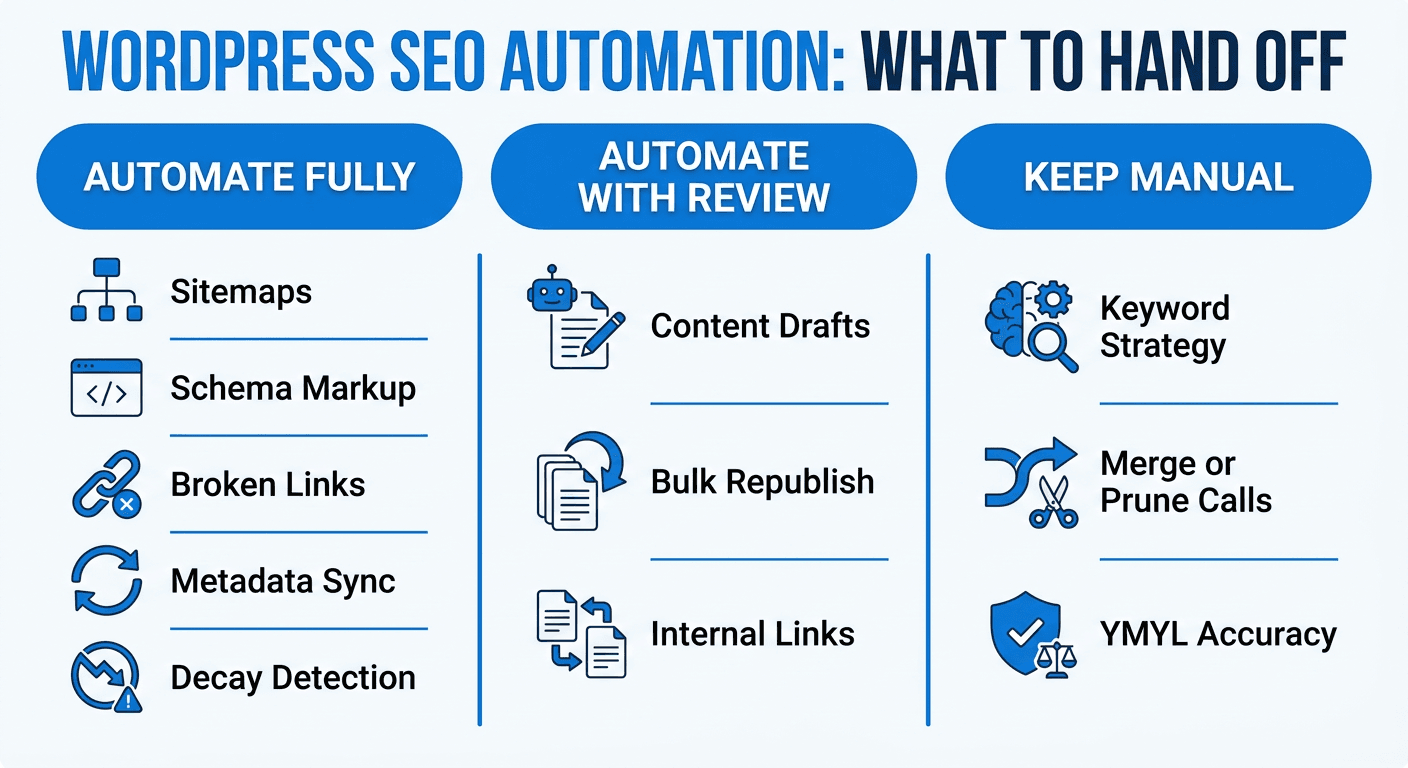
Not everything under the "AI SEO" banner is equally trustworthy. Some tasks are mechanical and low-risk to hand off. Others carry real downside if the automation gets it wrong. Here is the honest split.
Safe to fully automate
- Sitemap generation and resubmission. There is no judgment call here; a sitemap is a data structure, and keeping it current is exactly what software should do.
- Broken link and 404 detection. Crawling your own archive for dead internal links or orphaned redirects is tedious, repetitive, and near-zero risk to automate.
- Schema markup. Article, FAQ, and Review schema follow a fixed spec. Once the template is right, generating it for every new post is mechanical.
- Metadata sync. Keeping title tags, meta descriptions, and Open Graph data aligned with the actual content of a post, especially after you update that content, is a task worth automating so a stale title never sits alongside refreshed copy.
- Decay detection. Flagging which posts have dropped in ranking or organic clicks over the last 90 days is pure pattern-matching on Search Console data. A human still decides what to do about it, but finding the problem is automatable.
Automate with a human checkpoint
- Content drafts for a refresh. Software can draft an updated section for a post that has gone stale (new stats, a changed process, an outdated screenshot) far faster than you can from scratch. It should not publish that draft without you reading it first, at least until you trust its voice match on your specific blog.
- Bulk republishing. Pushing dozens of updated posts live in one session is a huge time saver, but batch-publish with a review step or a small canary batch first, not your whole archive at once.
- Internal link suggestions. Automation is good at spotting linking opportunities across hundreds of posts a person would never manually cross-reference. It is worse at judging which link actually helps the reader versus which one is just keyword-stuffing an anchor.
Do not automate
- Which keyword to target next. This is a strategic call about your audience and your niche, not a pattern in search data.
- Whether to merge, prune, or keep two competing posts. Consolidation decisions require judging your own content, and getting them wrong (merging two posts that actually serve different intents) can cost you a working ranking.
- Brand voice and factual accuracy on YMYL topics. If your niche touches health, money, or legal advice, every AI-drafted sentence needs a human who understands the subject reading it before it goes live, full stop.
A Practical Setup: Automating Without Breaking Your Archive
Here is a sequence that works whether you are setting this up for the first time or fixing a rushed automation setup that already burned you once.
- Connect read-only first. Link Search Console and GA4 to whatever tool you use before you let it touch WordPress at all. You want a few weeks of decay and traffic data before you automate any writing or publishing decisions.
- Start with detection only. Turn on ranking-drop and content-decay alerts and just watch them for a cycle. This tells you how noisy the signal is on your specific blog before you build a workflow around it.
- Draft mode before live mode. When you turn on AI-assisted content generation, set it to create drafts, not auto-publish. Read the first 10-20 drafts against your own posts. If the voice and factual accuracy hold up consistently, then consider auto-execution for lower-stakes posts.
- Batch the first bulk update small. Do not queue your whole 400-post archive for a metadata or content refresh on day one. Run a batch of 10-20 first, check how they render on the live site, then scale up.
- Keep a monitoring loop, not a fire-and-forget one. The point of automating detection is so a slipping post gets caught fast, not so you stop checking entirely. Set a weekly or biweekly review of what the tool flagged and what it changed.
Where a Connected Platform Beats a Standalone Plugin
Most WordPress SEO plugins (the AIOSEO/Yoast/RankMath category) are excellent at the on-page mechanics: title tags, sitemaps, schema, readability scores while you write. What they generally do not do is close the loop back to what actually happened after you hit publish. They tell you a page's SEO score; they do not watch that page's ranking six months later and tell you it started slipping, let alone draft and push the fix.
That gap is exactly where a connected platform fits, and it is worth naming plainly rather than vaguely: Murkuz watches a WordPress archive continuously, detects which posts are losing rankings, generates an updated draft grounded in your own site's existing content and voice, and then publishes straight back to WordPress with the choice of draft-for-review or fully automatic, while keeping title tags, meta descriptions, and Open Graph data in sync so you never have to separately touch Yoast or RankMath for the same change. For a blog with a real archive, that closes the actual gap: a plugin optimizes the page you are writing today; a platform like this also watches the 300 pages you wrote in the last three years and tells you which ones need attention now.
If you are still deciding what to automate first and what to leave manual, the best SEO automation tools comparison breaks down how different platforms handle this same detect-fix-deploy loop, and our fuller SEO guide for bloggers covers the on-page and content side in more depth if you are earlier in the process than automation.
Common Mistakes Bloggers Make With SEO Automation
- Turning on full auto-publish before verifying voice match. The fastest way to lose reader trust is a batch of AI-drafted refreshes that read nothing like the rest of your blog. Always run a manual-review period first.
- Automating everything at once. Doing detection, content generation, and bulk publishing all in the same week gives you no way to tell which change caused which result if something goes wrong.
- Ignoring plugin conflicts. If you already run an SEO plugin for on-page basics, check that a new automation tool is not double-writing metadata or fighting the same fields; that is a real, common failure mode with WordPress's plugin ecosystem.
- Treating automation as "set and forget." Even the best detection system needs a human glancing at what it found every week or two. An unread alert is not a fixed ranking.
- Skipping the read-only observation period. If you let a tool start changing content before you have watched a few weeks of its detection accuracy on your specific blog, you have no baseline to judge whether its calls are good.
FAQ
Can WordPress SEO be fully automated?
Parts of it can (sitemaps, schema, metadata sync, decay detection), but content decisions, keyword strategy, and anything touching accuracy on sensitive topics still need a human in the loop. Full automation with zero oversight is possible but risky for anything beyond the most mechanical tasks.
What is the best way to start automating SEO on WordPress?
Connect Search Console and GA4 read-only first, turn on decay and ranking-drop detection, and watch it for a few weeks before automating any content generation or publishing. Starting with drafts instead of auto-publish avoids most of the early mistakes.
Do SEO plugins like Yoast or RankMath already do this?
They handle the on-page mechanics well (title tags, readability, sitemaps) but generally do not monitor a post's ranking after publish or automatically fix it if it slips. That is a separate, ongoing job most standalone plugins are not built for.
Is AI-generated content bad for WordPress SEO?
Google has stated it does not penalize content for being AI-assisted; it evaluates helpfulness and quality regardless of how content was produced. The risk is not the AI label, it is unreviewed, generic, or inaccurate content, which is exactly why a review step matters for anything beyond mechanical tasks.
How many blog posts before SEO automation is worth it?
There is no hard cutoff, but most bloggers feel the pain somewhere between 50 and 150 posts, when manually re-checking old content for decay stops being realistic alongside writing new posts.
Junaid Khalid is the founder of Ertiqah, the company behind Murkuz. He has run SEO as the first growth channel across his own SaaS products before building a platform to close the loop between detecting a ranking problem and proving the fix worked.