If you manage SEO for more than one site, or more than one person touches your site's SEO work, you already know the real problem is not "what should we do." It is "who is doing it, is anyone tracking it, and did the last five things we said we'd fix actually get fixed." That is SEO workflow management: the system that turns a pile of SEO ideas and alerts into tracked, assigned, completed work, instead of a spreadsheet nobody opens after the second week.
This guide is not another "four stages of SEO" explainer (if you want the full detect-to-deploy process, see our SEO workflow breakdown). This one is the operations layer underneath it: how to structure the work, where a spreadsheet breaks, what real prioritization looks like, and how to wire SEO tasks into the project management tool your team already uses, ClickUp included.
What SEO Workflow Management Actually Means
SEO workflow management is the operational layer that sits on top of SEO strategy. Strategy decides what matters: which keywords, which pages, which fixes. Workflow management decides how that work actually gets done: who owns each task, what order it happens in, how it is tracked, and how you confirm it was finished and it worked.
Most teams have plenty of strategy and almost no workflow. They run an audit, generate forty recommendations, drop them into a spreadsheet, and within a month the doc is stale, nobody remembers who was supposed to do what, and half the recommendations never shipped. That gap between "we know what to do" and "we actually did it" is the entire discipline of SEO workflow management.
Three things distinguish a real workflow from a task list:
- A single source of truth. One place every task lives, not a spreadsheet plus a Slack thread plus someone's memory.
- Ownership and a due date on every item. A task with no owner is a suggestion, not work.
- A status that changes. Not started, in progress, in review, done, verified. If a tool can't show you that progression at a glance, it is a list, not a workflow.
Why Spreadsheets Are Where SEO Workflows Go to Die
Spreadsheets are the default because they are free and everyone already knows how to use one. They also fail in the same predictable ways on every team that tries to run SEO operations through one.
- No notifications. A spreadsheet does not tell anyone a task is due, overdue, or assigned to them. Someone has to remember to check it, and that habit decays within weeks.
- No real prioritization. Most SEO spreadsheets are sorted by whatever column was last clicked, not by actual traffic or revenue at stake. Every row looks equally urgent because nothing forces a ranking.
- No link between the task and the fix. A row that says "refresh /pricing-guide, competitor added a comparison table" does not tell the writer what to change or what "done" looks like.
- No handoff between the person who finds the issue and the person who fixes it. The gap between "I noticed this page dropped" and "someone actually edited the page" is where a spreadsheet-based process quietly stalls, sometimes for months.
- No record of what happened after. Even when a fix ships, almost no spreadsheet tracks whether the ranking recovered. The row gets marked "done" and nobody revisits it.
None of this means spreadsheets are useless. A spreadsheet works fine for a solo operator tracking a dozen tasks a month. It stops working the moment more than one person needs to see the same list and trust it is current.
A Practical SEO Task Management System
Here is a system that works whether you are running it in a spreadsheet, a general project tool, or SEO-specific software. The tool matters less than whether you actually run these four steps, in order, every time.
1. Capture every task in one inbox
Every SEO issue, whether it comes from a Search Console alert, a competitor audit, a client request, or someone's gut feeling that a page needs updating, goes into one intake list before it goes anywhere else. Not a Slack DM, not a verbal request in standup. One inbox. This is the single highest-leverage habit in SEO workflow management, because it is the only way you can honestly say "here is everything we know needs doing" at any given moment.
2. Triage and prioritize by impact, not by recency
The newest item in the list is not automatically the most important one. Score each task on two things: how much traffic or revenue is actually at stake, and how much effort the fix takes. A page pulling 5,000 monthly clicks that dropped three positions outranks a page pulling 40 clicks that dropped ten positions, even though the second one "looks" worse on a rankings chart.
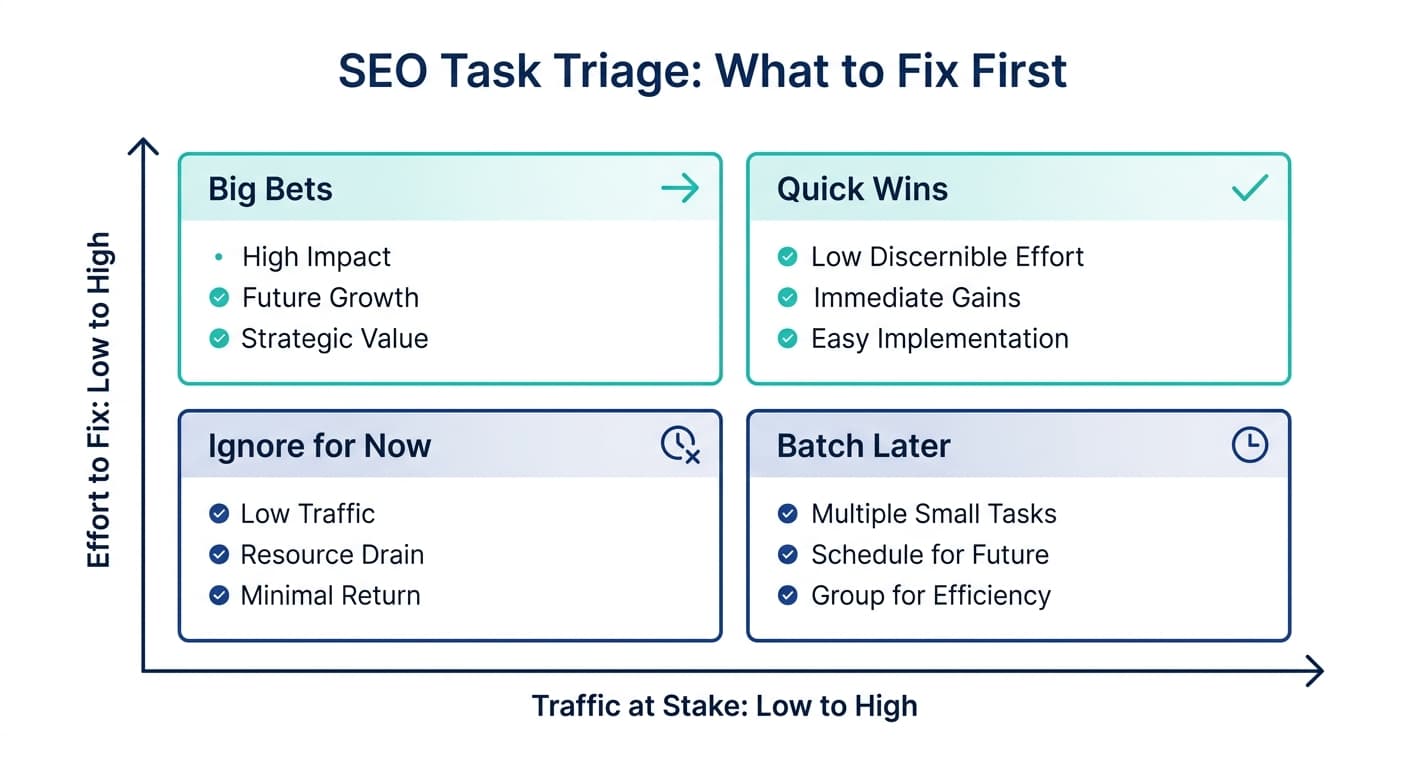
The image below shows the same idea as a simple decision aid: sort tasks into quick wins (low effort, real traffic at stake), big bets (higher effort, high traffic), things to batch later, and things to genuinely ignore.
3. Assign with context, not just a name
"Assigned to Sarah" is not enough. A task ready to be worked needs: what page, what specifically is wrong, what the recommended fix is, and what "done" looks like. A task missing any of those turns into a back-and-forth thread before the actual work even starts, which is the exact friction a workflow is supposed to remove.
4. Track to verified completion, not just "closed"
Marking a task closed the day the content gets edited is not the finish line. The finish line is confirming the fix worked, which for most SEO tasks means checking rankings or traffic four to eight weeks later. A workflow that stops tracking at "published" misses the only step that tells you whether the work was worth doing.
Choosing Where SEO Tasks Should Live
Most teams land on one of three setups. Each is a legitimate choice depending on team size and how much SEO work is happening in a given month.
| Setup | Best for | Where it breaks down |
|---|---|---|
| Spreadsheet (Sheets, Excel, Airtable) | Solo operators, under 15 active tasks a month | No notifications, no real prioritization, stalls once more than one person needs to trust it |
| General project tool (ClickUp, Asana, Monday) | Small in-house teams and agencies already running other work in the same tool | SEO context (what changed on the page, why it matters) has to be manually copied in; the tool does not know your rankings dropped |
| SEO-native workflow tool | Teams or agencies managing several sites who want detection and task creation connected | Newer category, fewer teams have adopted it yet; worth evaluating against the actual gap it needs to close |
For most in-house teams and agencies, the second option, running SEO tasks inside a general project tool you already use for everything else, is the practical middle ground: one home for all work, real notifications, real assignment, real due dates. Murkuz's ClickUp integration is built for exactly this setup: when Murkuz detects a page has started losing rankings or traffic, it creates the ClickUp task automatically, with the specific page, the likely cause, and the recommended fix already in the task description, so the person assigned to it does not start from a blank card. That closes the gap between "we found a problem" and "someone has an actionable task," which is the step most spreadsheet-based processes lose the most time on.
A Prioritization Framework That Actually Holds Up
Score every task on two axes, then work the list in this order:
- Traffic or revenue at stake. Pull the last 90 days of clicks or conversions for the page in Search Console or analytics. This is the single best proxy for how much a ranking drop actually costs you.
- Effort to fix. A stale statistic is a five-minute fix. A missing subtopic that needs a new section and a subject-matter interview is a multi-day fix. Be honest about which one you are looking at.
- Urgency of the trend. A page that dropped from position 4 to position 9 in two weeks is falling faster than one that drifted from 6 to 8 over six months. Speed of decline matters as much as current position.
Work high-traffic, low-effort tasks first. Schedule high-traffic, high-effort tasks deliberately rather than letting them sit because they feel daunting. Batch low-traffic, low-effort tasks into a monthly sweep. Deprioritize low-traffic, high-effort tasks unless there is a strategic reason, a page tied to a new product line, for instance, to invest anyway.
What to Look for in an SEO Workflow Tool
If you are evaluating software to formalize this, judge it against the actual workflow, not a feature list:
- Does it detect issues on its own, or does someone still have to remember to run a report?
- Does it create the task with context (which page, what changed, what the fix should be), or just a bare alert that someone else has to investigate from scratch?
- Does it push into the tool your team already lives in, or does it become a fourth place people have to check?
- Does it track what happened after the fix shipped, or does the workflow end at "published"?
A tool that only does the first of these is a monitoring tool, a genuinely useful category, just not workflow management. This is the specific case for Murkuz: it scans Google Search Console to detect declining pages, turns each finding into a prioritized, contextual task, and can push that task straight into ClickUp with the diagnosis already attached, rather than leaving the triage and the write-up to whoever picks it up. For agencies running this across several client accounts at once, that same detect-to-task pipeline is what makes managing SEO for a full client roster survivable without a full-time coordinator per client.
Common SEO Workflow Management Mistakes
- Running the workflow in more than one place. A task tracked partly in a spreadsheet and partly in Slack is not tracked. Pick one system and route everything through it.
- Skipping the prioritization step entirely. Without a ranking method, the loudest voice in the room decides what gets worked on, not the page actually losing the most traffic.
- Assigning tasks with no context. A task that just says "fix SEO on /blog-post" guarantees a clarifying question before any actual work starts.
- Treating "published" as "done." The verification step, confirming the ranking or traffic actually recovered, is the one most workflows drop first under time pressure.
- Letting the backlog grow unbounded. A task list that only grows and never shrinks stops being a useful priority signal. Prune it: batch, deprioritize, or explicitly kill tasks no longer worth doing.
FAQ
What is SEO workflow management?
SEO workflow management is the process of capturing every SEO task in one place, prioritizing it by actual impact, assigning it with enough context to act on, and tracking it through to verified completion, not just marking it closed once content is published.
What tool should I use to manage SEO tasks?
For a solo operator with a light task load, a spreadsheet is fine. For a team of two or more, a project management tool your team already uses (ClickUp, Asana, Monday) works well, especially paired with a detection tool that can push SEO-specific context directly into it. Agencies managing multiple client sites usually need that automated handoff, since manually copying findings into a project tool for every client does not scale.
How do you prioritize SEO tasks?
Score each task on traffic or revenue at stake and effort required to fix it, then work high-impact, low-effort tasks first. Add a third factor, how fast the page is declining, to catch pages that need urgent attention even if their absolute traffic is moderate.
Can SEO task management be automated?
The detection, task creation, and assignment steps can be automated reliably: a tool can scan Search Console, flag a decline, and open a ticket with the relevant page and likely cause already filled in. The actual fix, writing the new content or restructuring a section, still benefits from a person familiar with the brand and the subject matter reviewing it before it goes live.
How is SEO workflow management different from a content calendar?
A content calendar schedules new content that has not been published yet. SEO workflow management covers that plus the maintenance side: fixing, updating, and re-verifying pages that already exist and have started losing ground. Most teams have a content calendar and no equivalent system for the maintenance half, which is usually where the bigger, quieter traffic losses happen.
Junaid Khalid is the founder of Ertiqah, the studio behind Murkuz, and has run SEO operations across his own SaaS products long enough to know that the tasks that die are the ones with no owner and no due date, not the ones with the wrong strategy.