Most white label SEO reporting tools solve the wrong problem. They let you drop in your logo, pick a brand color, and export a PDF full of metric widgets, then call that "white label." But swapping a logo onto a report nobody reads does not make clients read it. The actual problem agencies have with white label SEO reporting is not branding. It is that the reports themselves are built to show data, not to answer the one question every client actually has: is this working, and why should I keep paying you?
This guide covers both halves of the problem: how to pick and set up a white label reporting tool without paying for a client-count tax you do not need, and, more importantly, how to structure what goes inside that report so a client opens it, understands it in ninety seconds, and comes away more confident in you, not less.
What White Label SEO Reporting Actually Means
White label SEO reporting is a dashboard or report that carries your agency's branding (logo, colors, domain) instead of the software vendor's, generated from data the tool pulled on your client's behalf. The client sees your name on the header, your color scheme, sometimes your own subdomain (seo.youragency.com). They never see the vendor's brand at all.
Two things get bundled under this term, and mixing them up is where agencies waste budget:
- White label branding, meaning the report LOOKS like it came entirely from you.
- White label reporting automation, meaning the report GENERATES itself on a schedule, pulling from Google Search Console, GA4, and rank-tracking data, so nobody on your team is manually building slides every month.
You want both, but they solve different problems. Branding protects the relationship (a client seeing "SEOptimer" or "Semrush" in the footer of their monthly report is a small but real reminder that you are a reseller, not the expert). Automation protects your time. Most tools in this category (SEOptimer, WooRank, MetricSpot, Sitechecker, WebCEO, Whatagraph) sell the branding hard and treat automation as a checkbox feature. Neither addresses the actual retention problem, which is what the report says, not what it looks like.
Why Branded Reports Still Get Ignored
Give a client a beautifully branded PDF full of rankings, traffic charts, and keyword tables, and a large share of them will skim the first page and never open it again. This is not a design problem. It is an information-design problem: the report is answering questions the client did not ask, in an order that makes them work to find the one they did ask.
Here is what a client is actually thinking when your report lands in their inbox:
- Is my SEO working or not? (One sentence. Not a chart they have to interpret.)
- What did you specifically do this month that I am paying for?
- Did what you did actually move anything, or did rankings shift on their own?
- What happens next month?
A report built around "here is our dashboard's export" answers none of these directly. A report built around those four questions, in that order, gets read every time, because it respects that the client is not an SEO and does not want to become one to understand their own account.
<mark class="km-highlight" style="--hl:#FEF08A;background:#FEF08A">The fix is structural, not cosmetic</mark>: reorder the report so the verdict comes first and the raw data comes last, as backup, not as the headline.
The Structure That Gets Read (Steal This Order)
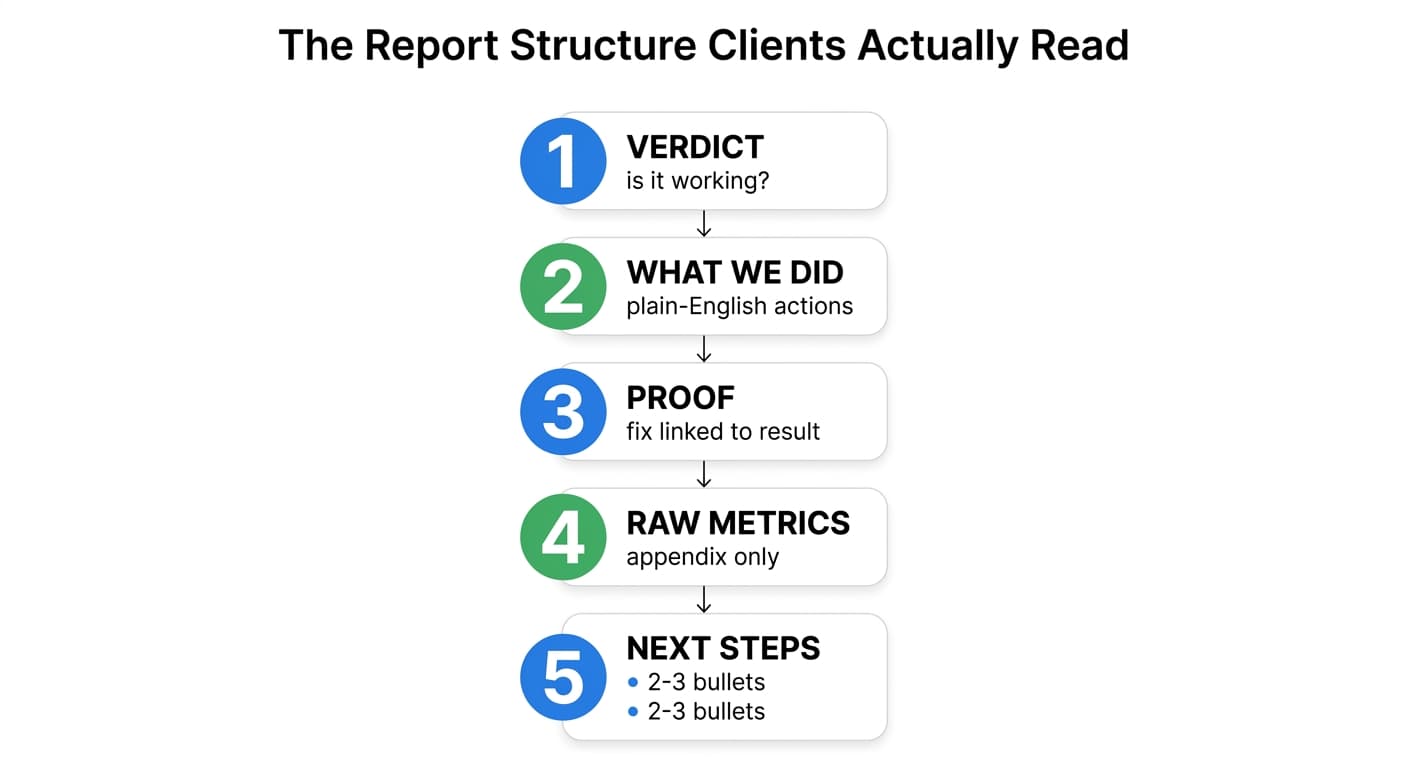
This is the section order that consistently gets a report actually opened past page one, based on what agencies with the lowest client-churn rates tend to send:
- One-line verdict. "Rankings are up, traffic is up 18%, no action needed from you." Or: "Two pages lost rankings this month, here is why and here is the fix already in progress." Either way, the client's first-question answer appears before any chart.
- What we did. A short, plain-English list of the specific work completed. Not "content optimization" (meaningless to a non-SEO). Instead: "Rewrote the pricing page's H1 and intro to target 'X', which was ranking position 14."
- Proof it worked (or didn't yet). This is the section almost every generic white label tool skips or buries: connecting a specific action to a specific ranking or traffic change, not just showing a line going up and hoping the client assumes it's your doing. Without this link, a client has no way to distinguish your work from a Google algorithm update, seasonality, or luck, and eventually they will not bother trying.
- Raw metrics, for the client who wants to dig in. Rankings, impressions, clicks, backlinks. This is where most tools start and end. Here, it is the appendix.
- What's next. Two or three bullets on next month's priorities. Keeps the relationship forward-looking instead of purely retrospective.
That third section, connecting a specific fix to a specific outcome, is the piece worth building real process around, because it is the difference between a report that retains a client and one that gets read once and filed away.
Choosing a White Label Reporting Tool: What Actually Matters
If you are evaluating tools in this category, most of the marketing pages look identical: logo upload, custom domain, PDF export, white-label dashboard. Underneath, the real differences are these:
| What to check | Why it matters |
|---|---|
| Does it connect directly to GSC and GA4, or only its own crawl data? | Crawl-only tools show technical scores clients don't care about. GSC/GA4 data shows rankings and traffic, which they do. |
| Can it show causation, not just a trend line? | A rankings chart going up after you did work is not proof you caused it. Look for tools that timestamp specific fixes against ranking movement. |
| Does automation mean "scheduled export" or "scheduled generation with narrative"? | Scheduled export still needs someone to write the summary. Full automation should draft the plain-English verdict too. |
| Per-client pricing model | Reseller-style tools often charge per site or per client, which punishes exactly the growth you're trying to support. Check the ceiling before you're at 20 clients and re-pricing your whole stack. |
| Does the client portal require them to log in and interpret a dashboard, or does the report land in their inbox? | Dashboards get opened by power users. Most clients want the report to come to them, not the other way around. |
This is also where a lot of the reporting-only tools run into a structural limit: they can show you that a page's rankings dropped, but they cannot fix the page, publish the fix, and then automatically prove that specific fix caused the recovery. That causal loop, detect the drop, fix the page, publish it, then show the client the before-and-after tied to that exact change, is what turns a report from "here's some data" into "here's what we did and here's the proof." Murkuz's Agentic Impact Scorecard is built around exactly that closed loop, and on the Command plan it comes with a fully white-label client dashboard, custom domain, and branded PDF reports, so the reporting layer and the actual SEO work are the same system instead of two tools you have to reconcile by hand every month.
A Worked Example: Same Data, Two Reports
To make the difference concrete, here is the same underlying data presented the generic way and the "gets read" way.
Generic version (what most white label tools produce by default):
Organic Traffic: 4,200 → 4,950 (+18%)
Average Position: 11.4 → 9.2
Keywords in Top 10: 34 → 41
Backlinks: +12
Restructured version (client opens it, understands it in one pass):
This month: traffic is up 18%, and we know why.
We rewrote your "enterprise pricing" page (it was stuck at position 14, invisible to searchers) and it moved to position 6 within three weeks of publishing. That single page is now responsible for roughly a third of this month's traffic increase. Two other pages (blog posts on integrations) are still declining and are next month's priority.What we did: Rewrote 1 page, published 2 new articles, fixed 3 internal linking issues.
Proof: Pricing page: position 14 → 6, 18 days after publish. [chart or scorecard here]
Next month: Fix the two declining integration posts, publish the Q4 comparison article.
Same numbers. Completely different experience for a client deciding whether to renew.
FAQ
What is white label SEO reporting?
It is an SEO report or dashboard generated by a third-party tool but branded entirely as your agency's own work: your logo, your colors, sometimes your own subdomain, with no visible trace of the underlying software vendor.
What is a white label report, specifically, versus a white label SEO tool?
A white label report is the output document or dashboard itself. A white label SEO tool is the broader platform (audits, rank tracking, sometimes content fixes) that generates that report as one of its features. You can have reporting-only tools that never touch the actual SEO work, or platforms where reporting is the output of work the tool also performed.
Can ChatGPT or another AI write a white label SEO report?
It can draft narrative summaries if you feed it the raw metrics, but it cannot pull live GSC or GA4 data on its own, cannot verify a ranking change is real versus a tracking glitch, and has no way to prove a specific fix caused a specific result unless you already have that data structured for it. Treat AI as a drafting assistant for the plain-English verdict section, not a replacement for a tool that connects to real data sources.
How do I automate white label SEO reports without losing the personal touch?
Automate the data pull and the first draft of the verdict section, then spend the few minutes you saved actually reading it and adding one sentence specific to that client's situation before it goes out. Full automation with zero human review is how reports drift back into generic-and-ignored.
How often should white label SEO reports go out?
Monthly is standard for most retainers. Weekly is usually overkill and trains clients to expect week-over-week movement that rarely exists in SEO. If something significant happens (a page recovers from a major drop, a competitor overtakes a key term) send a short one-off update rather than waiting for the monthly cycle.
If you are earlier in the decision, before reporting format, on whether to build a white label SEO offering at all versus staffing it in-house, the broader tradeoffs (reseller vs. software vs. hybrid models, margin math) are covered in white label SEO for agencies. And if you want the full reporting template this article's structure is based on, section by section with a fillable example, see the SEO report template.
Reporting is the part of agency SEO work clients actually see every month. Getting the branding right earns you five seconds of credibility. Getting the structure right, verdict first, proof of causation before raw data, is what earns the renewal.
Junaid Khalid is the founder of Ertiqah, the company behind Murkuz. He has run SEO as the first growth channel across his own SaaS products before building a platform to automate the parts of that process that do not require human judgment.